Mac Pro (Mid 2010) General Troubleshooting — Minimum Conguration Testing 35
2010-08-31
a verify step, as you’ve added modules since previous step.
Expected behavior:
5V STBY LED illuminates, conrming power to the backplane board. If the LED does not
illuminate, suspect power supply or backplane board failure.
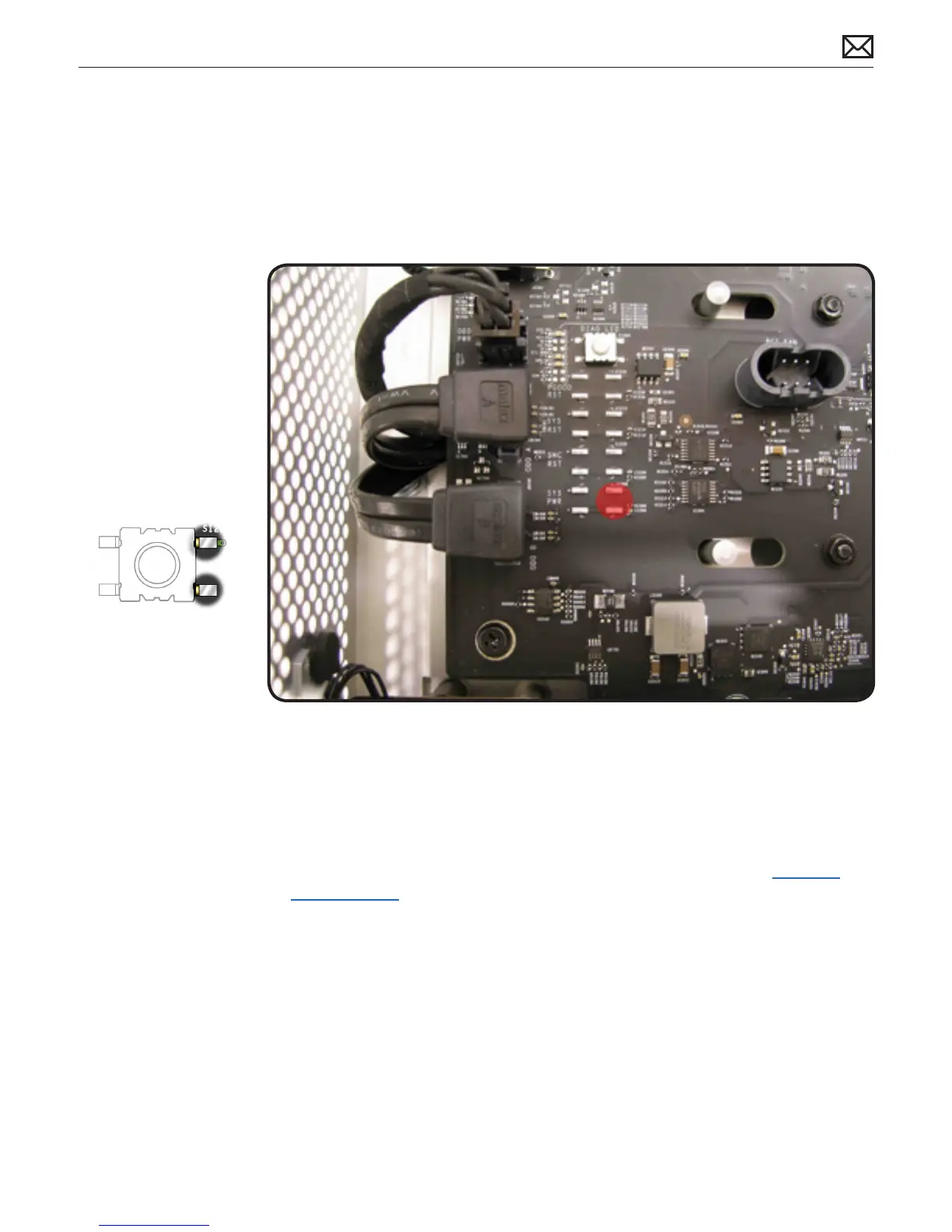
6. Momentarily jump the SYS_PWR solder pads to turn ON the Mac Pro.
Expected behavior:
• Front and rear processor cage fans (and PCIe fan, if installed) should spin slowly
• One red-colored error LED illuminates on the processor board (next to the memory slots).
Notes:
• The solder pads are at the same location where the power button would be.
• To help troubleshoot processor issues, check the related CPU Error LED. See “Processor
Diagnostic LEDs.”
7. Press and hold the DIAG button.
Expected behavior:
• PSU PWROK (green), 5V STBY (amber), EFI DONE (green), GPU OK (green) LEDs illuminated
• No startup tone
• Front and rear processor cage fans (and PCIe fan, if installed) should spin slowly
8. Disconnect AC power cord.
At this point, to make testing easier try powering on the computer using a known good front



 To Next Page