EasyManua.ls Logo

Apple Macintosh - Page 61

Apple Macintosh
321 pages
Print Icon
To Next Page IconTo Next Page
To Previous Page IconTo Previous Page
Loading...
Using
the
Finder
61
Notice
from
figures 3.13
and
3.14,
that
the
active
window
is
frontmost
on
th
e
De
s
ktop
.
If
we
close
the
active
window
,
the
next
window
behind
the
frontmost
window
will
become
the
active
window.*
Try
this
by
opening
the
following
icons in
order:
System
Di
sk
System Folder
Trash
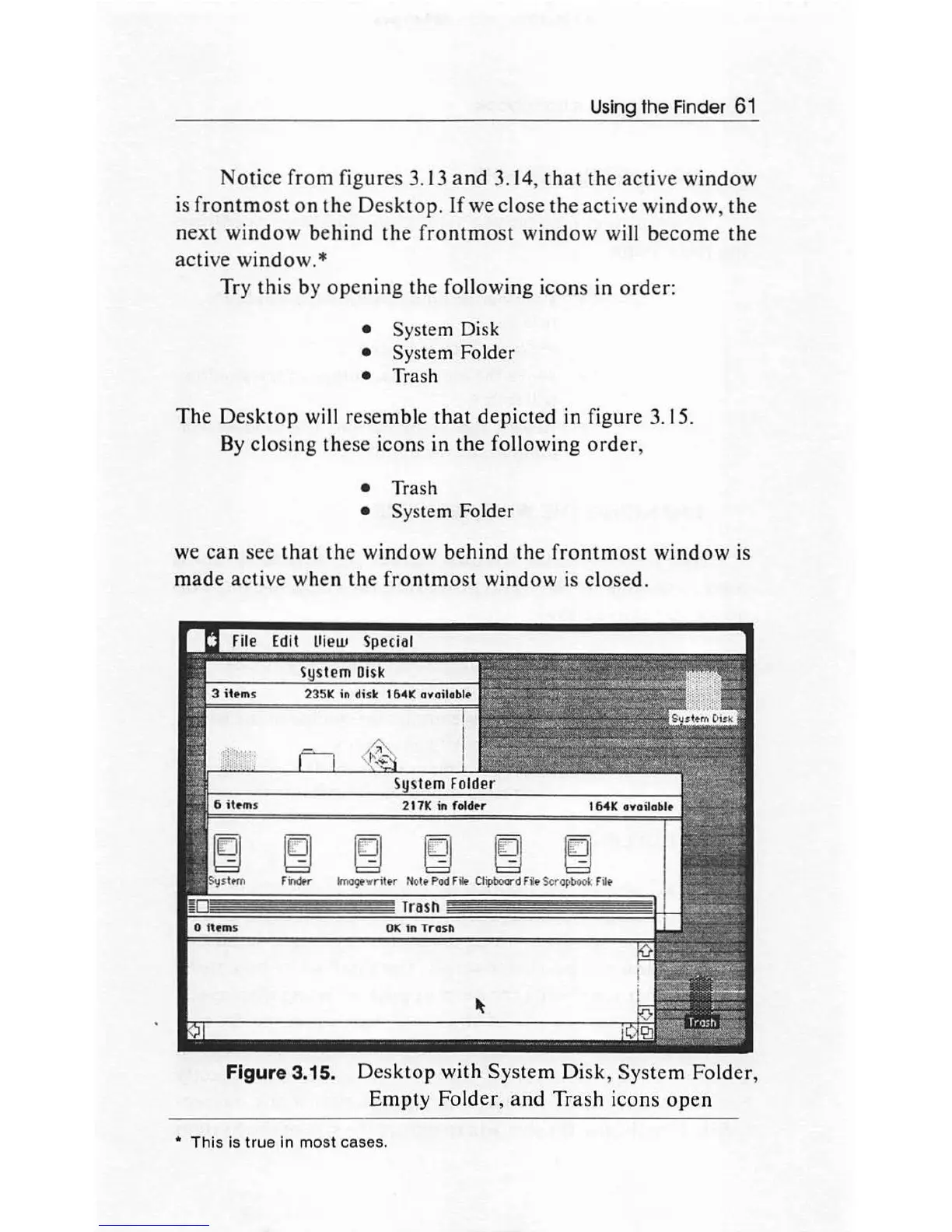
The
Desktop
will
resemble
that
depicted
in figure 3.15.
By
closing
these icons
in
the
following
order,
Trash
System Folder
we
can
see
that
the
window
behind
the
frontmost
window
is
mad
e
active
when
the
frontmost
window
is
closed.
e e e
Findtr
lmogtwn
tt
r Nott Pod
Filo
Clipboard Filt Scropbook Flit
Figure 3.15.
Desktop
with
System
Disk
,
System
Folder,
Empty
Fold
er,
and
Trash
icons
open
This is true in most cases.

Other manuals for Apple Macintosh

Related product manuals