Chapter 3 Working Inside Your Computer 67
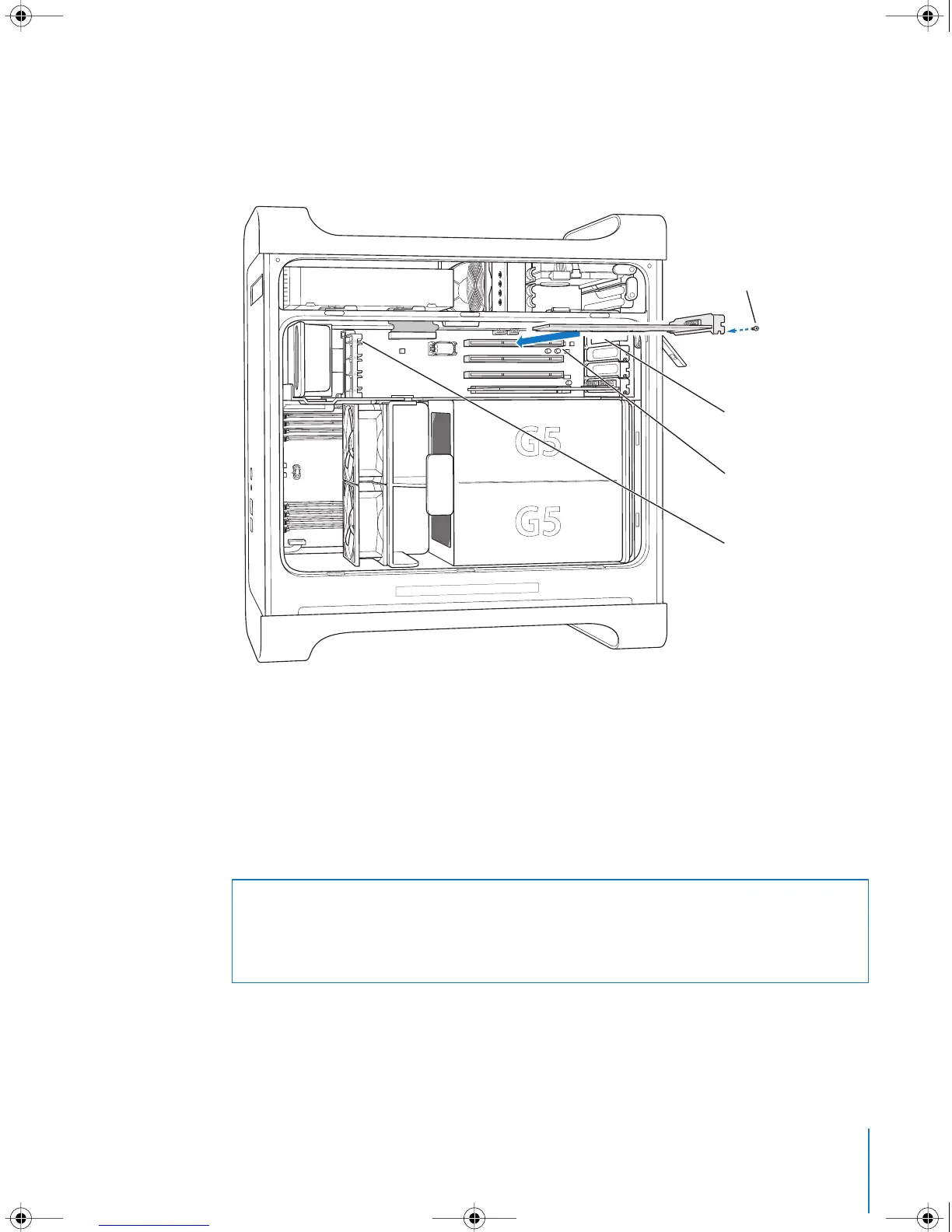
4 Align the card’s connector with the expansion slot and press until the connector is
inserted all the way into the slot.
If you’re installing a 12-inch card, make sure the card engages the appropriate guide.
Press the card gently but firmly until the connector is fully inserted.
 Don’t rock the card from side to side; instead, press the card straight into the slot.
 Don’t force the card. If you meet a lot of resistance, pull the card out. Check the
connector and the slot for damage or obstructions, then try inserting the card again.
 Pull the card gently to see if it is properly connected. If it resists and stays in place,
and if its gold connectors are barely visible, the card is connected.
5 Reinsert the port access cover screw and tighten it to hold the card in place.
6 Replace the air deflector and side panel, following the directions that begin on
page 53.
Port access opening
PCI slot
Reinstall the screw
to secure the card
in place.
If the PCI card you are
installing is full-length
(12 inches), make sure
it fits in one of these
card guides.
Warning: If you remove a card from your computer and do not install a replacement,
be sure to place a port access cover over the empty slot. Covers keep foreign objects
out of the enclosure. An uncovered slot can affect the airflow that cools the
computer’s internal components and cause damage.
LL3218Q87.book Page 67 Wednesday, March 16, 2005 6:28 PM



 To Next Page