16 www.Aprimatic.it
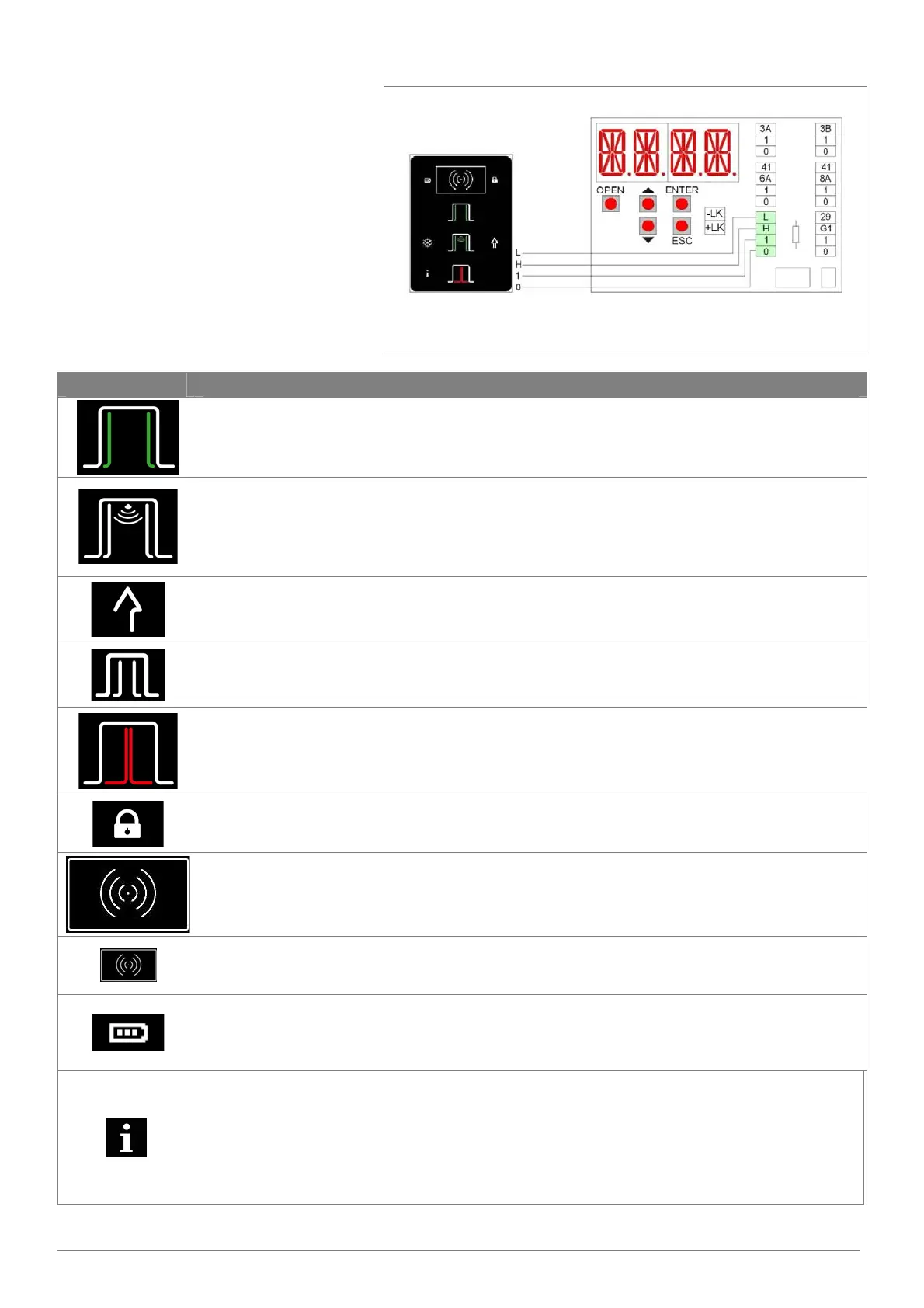
7.4 ELECTRICAL CONNECTION OF FUNCTION SELECTOR
Connect the 0‐1‐H‐L terminals of the function
selector, by cable (not supplied by us), to the 0‐
1‐H‐L terminals of the electronic control.
Note: for lengths over 10 m, use a cable with 2
twisted‐pairs.
After connecting, the function selector is
working. If you want to limit the use only by
authorized personnel, proximity badges
(13,56MHz ISO15693 and ISO14443 Mifare)
must be activated by the function selector menu
(max 50 badges).
The function selector allows the following
settings.
Symbol Description
Open Door.
When selected, the symbol lights up, the door is permanently open.
Note: the doors can still be handled manually.
Automatic bi‐directional operation.
When selected, the symbol lights up and the doors full open automatic in bidirectional mode.
Reset.
Select the symbol for 5 seconds, the automation performs the self‐test and the automatic learning.
Automatic one‐way operation.
When selected, the symbol lights up and automatic operation of the door in one‐way mode.
Automatic partial operation.
In the case of a door with 2 automations, when selected, the symbol lights and allows the automatic
operation of only one leaf.
Closed door.
When selected, the symbol lights up and controls the permanent closure of the door.
If the electric lock is present, the door is closed and locked.
Note: using the menu SEL > DLAY you can adjust the delay time to close the door.
Function selector is not active.
The symbol lights up when the function selector is not active. To activate the temporary operation of
the function selector is necessary to approach the badge, or select for 3 seconds the logo.
Activation of the function selector.
Select the prox logo for 3 seconds (the lock symbol light off), the function selector is activated for 10
seconds. Expired the time the function selector switches off (the lock symbol lights up).
Authorized activation of function selector.
Appproach the badge (the lock symbol light off), the function selector is activated for 10 seconds.
Expired the time the function selector switches off (the lock symbol lights up).
Battery signal.
Battery symbol off = the door is operating with the mains supply
Battery symbol on = the door is operating with battery power
Battery symbol flashing = the battery is low or disconnected
Information signal.
Information symbol on = it is necessary to perform the ordinary maintenance of the door.
Information symbol flashing = shows the presence of alarms (as described in chapter 13.5):
‐ 1 flash = failure of electronic control or locking device;
‐ 2 flashes = mechanical failure;
‐ 3 flashes = failure of sensor safety test;
‐ 4 flashes = motor overtemperature.


 To Next Page
 Loading...