PAGE 6©2018 4Front Engineered Solutions, Inc. - APS Resource
AP6846J 8/18
DO NOT START fan if there are any signs of damage;
particularly to blade, guards, or housing. If any
damage is suspected, STOP and call APS RESOURCE
immediately at (262) 518-1000.
Immediately stop the unit upon hearing excessive
mechanical noise or vibration.
Routinely inspect both the mounting of this product
and the entire assembly to nd and correct loose
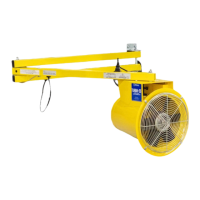
connections and unsafe conditions. If the TURBO-ES
Fan is hit during use, re-inspect immediately.
Exercise care during deployment and storage to
prevent physical damage.
This unit is equipped with thermal overload protection
and automatic reset. Motor will restart without warning
after motor cools.
DO NOT move fan while in operation.
1. Inspect fan for damaged or worn parts.
2. Inspect and clear away any foreign debris from both
the inlet and outlet areas of the fan.
3. With the trailer safely parked at the loading dock,
direct the fan into the upper corner of the trailer.
4. Using the toggle switch on the power cord, turn the
switch to the ON position. Check that the unit operates
properly before loading or unloading.
5. After use, turn the power switch to the OFF position,
and move the blower back to its storage position; out
of the way.
OPERATION/MAINTENANCE
OPERATION
Always stop the motor and disconnect the power
source to prevent the accidental starting and/or the
possibility of receiving an electrical shock before
service or maintenance.
Do not attempt any maintenance or repair work not
described in this User Manual!
Do not energize the electric motor with the shaft
key exposed on the open shaft. Personal injury can
result from being struck by a shaft key thrown from
the electric motor.
Do not operate the blower without the inlet and
outlet screens secured and in place.
Always properly maintain the fan.
• Frequently check all fasteners and individual parts.
Built-in safety features are effective only if they are
maintained in good working condition.
• Keep the fan clean and properly serviced. Heavy
accumulations of dust and dirt will result in
overheating and premature failure of the fan motor.
• Clean the motor surfaces and all ventilation
openings periodically.
• Routinely inspect both the mounting of this product
and the entire assembly to nd and correct loose
connections and unsafe conditions.
MAINTENANCE


 To Next Page
 Loading...