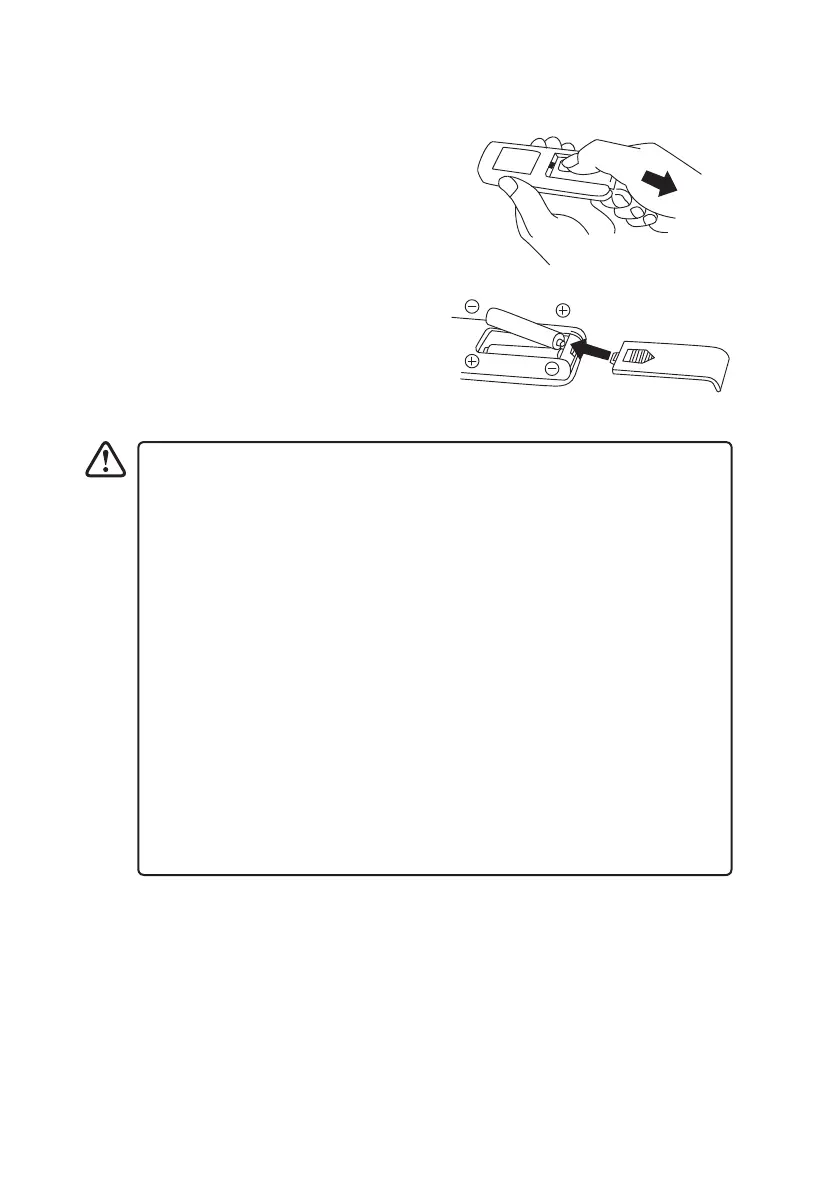
Installing Batteries in the Remote Control
1. Slide to open the battery compartment cover of
the remote control.
2. Insert two AAA size batteries. Make sure to
match the (+) and ( - ) ends of the batteries with
the (+) and ( - ) ends indicated in the battery
compartment.
3. Close the battery compartment cover.
Handling the Batteries
• Improper or incorrect use of batteries may cause corrosion or battery leakage,
which could cause re, personal injury or damage to property.
• Only use the battery type indicated in this manual.
• When the batteries are exhausted, the remote control will not function.
Replace both batteries at the same time with new ones.
• Do not install new batteries with used ones and do not mix dierent types of
batteries.
• Do not dispose of used batteries as domestic waste. Dispose of them in
accordance with local regulations.
Handling the Remote Control
• Do not drop or cause impact to the remote control.
• Do not spill water or any liquid on the remote control.
• Do not place the remote control on a wet object.
• Do not place the remote control under direct sunlight or near sources of
excessive heat.
• Remove the battery from the remote control when not in use for a long
period of time, as it could cause corrosion or battery leakage and may result in
physical injury and/or property damage including re.
STFDCB19E_IB_5L_190131_grace.indd 13 31/1/19 6:52 pm


 To Next Page