5
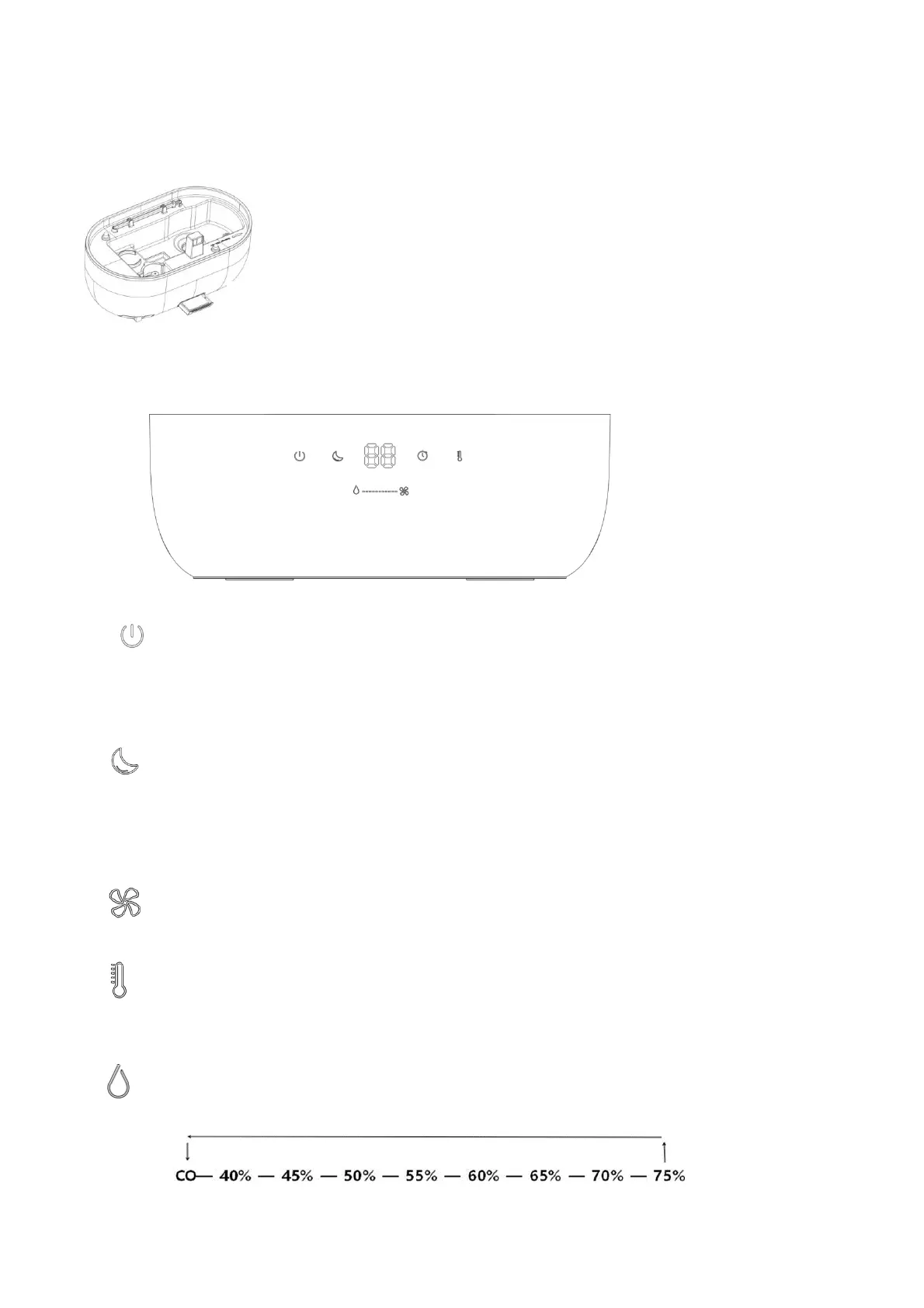
Aroma Drawer
Press the aroma drawer switch, fill 2-4 drops essential oil into the aroma pad
OPERATING THE AIR HUMIDIFIER
POWER ON AND OFF
Touch the Power Button to turn the device on or off.
1
st
touch the power button to turn the air humidifier ON. The display will show the
current ambient relative humidity.
2
nd
touch the power button to turn the air humidifier OFF.
NIGHT LIGHT & SLEEP MODE
1st touch: Circulated 7 color night lights.
2nd touch: Set the night light color at one color.
3rd touch: Enter into sleep mode, all lights and indicator lights are turned off
except this indicator light.
4th touch: Exit sleep mode and go to the default setting
MIST VOLUME
Touch the Mist Output Button to select the mist output level (C1-C2-C3/H1-H2-H3).
When the power is on, the unit will default to the medium speed mist output (C2).
HEAT FOR WARM MIST
Touch the Heat Button to turn on or off.
1st touch: heat function on and output warm mist (H1, H2, H3).
2nd touch: heat function off and output cool mist (C1, C2, C3).
HUMIDITY SETTING
The target relative humidity can be set from 40% to 75 % in 5% increments or CO for
continuous operation.



 To Next Page