-8-
Tips and trouble setting
Pairing...
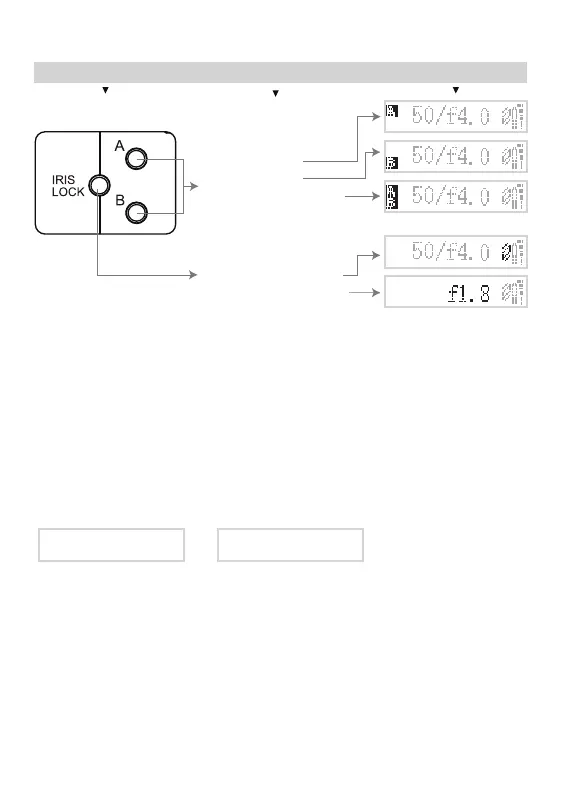
9. A, B stops and IRIS LOCK
Button Meaning Display
Pair_OK
1. Please full charge the Aputure DEC the rst time you use it.
2. Aputure DEC is able to work while charging by connecting to USB cable which attached to an AC
adapter (5V 1A).
3. Please charge the Aputure DEC within 3 minutes after the low battery icon appeared in case of
unstable work.
4. Please charge for the grip before using it again if it was powered o because of low battery.
5. Aputure DEC has been paired before shipping. You can follow the steps below if it is needed.
1) Adapter keeps OFF;
2) First press <START/STOP> of the Grip,then simultaneously Press<ON/OFF> of the Grip. The Grip will display "Pairing..."
3) Pull <ON/OFF> of the adapter to <ON>.The OLEDs both display "Pair_OK". This means pairing is nished.
6. The aperture value of some lenses cannot be displayed correctly.
7. Numerous focus pulling may change the memory of stop A and B.
8. The <START/STOP> button cannot be used when in <IRIS LOCK> mode in case of malfunction,
press <IRIS LOCK> to cancel the mode and start to record.
9. Suggest to use the Canon EF L lens or Canon STM lens. Other lenses especially made by the third party
may cause the incoherent movement when being controlled by the DEC.
10. Please rst set the camera to be in "Release without Lens enabled" mode if it does have before using
together with the DEC.
For example, you have to set the Panasonic GH4 as follows - "Custom->Shoot w/o lens->ON".
11. Please update rmware of the adapter according to the direction on our ocial updating
website: http://www.aputure.com/dec/update/
Press < IRIS LOCK >
Press (hold):Start/Stop vibrate alert.
Press: Set/Cancel maximum aperture.
Press < A >/< B >
< A >: Set/Cancel A stop.
< B >: Set/Cancel B stop.
<A>< B >: Set/Cancel A and B stop;
supporting to change A/B stop of focus
in different rate.


 To Next Page