Need help?
Do you have a question about the Aputure DEC and is the answer not in the manual?
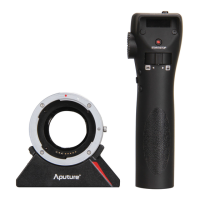
Introduction to the Aputure DEC wireless remote adapter.
Read manual, keep it, heed warnings, avoid contacts, magnetic fields, heat, water, and dropping.
Use microfiber cloth, store properly, use genuine accessories, avoid disassembly.
Certifications (ROSH, CE, FCC) and definition of proper/improper use.
Acknowledges trademarks of Canon, Panasonic, Blackmagic Design, and others.
Lists all items included with the Aputure DEC for verification.
Identifies parts of the Aputure DEC adapter, including mount, power, and ports.
Identifies parts of the Aputure DEC grip, including screen, buttons, and wheel.
Instructions for using the Claw Clip and Spacer for mounting.
How to open the provided safe case for the Aputure DEC.
Instructions for charging the adapter and grip via USB cable.
How to align and attach Canon EF and EF-S mount lenses to the adapter.
How to mount the DEC adapter onto MFT, E-mount, BMD, and Panasonic GH series cameras.
Guide for connecting remote cables to different camera models (BMPCC, Sony, GH4).
How to power on the device and start/stop video recording.
Instructions for adjusting aperture and performing speed-changeable focus pulls.
Using A/B stops, IRIS LOCK, and other operational tips.
Recommendations for first-time charging and working while charging.
Steps for re-pairing the device and notes on lens compatibility.
Camera settings for compatibility and instructions for firmware updates.
Details components, battery, ports, voltage, current, temperature, and humidity.
Lists compatible lenses (Canon EF/EF-S) and camera mounts (MFT, E-mount).
 General
| Brand | Aputure |
|---|---|
| Model | DEC |
| Category | Camera Accessories |
| Language | English |

 To Next Page