6
Quality for Professionals
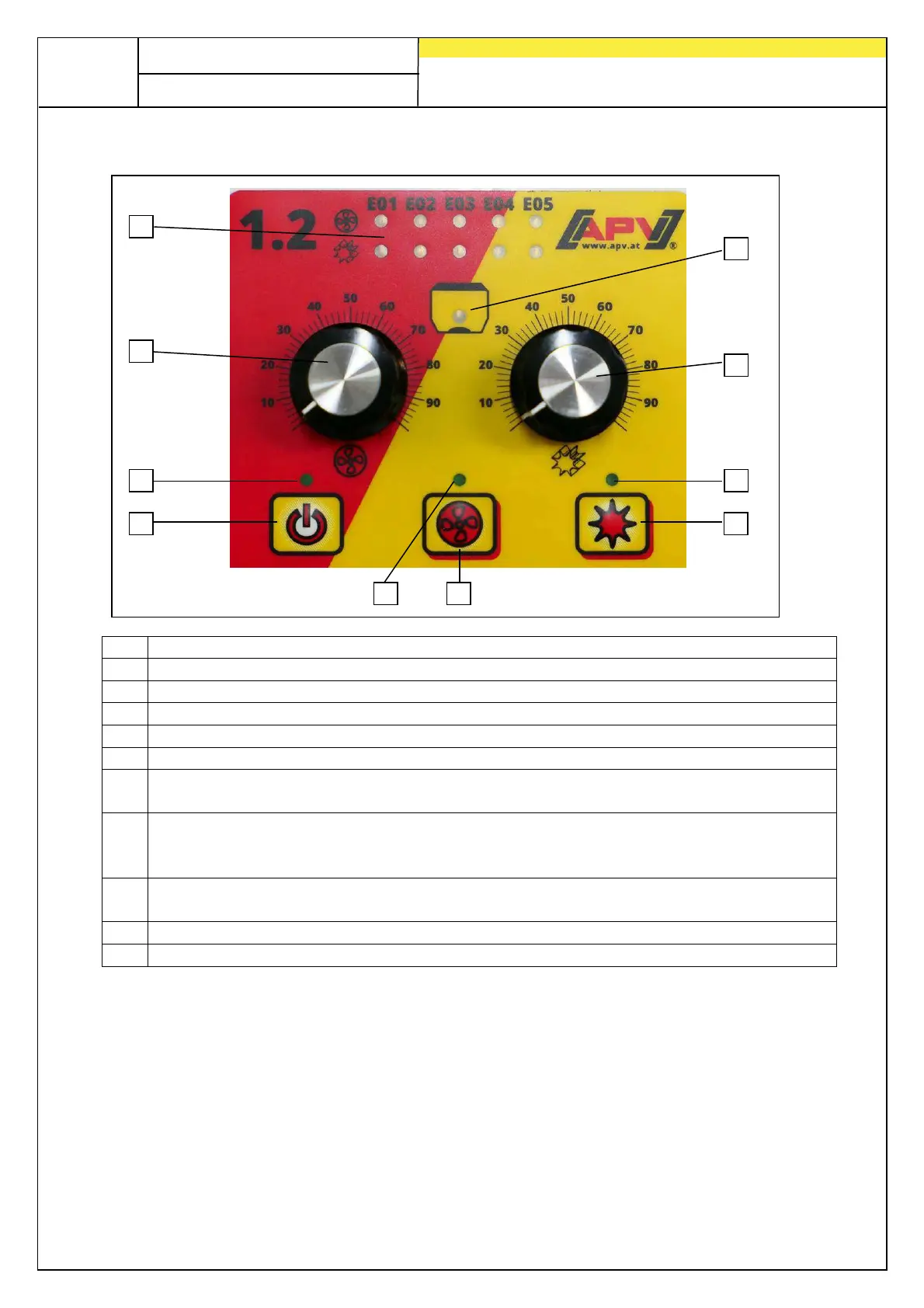
2.3 User interface of the control box
No.
Meaning / use
1 Display LEDs: display error messages, software version and settings
2 Adjust the speed of the blower fan or spreading plate
3 Lights up when the control box is switched on
4
("on/off"): switches the implement on and off.
5 Lights up when the blower fan or the spreading plate is switched on.
6
: turns the blower fan or spreading plate on or off.
(Not possible with hydraulic fan!)
7
turns the seeding shaft on or off. When pressing the
seeding shaft button, the seeding shaft starts rotating and the control lamp lights
up.
8 Lights up when the seeding shaft is switched on The LED flashes when 0 is set
as the speed on the rotary knob and the motor is switched on.
9 Adjust the speed of the seeding shaft
10 Lights up when there is no more seed in front of the fill level sensor.
Fig.: 4
1
2
3
4
5
6
7
8
9
10


 To Next Page