Production Introduction
Camera E1 is an intelligent product that supports Wi-Fi 6 and Bluetooth 5.2. It
supports 2K (2304×1296p) resolution with pan & tilt, and other functions such as
video intercom, human tracking, Micro SD card recording, NAS storage, and privacy
zone coverage. In addition, its rich features can be used for automation applications
to realize the functions such as home guard and smart control. It also supports
HomeKit Secure Video.
Description of button:
1.Hold down the Set button for 5
seconds to reset the camera's
network.
2.Quickly press the Set button 10
times to restore the camera to
its factory settings.
3.Press the Set button once to
turn off the alarm when the
camera is sounding an alert.
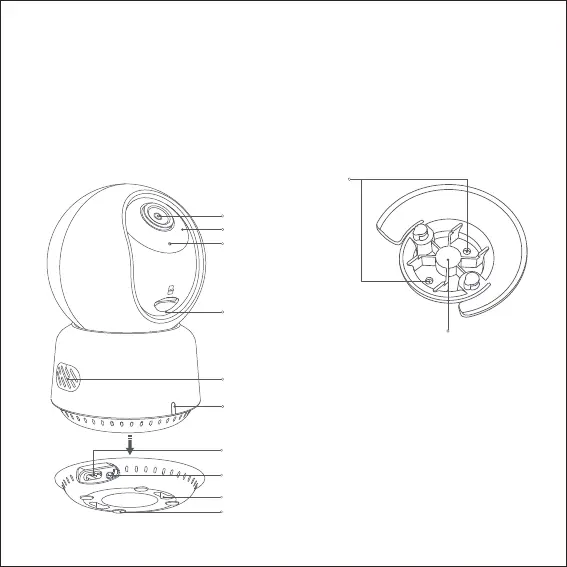
1/4 "Screw Hole
Screw Holes
Indicator Light
Microphone
Lens
Infrared Light
Speaker
Micro SD Card Slot
USB C Power Port
Silicone Pad
Base Mounting Slot
SET Button
SET
01


 To Next Page