Page - 3
CONTROL PANEL OVERVIEW
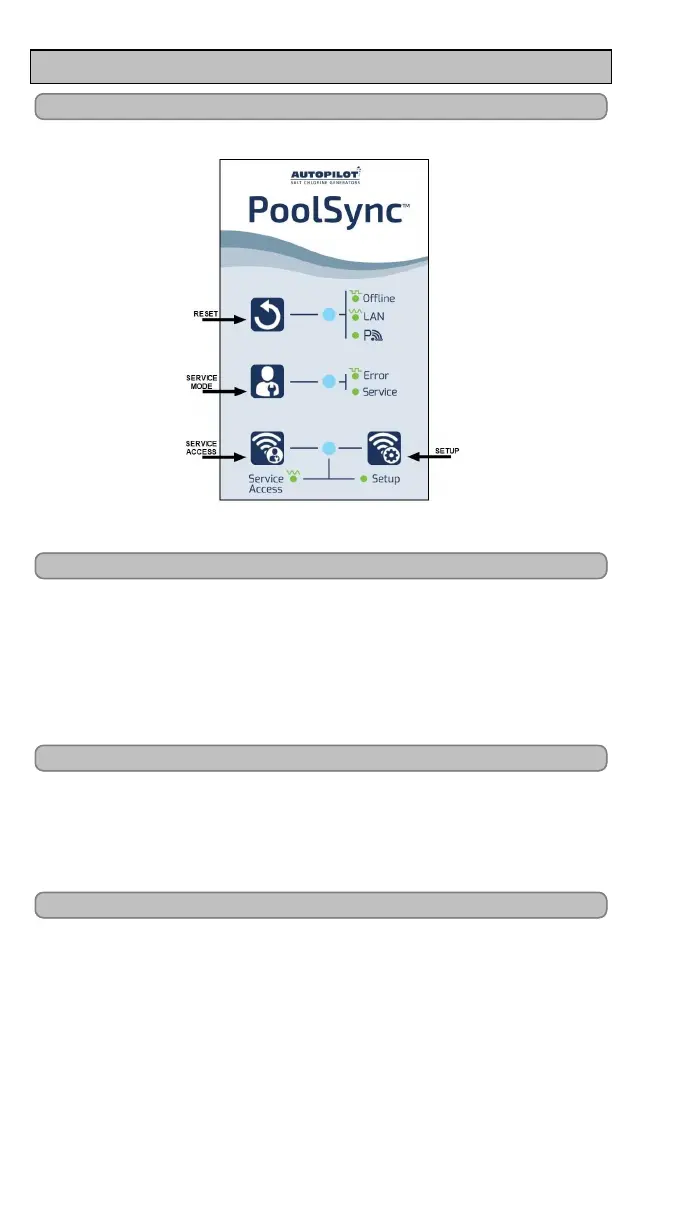
User Display
PoolSync
TM
Label
Figure 1
Reset Button LED
Pressing this button will allow the PoolSync
TM
to be reset.
l Blinking: Indicates the PoolSync
TM
unit is Offline and not
connected to the network.
l Fading: Indicates the PoolSync
TM
is connected to the local home
router.
l Solid: Indicates the PoolSync
TM
is connected to the Cloud.
Service Mode Button LED
Indicates the unit is in Service Mode.
l Blinking: Indicates there may be a communication error.
l Solid: Indicates your system is being serviced and user control
is disabled.
Service Access and Setup Button LEDs
l Fading: This will allow a service technician to use the
PoolSync
TM
as an access point when setting up all PoolSync
TM
Ready equipment.
l Solid: Indicates the unit is in setup mode and ready to be
connected to the home network.


 To Next Page