

EasyManua.ls Logo

Aqualin YL21076 - User Manual

Aqualin YL21076
9 pages
Print Icon
To Next Page IconTo Next Page
Loading...
YL21076 Double Outlet Water Timer Manual
Dial and button:
Question and Answer IconNeed help?

Do you have a question about the Aqualin YL21076 and is the answer not in the manual?

Summary

Timer Interface and Controls

Physical Controls Overview

Introduces the physical dial and buttons of the water timer.

Button Functions

Details the functions of each button: MAN, +, -, OK, L/R, ECO.

Dial Functions

Explains the settings controlled by the dial: RUN, SET CLOCK, START TIME, HOW LONG, HOW OFTEN, OFF.

Timer Modes and Status

Manual Watering Mode

Details how to operate the timer in manual watering mode.

OFF Mode

Describes the operation and display when the timer is in OFF mode.

Battery Status Indicator

Explains the battery level indicators and their corresponding voltage levels.

Timer Setup and Configuration

General Setup Instructions

Provides general instructions on how to operate the timer settings using the dial.

Setting the Clock Time

Step-by-step guide to setting the current time on the water timer.

Setting the Start Time

Guide for configuring the initial watering start time for the timer.

Setting Watering Duration (How Long)

Instructions for setting the duration of each watering cycle.

Setting Watering Frequency (How Often)

Details on setting the frequency of watering cycles.

Rain Delay Feature

Explains how to activate and configure the rain delay feature.

Advanced Features and Connections

Rain and Moisture Sensor Connection

Information on connecting external rain or moisture sensors to the timer.

Ecological Watering (ECO Mode)

Guide to enabling and configuring the ecological watering mode.

Overview

The YL21076 Double Outlet Water Timer is a device designed for automated and manual watering, featuring a dual-valve system and various programmable settings.

Function Description:

The water timer operates in several modes:

  • Auto Watering Mode (RUN): When the dial is set to "RUN," the timer follows a pre-programmed schedule. It displays the current clock time, and then alternates every 2 seconds to show the next start watering time for the left valve and then for the right valve. If no program is set, only the clock time is displayed. During active watering, it shows a countdown of the run time for the active valve(s), alternating with the clock time every 2 seconds. If both valves are open, it displays the countdown for each valve alternately, without showing the clock time.
  • Manual Watering Mode (MAN): This mode allows for one-time manual watering sessions from 1 to 240 minutes, with a default duration of 30 minutes. To activate, press the "MAN" button when the dial is at "RUN." Users can select either the left or right valve and set the desired duration using the "+" or "-" buttons. Once confirmed with "OK," watering starts immediately, and the display shows a countdown. Manual watering can be stopped by pressing "MAN" again or turning the dial to "OFF," returning the timer to auto-run mode.
  • OFF Mode: When the dial is set to "OFF," all valves are closed, and both auto and manual watering are disabled. The display alternates between showing the clock time and "OFF" every 2 seconds.

Important Technical Specifications:

  • Watering Duration:
    • Manual: 1-240 minutes (default 30 minutes).
    • Programmed ("HOW LONG"): 1-240 minutes.
  • Watering Frequency ("HOW OFTEN"): Options include 4 hours, 6 hours, 12 hours, or 1-15 days (default 1 day).
  • Rain Delay: Can be set for 0 hours, 24 hours, 48 hours, or 72 hours.
  • ECO Watering: Splits total watering duration into smaller durations with pauses. Smaller watering durations can be set from 1 minute to the larger watering duration, and pause watering time can be set from 1-240 minutes.
  • Battery Voltage Indicators:
    • Full: Voltage over 3V.
    • Half: Voltage between 2.6V and 3V.
    • Empty: Voltage below 2.6V (blinks quickly, valves closed, all watering disabled).
  • Sensor Connection: Features a connection point for a normally closed (NC) rain or moisture sensor. When activated (switch off), the timer skips all auto-run watering programs until the rain stops or soil dries. An umbrella sign appears on the display when the sensor is active. Manual watering remains operational even with an active sensor.

Usage Features:

The device features a central dial and several buttons for navigation and setting adjustments:
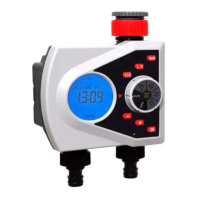
  • Dial: Used to select different operational modes or settings:
    • "RUN": Auto watering mode.
    • "SET CLOCK": To set the current time.
    • "START TIME": To set the start time for watering.
    • "HOW LONG": To set the duration of watering.
    • "HOW OFTEN": To set the frequency of watering.
    • "OFF": To turn off the timer.
    • Turning the dial saves previously set input.
  • Buttons:
    • MAN: Activates manual watering mode.
    • +:
      • Increases numbers during settings. Holding it down changes digits quickly.
      • Serves as a setting button for Rain Delay when the dial is at "AUTO."
    • -:
      • Decreases numbers during settings. Holding it down changes digits quickly.
    • OK: Confirms settings.
    • L/R: Shifts selection between the left and right valves.
    • ECO: Activates ecological watering mode.

Setting Procedures:

  • Setting Clock Time:
    1. Turn the dial to "SET CLOCK."
    2. Hours digits blink; adjust with "+"/"-" and confirm with "OK."
    3. Minutes digits blink; adjust with "+"/"-" and confirm with "OK."
    4. Default clock time is 12:00.
  • Setting Start Time:
    1. Turn the dial to "START TIME."
    2. Use "L/R" to select the valve (left or right).
    3. Press "OK" or "+" to confirm the valve selection.
    4. Hours digits blink; adjust with "+"/"-" and confirm with "OK."
    5. Minutes digits blink; adjust with "+"/"-" and confirm with "OK."
    6. Confirm the final setting with "OK."
    7. Default start time changes to 12:00 if "+" or "OK" is pressed without a prior setting.
  • Setting How Long (Watering Duration):
    1. Turn the dial to "HOW LONG."
    2. Use "L/R" to select the valve.
    3. Press "OK" or "+" to confirm the valve selection.
    4. Digits for hours/minutes blink; adjust with "+"/"-" and confirm with "OK."
    5. Confirm the final setting with "OK."
    6. Default watering duration is 30 minutes.
  • Setting How Often (Watering Frequency):
    1. Turn the dial to "HOW OFTEN."
    2. Use "L/R" to select the valve.
    3. Press "OK" or "+" to confirm the valve selection.
    4. Digits for hours/days blink; adjust with "+"/"-" and confirm with "OK."
    5. Confirm the final setting with "OK."
    6. Default frequency is 1 day.
  • Setting Rain Delay:
    1. When the dial is at "RUN," press the "+" button.
    2. Digits blink, indicating rain delay setting mode.
    3. Adjust delay (0, 24, 48, or 72 hours) with "+"/"-".
    4. Press "OK" to confirm. Rain delay activates immediately.
    5. The display shows clock time and rain delay countdown alternately every 2 seconds.
    6. Settings are saved after 5 seconds of inactivity.
  • Setting ECO Watering:
    1. When the dial is at "RUN," press the "ECO" button.
    2. Use "L/R" to select the valve.
    3. Use "+" or "-" to set the smaller watering duration.
    4. Press "OK" to confirm and proceed to set the pause time between smaller durations.
    5. Press "OK" again to confirm all ECO settings.
    6. The ECO icon will appear on the display once settings are saved.

Maintenance Features:

  • Battery Monitoring: The device provides clear visual indicators for battery status (full, half, empty) to alert users when batteries need replacement. When the battery is low (below 2.6V), the empty battery sign blinks quickly, and all watering functions are disabled to prevent damage or incomplete cycles.

Aqualin YL21076 Specifications

General IconGeneral
BrandAqualin
ModelYL21076
CategoryTimer
LanguageEnglish