Button description:
MAN: manual watering, 1-240 mins, default is 30 mins
+: When timer is under settings, + serves as a plus button; when dial is at AUTO, + serves as a setting
button for Rain Delay
-: serves as a minus button
OK: to confirm a setting
L/R: to shift between left or right valve
ECO: Ecological watering
Dial description:
RUN: timer is running under set program
SET CLOCK: to set clock time
START TIME: to set start watering time
HOW LONG: to set watering duration, 1-240 mins
HOW OFTEN: to set watering frequency, 4 hrs, 6hrs, 12hrs, or 1-15 days
OFF: to turn off timer
RUN, MANUAL, OFF:
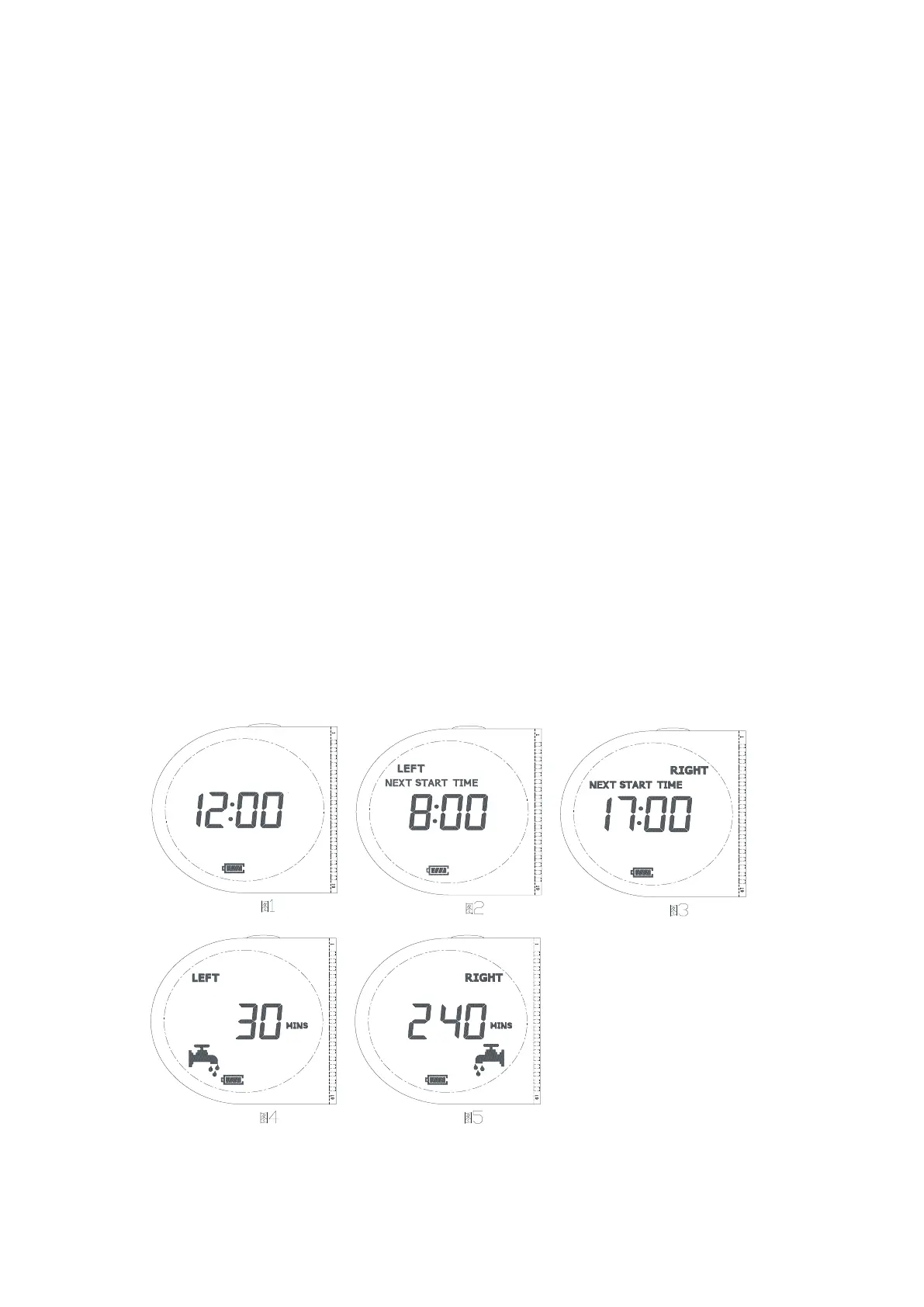
RUN: when dial is at RUN, timer is in auto watering mode. Display will show clock time(as picture 1),
next start watering clock time for left valve(as picture 2), and next start watering clock time for right
valve(as picture 3),every 2 seconds in alternative. If no program is set, display will only show clock time.
When 1 of the 2 valve opens, display will show countdown of the run time(as picture 4 or 5), and clock
time, every 2 seconds in alternative. When both valves open, display will show countdown of the run time
for each valve every 2 seconds in alternative., it will not show clock time.


 To Next Page