5
LINKED
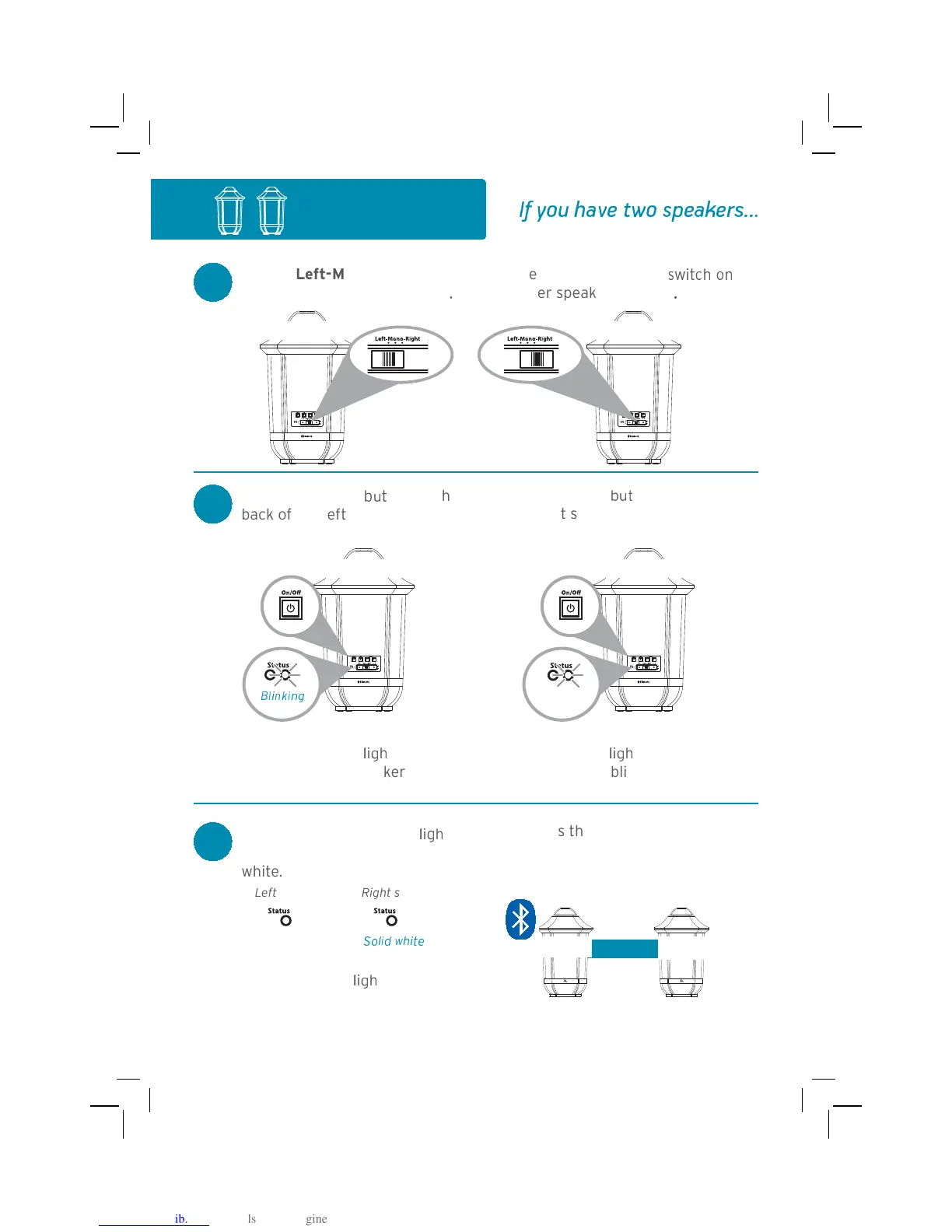
Stereo Setup
1
Left-Mono-Right
switch on one speaker to Left
.
Set the Left-Mono-Right
-
#' !
the other speaker to Right
.
2
On/Off
ton on the
back of the left speaker to turn
it on.
Press the
On/Off
ton on the back
of the right speaker to turn it on.
The right Status
"#$
t on the
back of the left speaker blinks
white slowly.
The right Status
"#$
t on the back of
the right speaker blinks white slowly.
3
W%
# ( #$
Status
"#$
t
on both speakers to turn solid
white.
Right speakerLeft speaker
Solid white
The left
Status
"#$
t on the left
speaker will start blinking blue.
This means the two speakers are
linked for stereo and ready to pair with
your Bluetooth device.
R
<
=
L>?
=
Continues on the next page...
S
aker back
S
aker back
@DF G H5I JHK5
B2345346
white
M36N
t speaker back
B2345346
white
SO23Q UN3F
VX YZ[ \]^_ `aZ bc_]d_ebfff



 To Next Page