12
English
TO REMOVE/REPLACE BASE PLATE
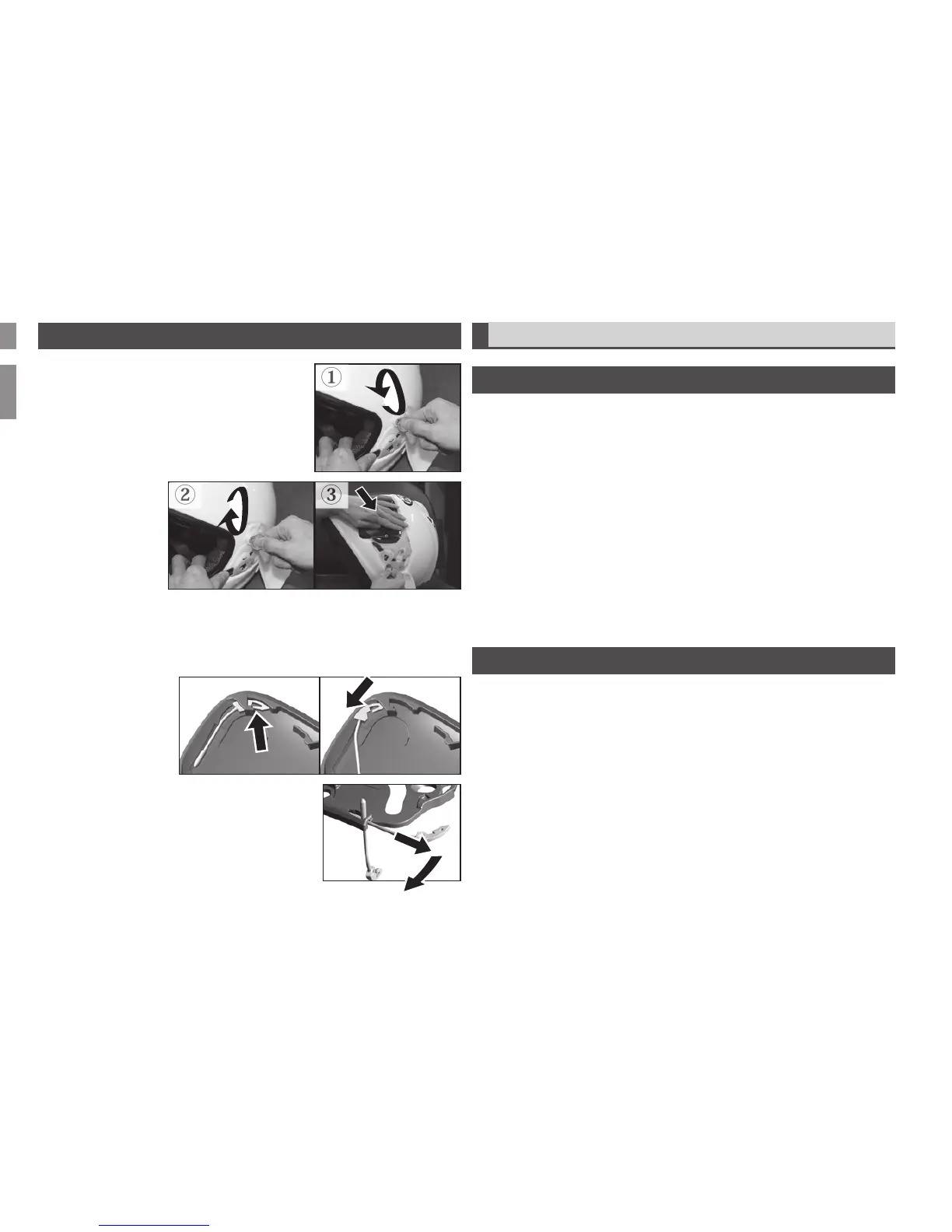
To remove, first remove the shield. Remove two screws from each base plate
with a flat blade screwdriver or a coin ①. Remove plates from helmet shell.
Note the right and left base plate for proper reinstallation.
To replace, place base plate over the threaded screw receptacles in the
helmet. Install the two screws through each base plate into the helmet finger
tight ②, do not fully tighten. Install shield, lower the shield to fully closed
position and press the front center of the shield to bring it against the eyeport
trim. While still pushing on the shield to keep a tight seal against the eyeport
trim, tighten the base plate screws ③ – but be careful not to overtighten, as
the screws may break. It may be necessary to do one side at a time, with
a smoothing pressure from the shield center toward each base plate and
tightening one and then the other for best results.
TO REMOVE/REPLACE TETHER
To remove the tether connecting the side pod and base plate, compress the
tether spring hook at the side pod ① and pull the tether out from the slot ②.
To remove tether from the base plate, remove base plate from helmet. Pull
tether until it stops, then bend it toward the back of the base plate to release it
③ To reinstall, reverse the removal procedure.


 To Next Page