EasyManua.ls Logo

araknis AN-300-AP-I-N - User Manual

araknis AN-300-AP-I-N
100 pages
Print Icon
To Next Page IconTo Next Page
Loading...
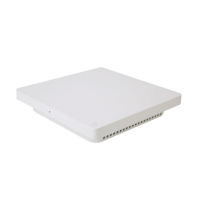
WIRELESS ACCESS POINT
PRODUCT MANUAL
Models:
AN-100-AP-I-N
AN-300-AP-I-N
AN-500-AP-I-AC
AN-700-AP-I-AC

Table of Contents

Other manuals for araknis AN-300-AP-I-N

Questions and Answers

  • A
    Allison DavenportAug 2, 2025
    What to do if restoring factory defaults does not restore proper functionality to my araknis AN-300-AP-I-N?
    • J
      Jay BoothAug 2, 2025
      If restoring factory defaults does not restore proper functionality, perform a hardware reset to reload the original base configuration file.

Summary

About this Manual

Information Symbols Explained

Explains the meaning of Pro Tip, Note, Caution, and Warning symbols.

Welcome and Hardware Overview

Product Features and Package Contents

Lists key features and items included in the access point package.

Hardware Overview

Describes the physical layout of the access point's panels.

Mounting and Wiring

Mounting Location Guidelines

Provides guidance on optimal placement and site survey tools.

Access Point Mounting Instructions

Details methods for table top, junction box, drywall, and ceiling tile mounting.

Wiring Requirements and Diagram

Covers cable specs, power needs, and a wiring diagram.

Initial Setup and Access

Power-On and Status LED Indicators

Explains the meaning of different status LED light behaviors during operation.

Network Setup and Access Methods

Covers introduction to setup, access methods, and warnings.

Web Interface Navigation and Settings

Web Interface Overview

Describes the navigation menu, main window, and top bar.

Applying Web Interface Changes

Steps to save and apply configuration changes in the web interface.

System Information and Status

Displays current system settings like name, firmware, and VLAN.

Wireless and LAN Status

Shows current wireless radio and LAN connection information.

Radio and Client Status

Provides detailed radio settings and connected client information.

System Configuration

System Information Configuration

Configure system name, admin credentials, and LED status.

Date, Time, and Time Zone Settings

Set the system's date, time, and time zone.

LAN and Wireless Configuration

IP Settings Management

Configure static or DHCP IP address settings for the AP.

Interface Settings Management

Configure LAN speed and duplex settings.

Radio Settings Configuration

Configure radio modes, channels, and bandwidth.

Global Wireless Settings

Configure Band Steering and Fast Roaming features.

Advanced Wireless Features

Fast Roaming Mode Setup

Explains Fast Roaming and its setup requirements.

Wireless Networks (SSID) Setup

Configure network names (SSIDs) and their properties.

Wireless Security Setup

Details configuration for WEP, WPA, and WPA2 security modes.

Guest Network Setup

Steps to set up a dedicated guest network.

Configuring WAP as Repeater

Explains how to set up the AP in repeater mode for extended coverage.

Security Settings

User Accounts Management

Configure user accounts and privilege levels for access.

Access Control Settings

Control access methods like HTTP, Telnet, and SSH.

Email Alert Configuration

Set up email notifications for system status and warnings.

Device Discovery Settings

Configure Bonjour and UPnP for network device discovery.

Scheduling and Network Testing

Scheduling Features

Configure auto reboot, gateway monitoring, and Wi-Fi scheduling.

Network Testing Tools

Perform ping and traceroute tests to diagnose network issues.

File Management and Maintenance

Configuration File Management

Back up, upload, or restore AP configuration files.

Factory Default Reset Procedures

Restore factory defaults via software or hardware reset.

Firmware Update

Upload and install new firmware for the AP.

Restart and Logout Procedures

Procedures for rebooting the AP and logging out the user session.

Advanced Configuration Options

Advanced Wireless Settings

Configure advanced radio settings like transmit power and data rate.

Wireless MAC Filter Settings

Control wireless access based on MAC addresses.

WPS Settings Configuration

Configure Wi-Fi Protected Setup for device connection.

Site Survey and Spectrum Analyzer

Tools for analyzing wireless environment and channel interference.

Wireless Traffic Shaping

Regulate network traffic flow to manage bandwidth.

SNMP and Spanning Tree Settings

Configure SNMP for network monitoring and STP to prevent loops.

VLAN Settings Configuration

Configure Virtual Local Area Network settings.

Guest Network with Fast Roaming

Configure Guest SSIDs on VLAN

Set up guest network SSIDs on a separate VLAN for Fast Roaming.

Managed Switch and Router Configuration

Configure network infrastructure for guest VLANs.

Testing Guest Network Functionality

Verify guest network operation and client connectivity.

Troubleshooting

Hardware Reset Procedure

Steps to perform a hardware reset on the access point.

Product Specifications

100;300 Series Specifications

Detailed specifications for the 100 and 300 series access points.

500;700 Series Specifications

Detailed specifications for the 500 and 700 series access points.

Regulatory Compliance

CE Compliance and Warnings

Information regarding CE certification and potential interference.

FCC and Industry Canada Compliance

FCC and Industry Canada compliance statements, and radiation exposure limits.

EU Declaration of Conformity

EU compliance declaration according to R&TTE Directive.

Warranty and Support

2-Year Limited Warranty

Information on the product's limited warranty terms.

Contacting Technical Support

Provides contact information for technical support.

araknis AN-300-AP-I-N Specifications

General IconGeneral
Brandaraknis
ModelAN-300-AP-I-N
CategoryWireless Access Point
LanguageEnglish

Related product manuals