WiFi SSID:
WiFi IP: 192.168.206.100
Username:
Password:
root
FhTdwPN7fg
Aranet-C20a47
PRO Plus base station
S/N:
M/N:TDSBOA03
371010004641
www.aranet.com
Made in Latvia, EU
ETH IP:
C493003034E4ETH MAC:
192.168.205.100
IEEE 802.3af PoE
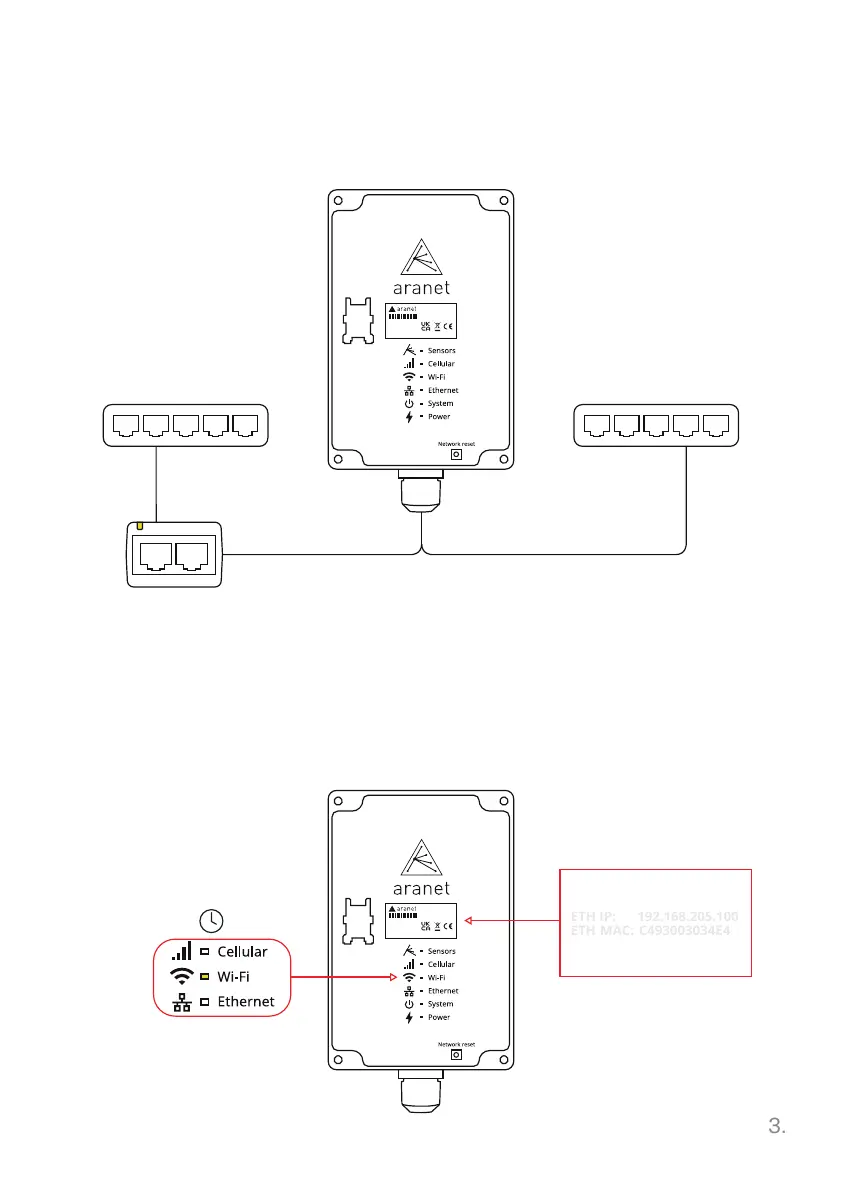
Connect Base station to the internet
Unpack and plug the Base station in using A POE injector or B PoE enabled
network switch.
1. In about 30 seconds, the Wi-Fi LED will turn on indicating the Base station
is ready to be connected to.
2. Connect to the Base station WiFi SSID in your network settings by etering
the password provided on the label of base station. Then type WiFi IP in your
browser and log in with Username & Password.
PRO Plus base station
S/N:
M/N:TDSBOA03
371010004641
www.aranet.com
Made in Latvia, EU
WiFi SSID:
WiFi IP: 192.168.206.100
ETH IP:
C493003034E4ETH MAC:
Username:
Password:
192.168.205.100
root
FhTdwPN7fg
Aranet-C20a47
IEEE 802.3af PoE
PRO Plus base station
S/N:
M/N:TDSBOA03
371010004641
www.aranet.com
Made in Latvia, EU
WiFi SSID:
WiFi IP: 192.168.206.100
ETH IP:
C493003034E4ETH MAC:
Username:
192.168.205.100
root
Aranet-C20a47
PoE-enabled
network switch
PoE injector
A
1.
2.
B
IN OUT
30 sec
12V
POWER FROM BATTERY
OFF ON
TCP cable TCP cable
Network
switch



 To Next Page