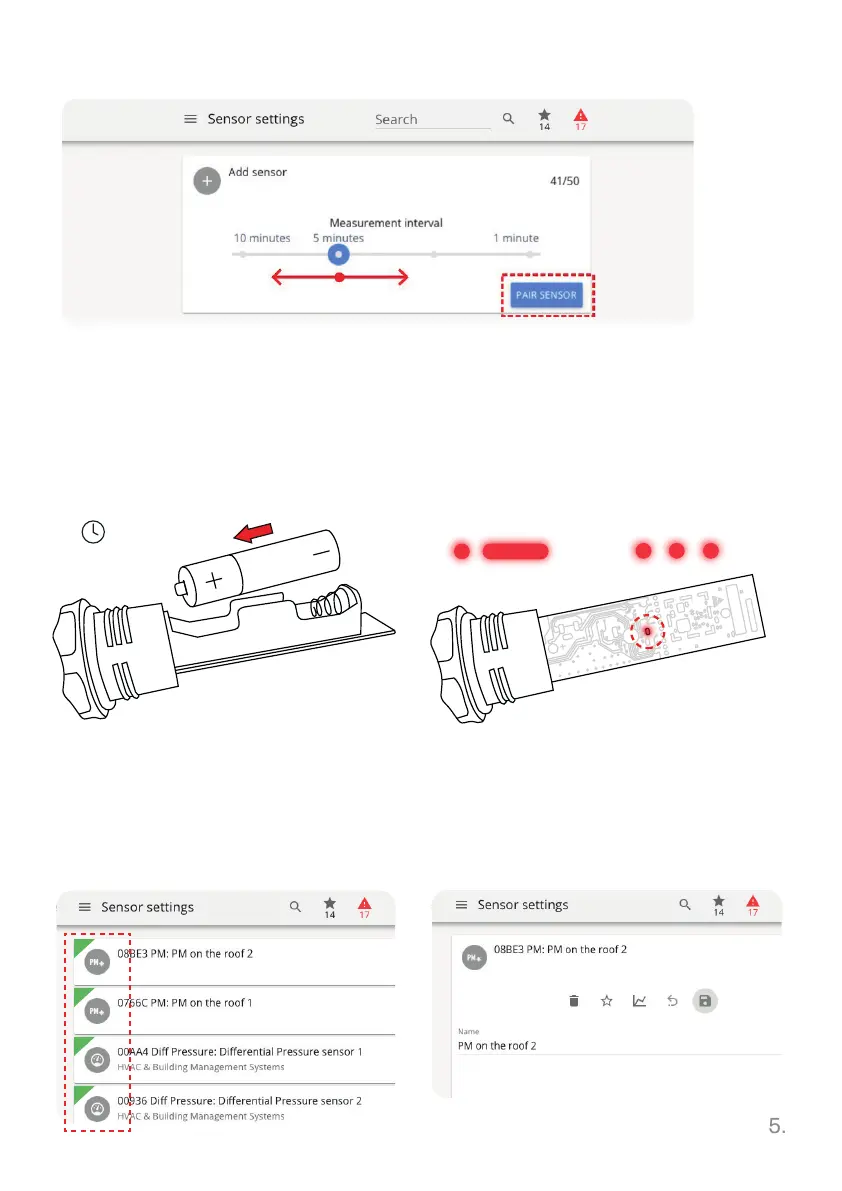
Choose the measurement interval, then click PAIR SENSOR
6. Attach the battery cover back on the
sensor. To start customize the sensor
click on the interface to STOP Pairing.
Now sensor option customization is
available.
5. Newly paired sensors, marked
by green triangle, are shown in
the base station browser menu.
3. The 2 min timer indicates the
window to insert the battery in the
sensor. Correct battery type for
each sensor is indicated in its
datasheet.
M/N:TDSPRMU1
FCC ID: W9Z-ARANETRM
IC:8855A-ARANETRM
2 min
PAIRED NOT PAIRED
AA
4. Successful pairing is confirmed by
one short and one long LED light flash
and takes up to 30 seconds. Failed
pairing is indicated by three short
flashes.



 To Next Page