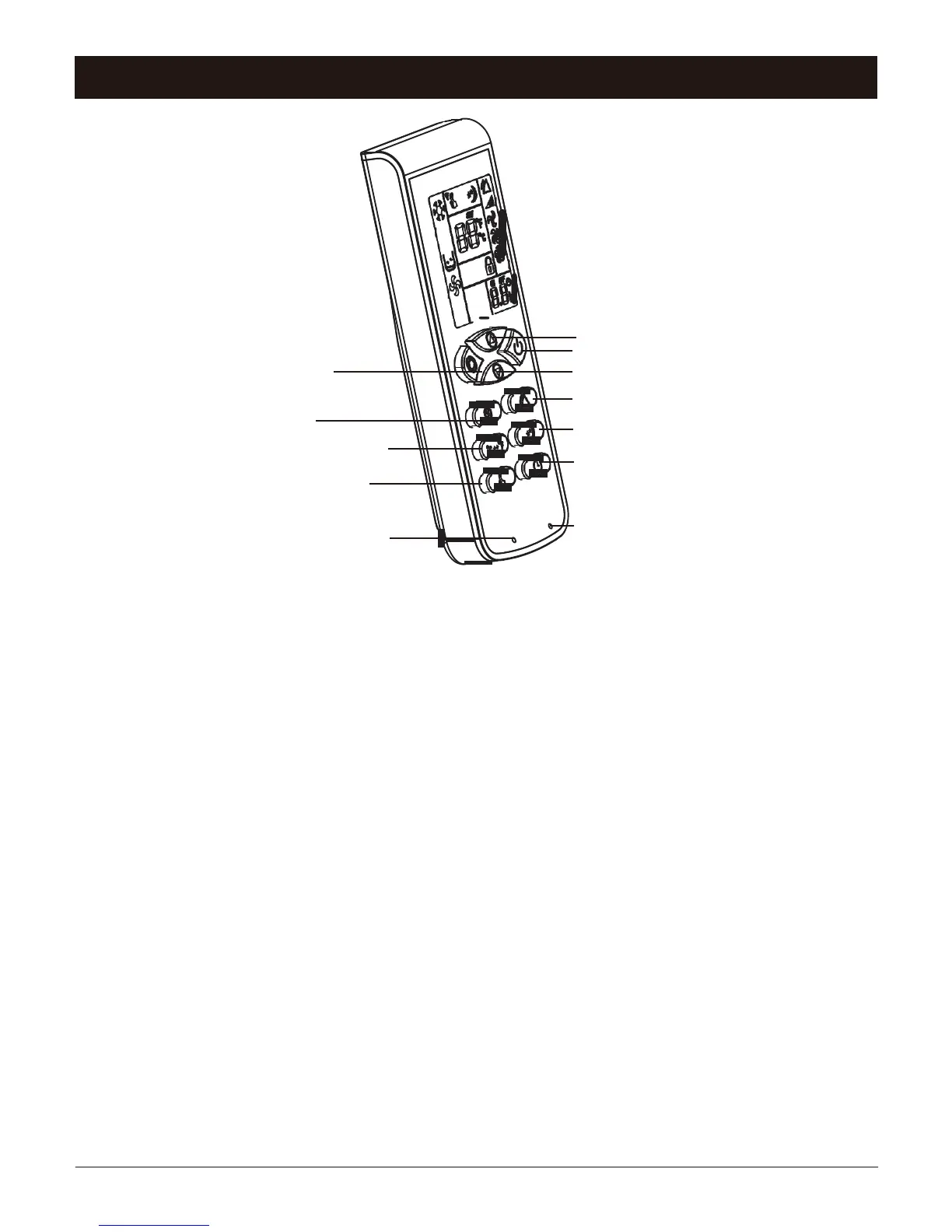
Mode
Fan
Temperature
Mightiness
Keypad Lock
Up
Power
Down
Swing
Sleeping
Timer
Reset
1. POWER: Press this key to turn on/off the unit.
2. MODE: Press this key to choose cooling, dehumidifying or fan
3. UP: Press this key to turn up temperature or adjust time.
4. DOWN: Press this key to turn down the temperature or adjust the time.
5. FAN: Press this key to set low/middle/high fan speed.
6. SWING: Press this key to control swing function.
7. TEMPERATURE: Press this key to choose Celsius or Fahrenheit.
8. SLEEPING:
Only under cooling or heating function. Press this key to enable this function.
9. TIMER:
Press this key to set the time. Within 5 hours, time interval is half hour; from 5 hours to
24 hours, time interval is 1 hour. Once set number will flash 5 times as confirmation.
10. MIGHTINESS: Under cooling mode, press this key to achieve maximum output.
11. KEYPAD LOCK:
Once set, press this key to lock all the button, as the screen will show image: Press
this key again to unlock (This function can prevent children from controlling the
unit).
12. RESET: Press this key to reset remote control; default setting is cooling mode and
high speed fan, auto swing.



 To Next Page