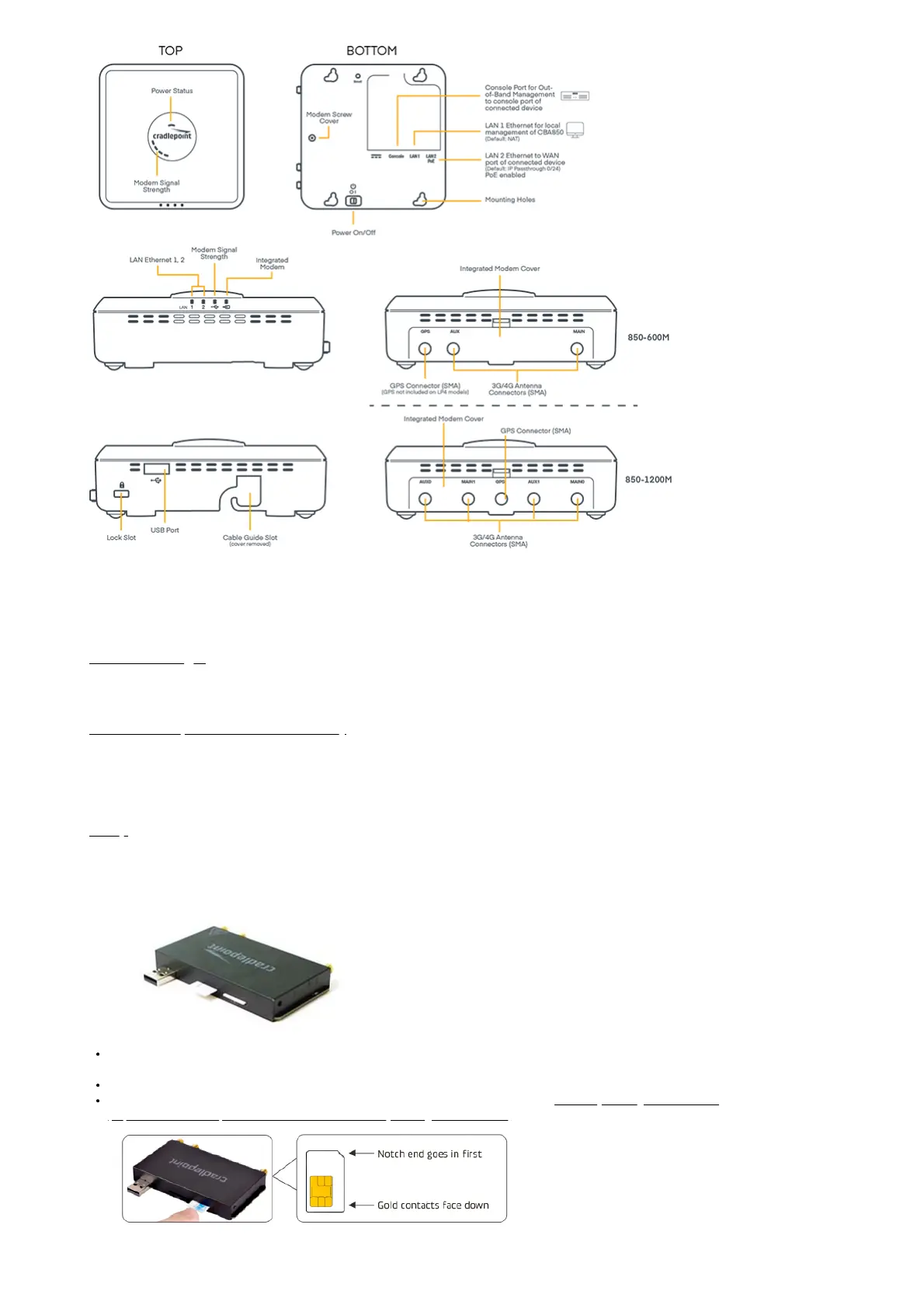
Before You Begin
Read the following before setting up your CBA850 Branch LTE Adapter.
SIM Card Setup for Wireless Connectivity
A wireless broadband data plan must be added to your Cradlepoint CBA850 for wireless broadband connectivity. Wireless broadband data plans are
available from wireless carriers such as Verizon, AT&T, Sprint, EE, and Vodafone. The SIM must be provisioned by the carrier. Contact your carrier for details
about selecting a data plan and about the process for provisioning your SIM.
Setup
Read through the following to set up your CBA850 Branch LTE Adapter.
1. Insert an Activated 2FF-Sized SIM.
The CBA850 includes a modular modem that may be installed by the factory. If the modem is installed, unscrew and remove the modem door and then
carefully pull the MC400 modem out of the CBA850.
Insert the SIM into the slot marked SIM1 with metal contacts down and notch in. It will click into place. Depress again to remove.
Use SIM2 slot for secondary/backup. For more information about using dual modems, refer to Effectively Utilizing 2-SIM Modems
(https://customer.cradlepoint.com/s/article/NCOS-Effectively-utilizing-2-SIM-modems).



 To Next Page