6 7
Controller overview
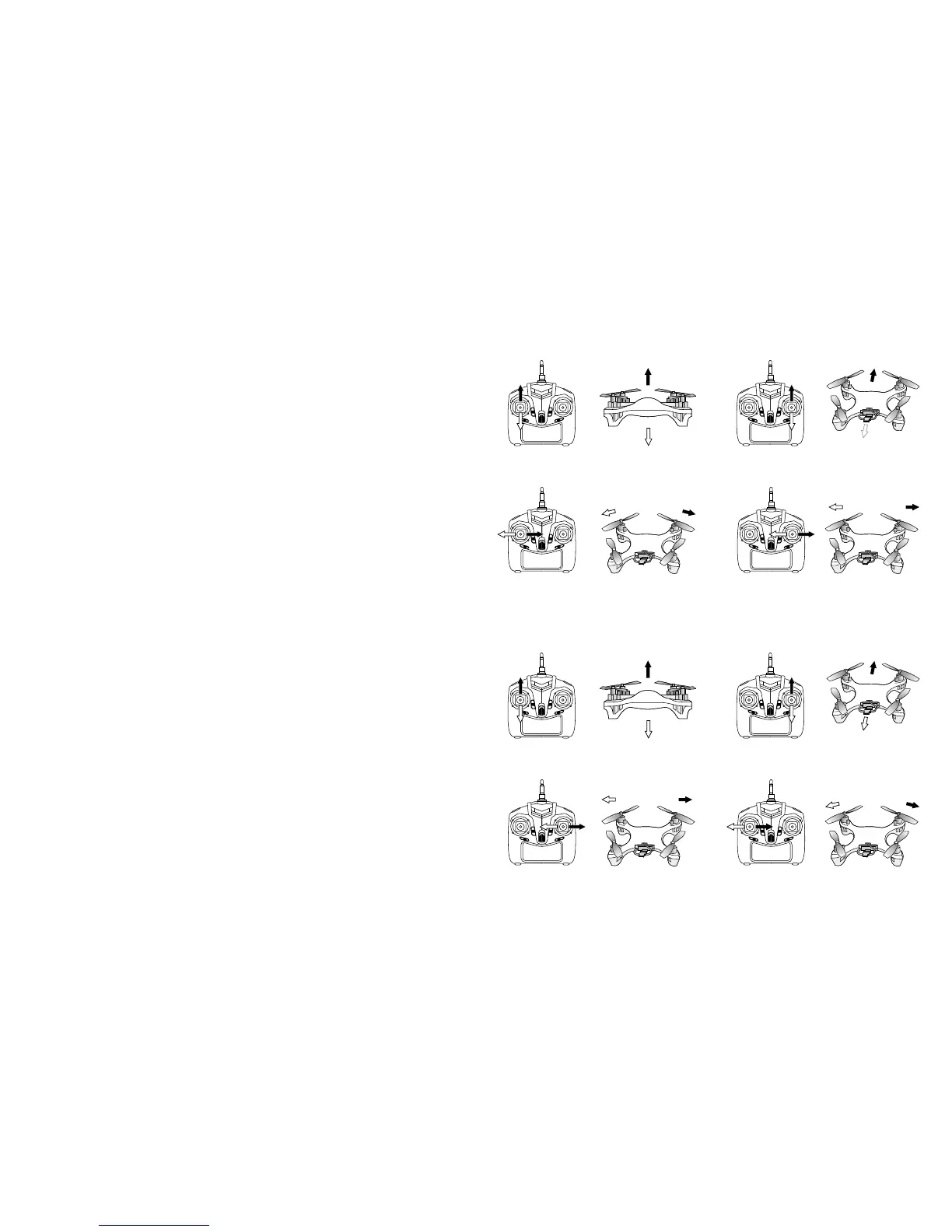
The Arcade drone controller can be used in 2 modes:
Mode 1 (default) The left stick controls pivotal turning, the right stick controls lateral ight.
Mode 2 The left stick controls lateral ight, the right stick controls pivotal turning.
To toggle between the two controller modes, press and hold the Control Mode Switch until you hear a beep sound.
The Arcade drone has three different programmed speeds. Toggle through these three speed settings using the
Speed Select button. Press to hear 1 beep for speed 1 (slow), 2 beeps for speed 2 (medium) and 3 beeps for
speed 3 (fast). Speed 3 is required for the ips and rolls manoeuvres (see Flips and rolls).
The Arcade drone has an auto-trim function (ne-tunes all rotors balance). Use this function if your Arcade drone is
not hovering in a balanced position. To auto-trim all the rotors, turn on the drone, place it on a at surface, and power
the controller (push the power button upwards) whilst holding down the Auto-trim button.
Throttle/Left stick: While in mode 1, up/down, left/right pivot turn.
While in mode 2, up/down, left/right side y.
Rudder/Right stick: While in mode 1, up/down, left/right side y.
While in mode 2, up/down, left/right pivot turn.
Trim slider A: Adjust throttle position
Trim slider B: While in mode 1, used for left/right pivot turning, manual ne-tuning.
While in mode 2, used for left/right side ight, manual ne-tuning.
Trim slider C: While in mode 1, used for left/right side ight, manual ne-tuning.
While in mode 2, used for left/right pivot turning, manual ne-tuning.
Trim slider D: Used for forward/reverse ight, manual ne-tuning in modes 1 and 2.
LED controls/Control mode switch:
– Press once for LED lights on/off toggle function
– Press and hold until beep sounds to toggle between Controller modes
Forward and backward
Forward and backward
Left spin and right spin
Left spin and right spin
Left side and right side
Left side and right side
Up and down
Up and down
Controller ight sticks
Mode 1:
Note: When the drone is facing backwards, the controls are reversed.
Left spin
Leftside y
Leftside y
Left spin
Right spin
Rightside y
Rightside y
Right spin
Mode 2:
Note: Please ensure you have fully read and understand the operating ight sticks for both mode 1 and 2. It is
advised to learn both layouts to avoid damage whilst ying, and for user satisfaction.
Rise
Drop
Rise
Drop
Forward
Forward
Backward
Backward


 To Next Page