10 11
Flips and rolls
Now you have the basics of ying, you are now ready to put your skills to the test. Select the third speed mode and
start learning to ip and roll your drone, and master full aerial acrobatics.
To do this select the highest speed mode; see Controller functions for details.
The top left trigger controls the speed modes, and pressing this changes the level of speed of the drone:
– speed 1 (default)
– speed 2 (two beeps)
– speed 3 (three beeps)
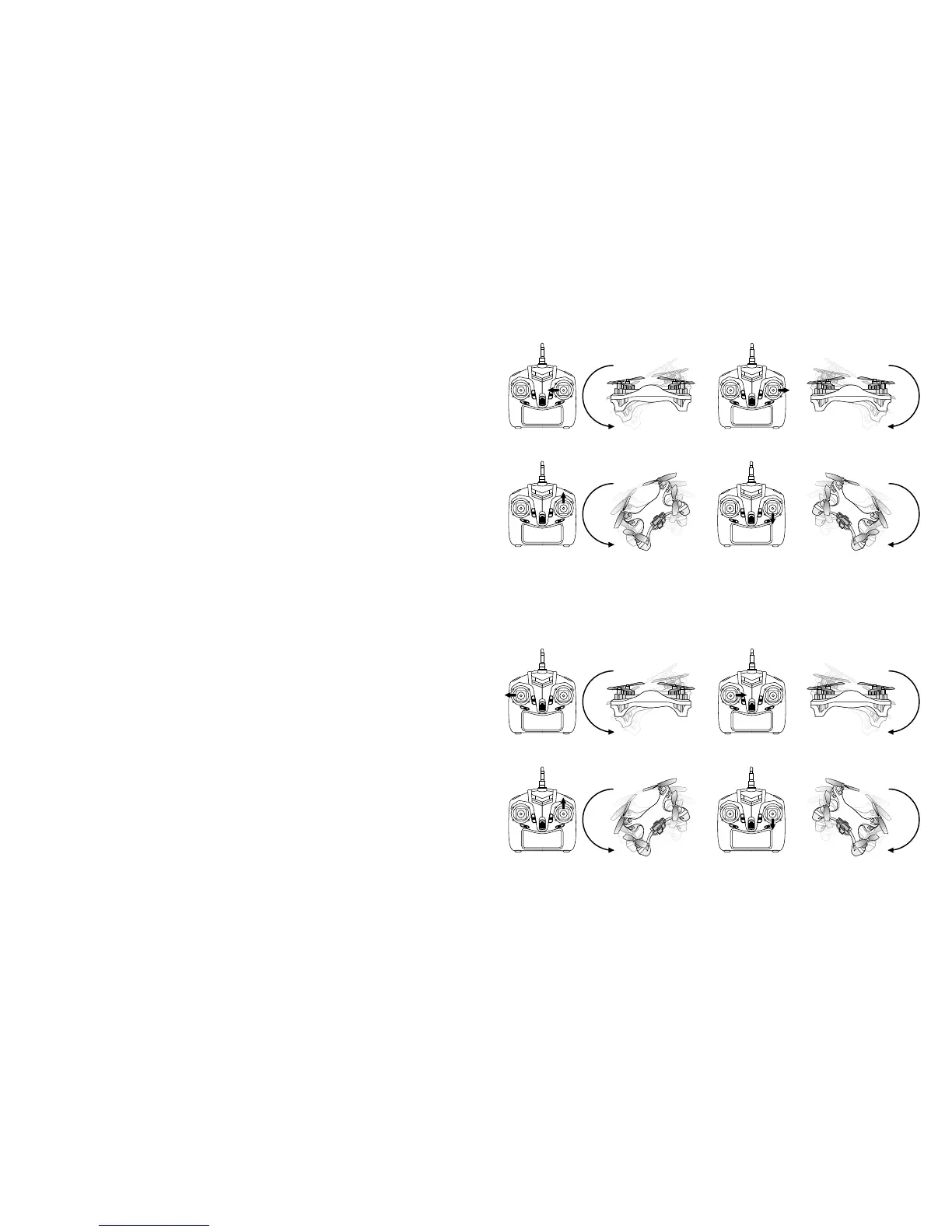
To perform a ip or roll, press the top trigger twice, make sure the drone is at least 3 metres off the ground, and
quickly push the right ight stick (Rudder) in either direction to make the drone ip or roll. Once the manoeuvre is
completed, steady the drone. It is recommended to press the trigger once more to set it back to speed mode 1.
Note: The ips and rolls directional functions can be different, depending on which Control mode was set on the
controller (Mode 1 and 2). Refer back to Controller overview for these instructions.
Right ip
Right ip
Mode 1:
Mode 2:
Left ip
Left ip
Forward ip
Forward ip
Backward ip
Backward ip


 To Next Page