Post Mount Mailbox | Model 5100
MOUNTING INSTRUCTIONS
R
Before You Begin
Outgoing Flag
Your new mailbox comes fully assembled
with the exception of the included
outgoing flag. The outgoing flag should
be attached before proceeding to mount
the mailbox to it’s post.
Outgoing Mail
To leave mail for your carrier to pick up, place
it under the outgoing mail clip inside of the
hopper door and raise the outgoing flag. Upon
your carrier's next delivery, they will retrieve
your outgoing mail and lower the flag.
Keys
Your new mailbox comes with two keys. The keys allow access to the storage compartment. To retrieve
incoming deliveries, simply open the access door at the bottom of the box. IT IS IMPORTANT TO
NOTE THAT IT IS NOT THE RESPONSIBILITY OF MAIL CARRIERS TO OPEN MAILBOXES
THAT ARE LOCKED, ACCEPT KEYS FOR THIS PURPOSE, OR LOCK MAILBOXES AFTER
DELIVERY OF THE MAIL.
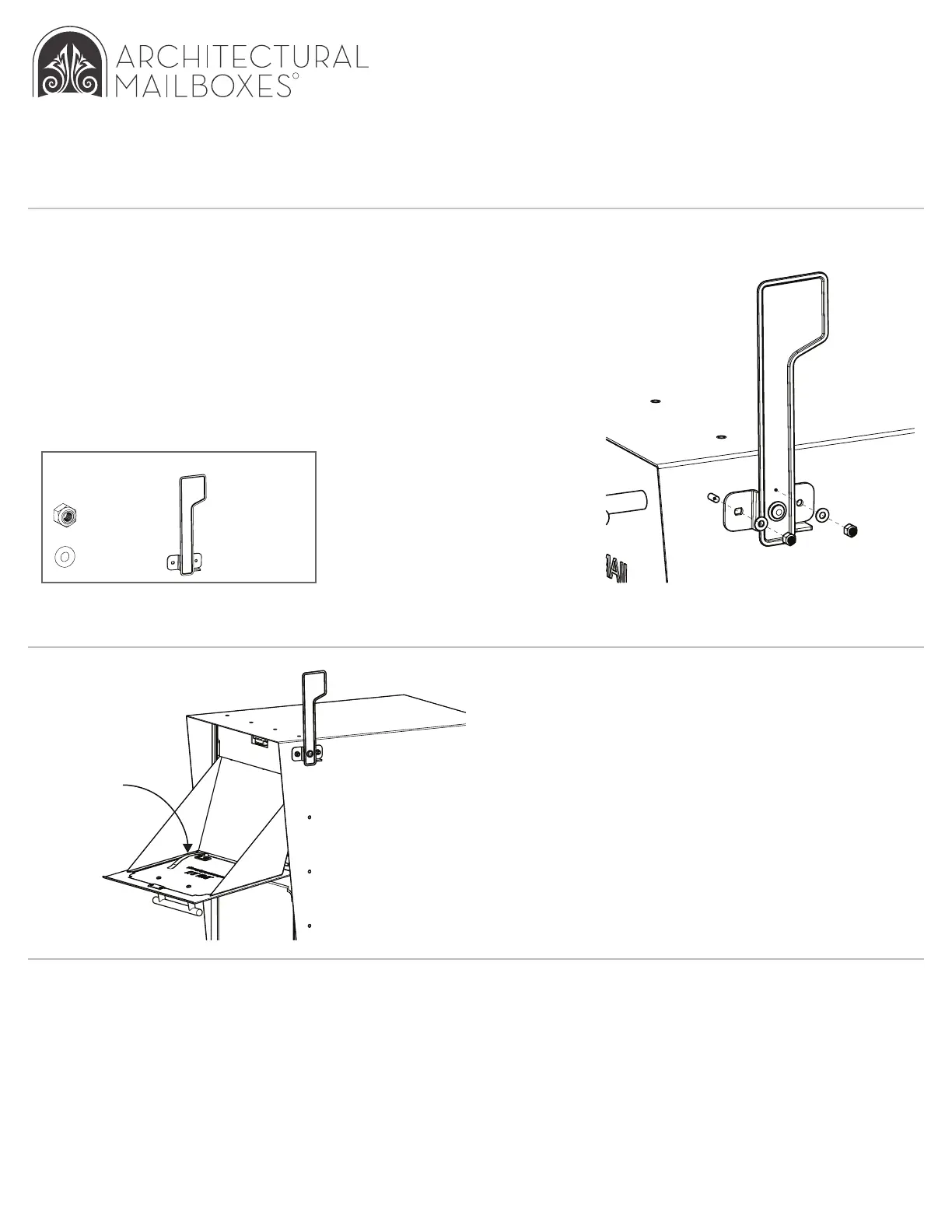
Parts
x 2, nuts
x 2, washers
x1, outgoing flag
Then, place the washers
over the rods and secure the
flag with the nuts. Tighten
the nuts with a wrench.
To attach the flag, slide it over
the threaded rods on the right
side of the mailbox, ensuring
proper orientation.
Outgoing
Mail Clip


 To Previous Page