5
▼
ENGLISH
THE ARCHOS INTERFACE
► S
ee the full manual for further information about the interface.
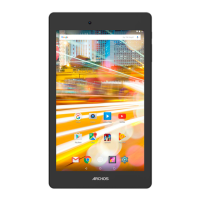
Status icons: (Time, WiFi
connection status, battery
level, etc.)
Home Screen
Notification icons: tap and
hold on the top bar until the
notification window appears,
then drag it downwards to
reveal the notification mes-
sages (if any).
When you rotate the product, the built-in accelerometer will automatically switch the
screen between landscape and portrait views. Your ARCHOS device is equipped with a
touchscreen. Most screen areas will react when you tap on them with your finger.
Applications Tab
Tap on this icon to reveal all
the Android™ applications
installed on your ARCHOS
(games, various tools, etc.). You
can copy them onto the Home
screen. You can get more An-
droid™ applications from the
AppsLib which can be found on
the Home screen.
These are the main Android™
applications (Video, Music,
Gallery, Web Browser, etc.). Tap
on an icon to open the corre-
sponding application. You can
customize the Home screen
by adding/removing shortcuts
and widgets, changing the
wallpaper, etc.
QSG_A10_IT_book_PN109852.indd 5 13/06/2011 16:46:08



 To Next Page