8-10
CLEANING AND INSPECTING
NOTE: Whenever a part is worn excessively,
cracked, or damaged in any way, replacement is
necessary.
1. Clean all bumper components with parts-cleaning
solvent.
2. Inspect all welds for cracking or bending.
INSTALLING
1. Place the front bumper assembly into position and
install the through-bolt. Start the lock nut and fin-
ger-tighten only.
2. Install the two flange bolts and lock nuts on the
upper supports. Tighten all hardware securely.
Front Body Panel/
Side Panels
REMOVING
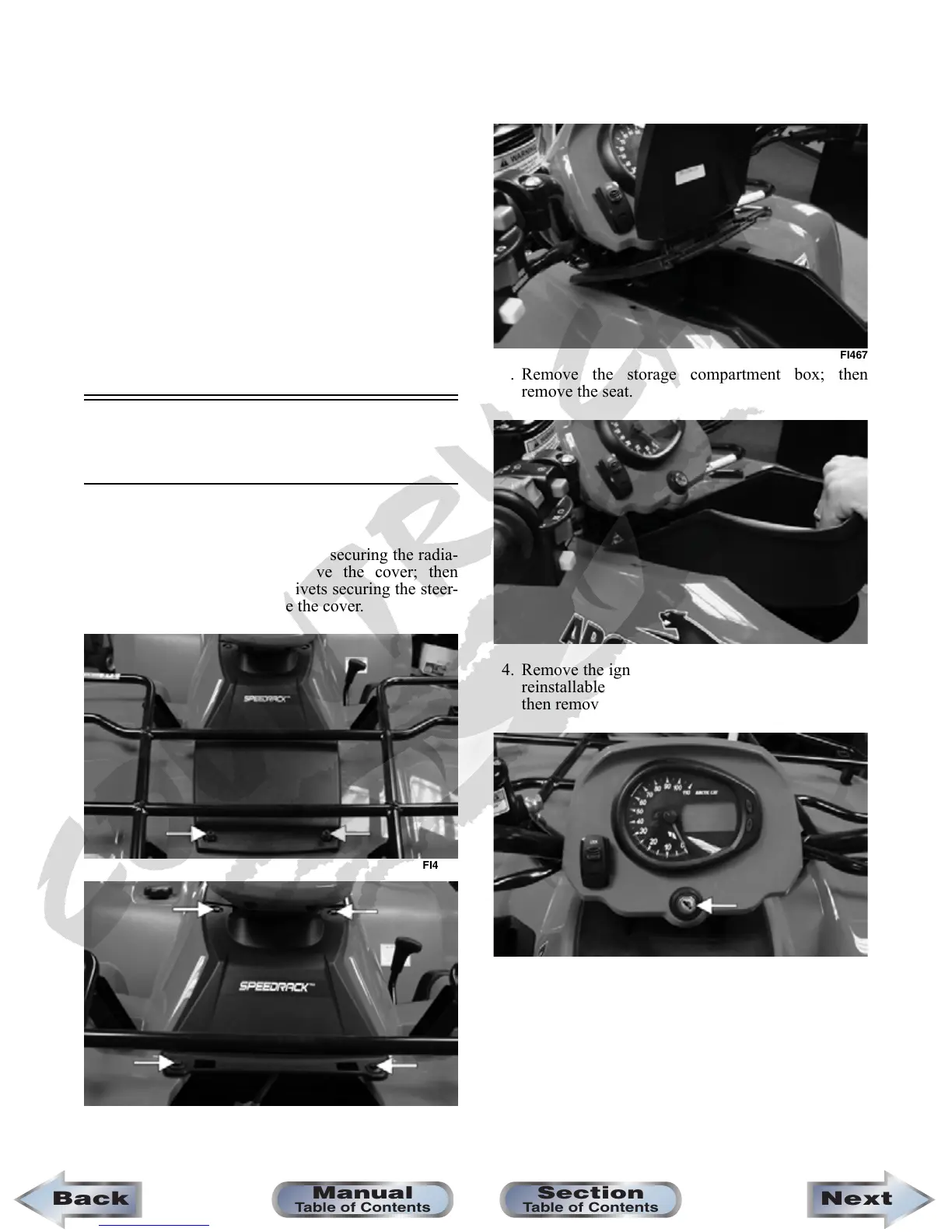
1. Remove the reinstallable rivets securing the radia-
tor access cover and remove the cover; then
remove four reinstallable rivets securing the steer-
ing post cover and remove the cover.
FI465A
FI466A
2. Unlock the storage compartment lid; then slide the
storage compartment cover assembly forward and
lift off the storage compartment.
FI467
3. Remove the storage compartment box; then
remove the seat.
FI468
4. Remove the ignition switch retaining ring and two
reinstallable rivets securing the instrument pod;
then remove the instrument pod.
FI463A
NextBack
Section
Table of Contents
Manual
Table of Contents










 To Next Page