60 MAINTENANCE
5. Remove the two self-tapping
screws securing the taillight to the
bumper; then route the harness out
of the bumper and remove the tail-
light.
6. Route the taillight harness through
the bumper; then secure the tail-
light to the bumper with the two
self-tapping screws.
7. Carefully route the harness
beneath the Speedrack mount and
through the hole in the storage
compartment panel; then connect
the harness connector.
8. Tighten the three right-side mount
cap screws; then lower the front
seat.
9. Place the rear seat into position on
the mount making sure the four
pin holes are properly aligned with
the mounting location on the
mount.
10. Install the four pins making sure
they are properly seated.
Removing and
Installing Taillight/
Brakelight Bulb
(Bearcat 570/T570/
TZ1 Models)
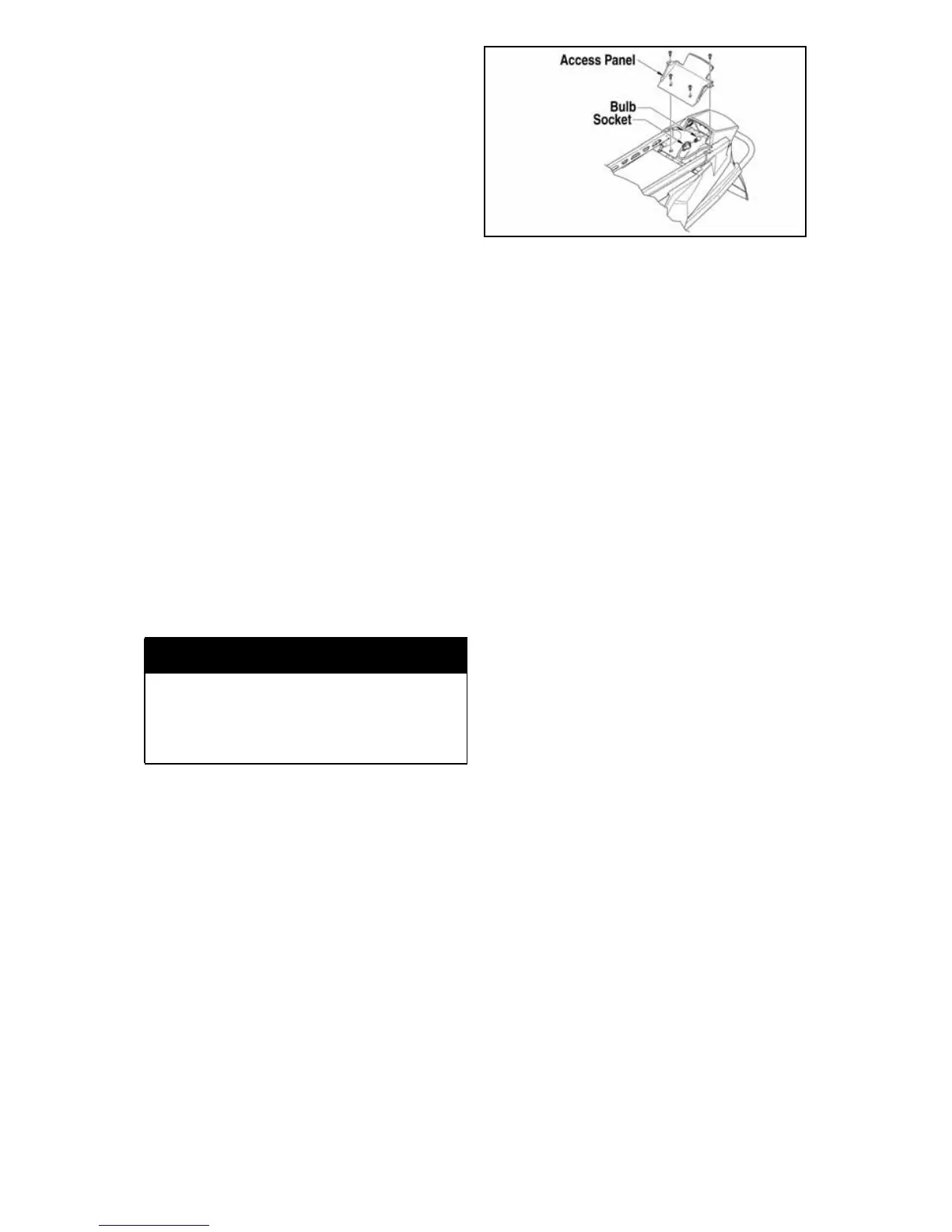
1. Remove the torx-head cap screws
securing the taillight access panel.
742-467A
2. Disconnect the harness connector
and remove housing.
3. Push in on the socket and rotate it
counterclockwise to remove it
from the housing.
4. Remove the old bulb by pulling it
straight out of the socket.
5. Install the new bulb in the socket
by pushing it straight in.
6. Push the socket into the housing
and rotate it clockwise to lock into
place.
7. Connect the harness connector.
8. Secure the access panel with the
torx-head cap screws.
Removing Headlight
Bulb
NOTE: The bulb portion of head-
light is fragile. HANDLE WITH
CARE. When replacing the head-
light bulb, the bulb assembly must
first be removed from the housing.
Do not touch the glass portion of
the bulb. If the glass is touched, it
must be cleaned with a dry cloth
before installing.
To access the headlight bulbs, use the
following procedure:
1. Remove the two torx-head screws
located to the outside of the head-
light adjustment knobs; then
remove the single torx-head screw
from beneath the console (located
between the headlights).
! WARNING
Make sure the rear seat is securely
locked in place with the four pins
before carrying a passeng er or
personal injury may result.



 To Next Page