6
Operating Elements on the Rear
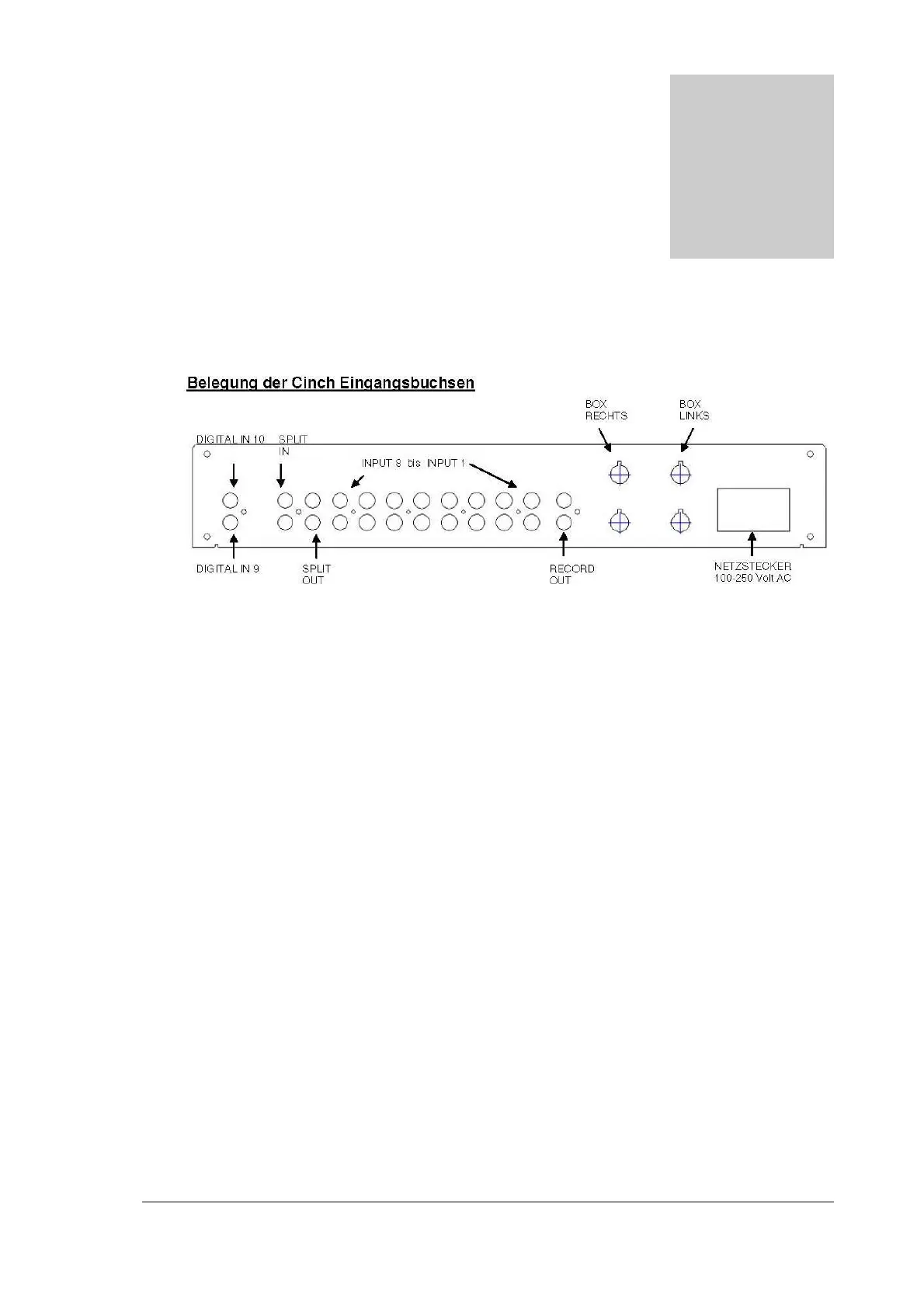
AssignmentofCinchaudioinputports
1. AUDIO INPUT PORTS 1-8
Your choice of high-volume devices such as tuners, CD players, tape decks etc. can be
connected here. Record players cannot be connected as they require an extra amplifier
stage in addition. However, special phono pre-amplifiers for record players can be
connected to these inputs again.
2. AUDIO INPUT PORTS 9-10
Digital input for digital playback sources such as, for example, DAR 300
3. Record Out / Pre Out
Assymetric pre-amplifier output. A output stage or an active loudspeaker with asymmetric
inputs can be connected here.
By switching the menu function (see item 4 Record page 19) you can also convert the
device into a recording device. The RECORD input of a tape recorder, cassette recorder,
minidisc player etc. is then connected to these ports. The respective audio signal of the
selected input source then becomes active.
4. SPLIT In / Out
A special device (equalizer, external tone control, surround decoder) can be connected to
this input/output and thus looped into the signalling pathway. When using a surround
decoder with your own volume control device please also pay attention to the special
function “Unity Gain”, which is described in more detail under item 6.4 “Connecting to
surround systems”.
Section
4


 To Next Page