16
Remote controlControl panel
E
B
C
D
A
A
B
C
D
E
1
2
3
4
5
6
7
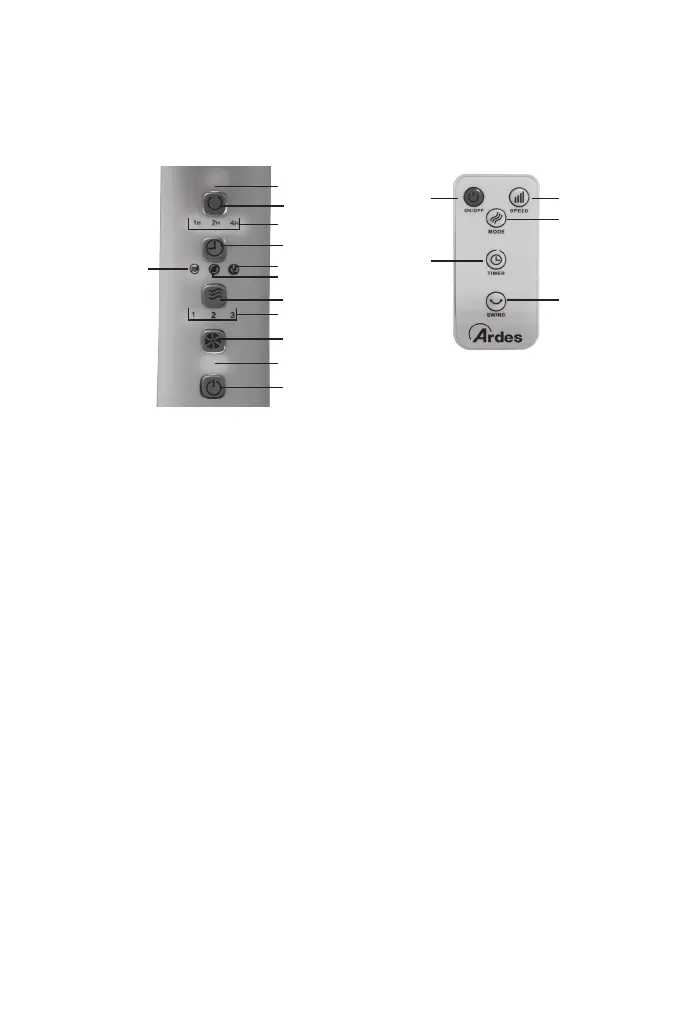
Buttons:
A. On/Off
B. Speed
C. Mode
D. Timer
E. Oscillation
Indicator light:
1. Working light
2. Speed: low (1), medium (2),
maximum (3)
3. Normal mode indicator
4. Natural mode indicator
5. Sleeping mode indicator
6. Timer
7. Oscillation
ON/OFF Button (A):
• Press On/Off button once to turn on the fan: the unit will operate at
minimum speed and normal mode. The related indicators light will be
on on the control panel.
• Press On/Off button when the unit is on to turn it off.
SPEED Button (B):
• When unit is on, press this button to select the desired speed: low,
medium or maximum. The related indicator light (2) will be on on the
control panel.
MODE Button (C):
• Press this button to select normal mode, natural mode or sleeping
mode.
• If the normal mode is selected, the ralated indicator light (3) will be on
in the control panel and the unit works according to the speed selected.
• If the natural mode is selected, the related indicator light (4) will be
on in the control panel and the unit simulates a natural breeze mode.


 To Next Page