17
Maintenance
Before carrying out the regular cleaning operations turn off the fan and
unplug it.
For external cleaning use a soft and dry cloth.
DO NOT disassemble the fan: this fan cannot be disassembled.
DO NOT dip the device in water, or splash it with any other liquids.
DO NOT use solvents or any other chemical products for cleaning it.
When you do not use it, after cleaning it, store the fan in a dry place.
• If the sleeping mode is selected, the related indicator light (5) will be
on in the control panel and the unit simulates a soft breeze suitable for
night time use
• If natural mode or sleeping mode is on, the selection of speed is
irrelevant. .
TIMER Button (D):
• When the unit is operating, you can set the timer to switch the fan
off automatically after the set time. Press the timer button repeatedly
to select the desired time period in one hour increment: 1h, 2h....7h.
The related indicator light (6) will illuminate on the control panel. When
all the light (6) are off means that time is not setted and the unit will
continuously work until you switch off manually the unit.
• To turn timer function off press this button till all the indicator light (6)
will be off in the control panel or turn the unit off manually.
OSCILLATION Button (E):
• Press the oscillation button to activate the automatic oscillation from
right to left. The related indicator light (7) will illuminate in the control
panel.
• Press again the oscillation button to deactivate the automatic
oscillation; the indicator light (7) will off on the control panel.
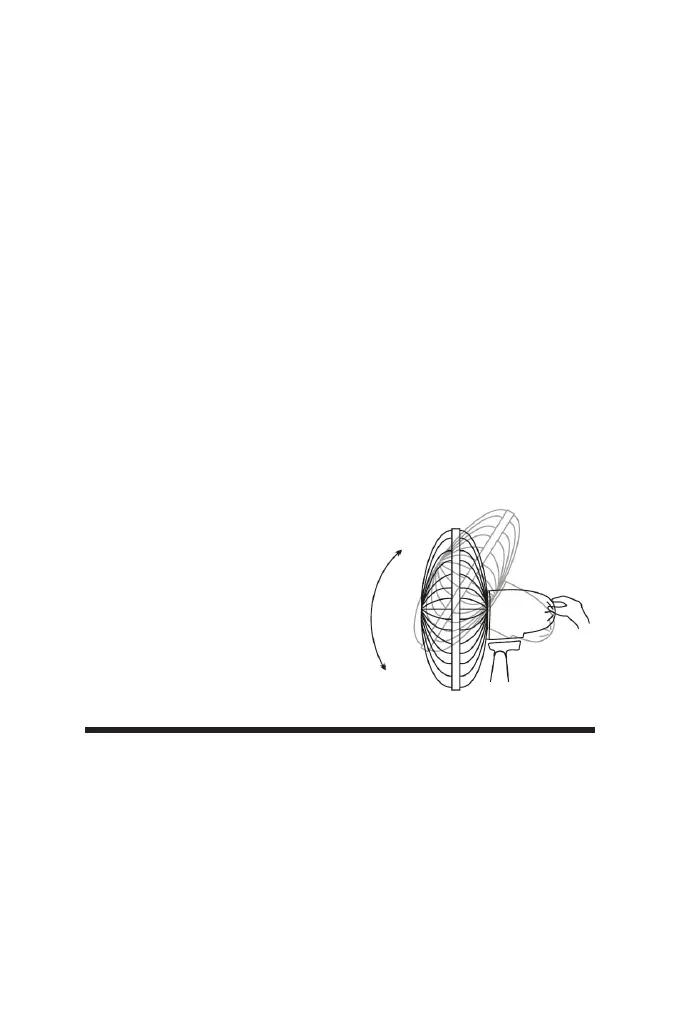
VERTICAL SLOPE:
You can vertically point the front of the
fan choosing the desired angle. It is
sufcient to move the front of the fan up
or down according to the desired slope.


 To Next Page