4.3 Getting Started - Arduino Cloud
All Arduino® IoT enabled products are supported on Arduino® Cloud, which allows you to log, graph and analyze
sensor data, trigger events, and automate your home or business.
4.4 Getting Started - WebBLE
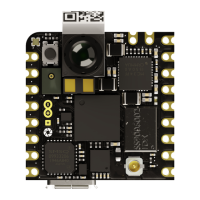
The Arduino Nicla Vision provides the capability for OTA updates to the STM32 microcontroller using WebBLE.
4.5 Getting Started - ESLOV
This board can function as a secondary to an ESLOV controller and update the firmware through this method.
4.6 Sample Sketches
Sample sketches for the Arduino® Nicla Vision can be found either in the “Examples” menu in the Arduino® IDE or
on the Arduino® documentation website [4]
4.7 Online Resources
Now that you have learned the basics of what you can do with the board, you can explore its endless possibilities by
checking out exciting projects on ProjectHub [5], the Arduino® Library Reference [6], and the online store [7], where
you can complement your board with sensors, actuators, and more.
4.8 Board Recovery
All Arduino® boards have a built-in bootloader, which allows flashing the board via USB. In case a sketch locks up
the processor and the board is no longer reachable via USB, it is possible to enter bootloader mode by double-
tapping the reset button right after a power-up.
5 Connector Pinouts
Note 1: All the pins on J1 and J2 (excluding fins) are referenced to the V
DDIO_EXT
voltage which can be generated
internally or supplied externally. Note 2: I2C1 is connected to the level translator U12 which has internal 10k
pullups. R9 and R10 pull-up resistors are not mounted on the board.


 To Next Page
 Loading...