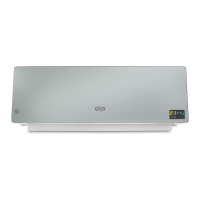
This document describes the Argo SLEEK wall-mounted ceramic fan heater, designed for heating well-insulated spaces or for occasional use. It is equipped with an IPX2 degree of protection, making it suitable for use in private bathrooms in zone 2, provided it is not touched by individuals using bathtubs or showers.
Function Description
The Argo SLEEK fan heater provides heating through ceramic elements and also offers a summer ventilation (FAN) mode. It is designed for wall installation, requiring it to be mounted 1.8 meters above the floor and at least 25 cm from any side wall, and should not be used as a floor-standing device. The appliance features an LED display and can be controlled via a control panel on the unit or a remote control.
It offers several operating modes:
- Stand-by Mode: The default state when the appliance is connected to power but not actively heating or ventilating.
- Summer Ventilation (FAN) Mode: Provides air circulation without heating.
- ECO Heating Mode (1000 W): An energy-saving heating mode.
- COMFORT Heating Mode (2000 W): Provides maximum heat output.
The fan heater includes an ECO Smart Function that automatically adjusts the heating power based on the difference between the set temperature and the room temperature. If the set temperature is at least 4°C higher than the room temperature, it operates at maximum power (COMFORT mode). If the set temperature is 0-2°C higher, it operates at medium power (ECO mode). If the room temperature is higher than the set temperature, the fan heater switches off and restarts when the room temperature drops 2°C below the set temperature.
A notable feature is the "Open Window" Function Setting. When active, if the room temperature drops by 5-10°C in less than 10 minutes, the fan heater automatically stops operating and switches to stand-by mode, conserving energy. This function can be reactivated manually. If both the weekly timer and open window functions are set, and the appliance is off according to the weekly program, the open window function will be inactive. Conversely, if the appliance is operating in line with the weekly program, the open window function can control the ON/OFF operation.
The appliance is equipped with an Overheating Safety Device. In the event of overheating, the protection system automatically disables the heating elements and the motor, causing the fan heater to stop working. To reset, the user must turn off the fan heater, remove the cause of overheating (e.g., obstacles, dust), allow it to cool for 15-20 minutes, and then turn it on again. If the malfunction persists, contact an Authorized Service Centre.
Usage Features
The fan heater offers flexible control options, including a control panel on the unit and a remote control.
Switching On/Off:
- From stand-by, press the ON/OFF button on the appliance or the remote control to switch it ON.
- To return to stand-by mode, press the function selection button on the appliance or the MODE button on the remote control. The fan heater will switch off approximately 30 seconds after stand-by mode is activated.
Automatic Flap Swivel:
- The horizontal flap can be set to swivel automatically for better air distribution by pressing the SWING button on the control panel or remote control.
Temperature Regulation:
- The desired temperature (from 10°C to 49°C) can only be set via the remote control using the + or - buttons. The "°C" LED illuminates when a temperature is set. The temperature setting can be cancelled by pressing the SET button.
ON/OFF Daily Timer Setting:
- Switch-on Timer: In stand-by mode, press the TIMER button to set a switch-on timer from 1 to 12 hours in 1-hour intervals. The default set temperature upon switch-on is 23°C.
- Switch-off Timer: When the appliance is operating, press the TIMER button to set a switch-off timer from 1 to 12 hours in 1-hour intervals.
Time Setting (Remote Control Only):
- Press the SET button to display and set the current hour (00-23), minutes (00-59), and day of the week (d1-d7 for Monday-Sunday). Confirm settings with the OK button.
Weekly Timer Setting (Remote Control Only):
- After setting the current time and day, press the P button to enter the weekly timer setting.
- Users can set the switch-on day (DAY button), operating periods (EDIT button for P1-P6), switch-on time (TIME ON button), switch-off time (TIME OFF button), and desired temperature (+ or - buttons) for each period.
- Settings are confirmed with the OK button. Multiple operating times (up to 6) can be set for each day.
- All settings are deleted when the fan heater is switched off using the main ON/OFF switch.
Remote Control Batteries:
- The remote control uses Lithium/Manganese button cells (model CR2025 -3 V). Batteries are inserted by opening the cover at the back, ensuring correct polarity.
Maintenance Features
Regular maintenance is crucial for the safe and efficient operation of the fan heater.
Safety Precautions for Maintenance:
- Always unplug the appliance before cleaning or performing any maintenance.
- Never submerge the fan heater in water.
- The ON/OFF switch is not the only method of disconnecting mains power; always unplug the appliance during maintenance, when moving it, or when it is not in use.
Cleaning the Outside Surface:
- Switch off and unplug the appliance.
- Use a soft cloth to remove dust.
- For more thorough cleaning, use a soft cloth dampened with water and a neutral detergent (at a temperature below 50°C). Ensure the appliance is thoroughly dry before reuse.
- Do not use corrosive detergents, solvents (like petrol), oils, chemical substances, or abrasive products.
- Do not wash the appliance with water directly.
Cleaning Grilles:
- The most common cause of overheating is dust build-up. Remove accumulated dust from the air inlet/outlet grilles using a vacuum cleaner after unplugging the device.
Storage:
- If the appliance will not be used for prolonged periods, store it in its original packaging in a cool, dry place, along with the manual.
General Safety Reminders:
- Do not restrict the air inlet and outlet grilles.
- Avoid placing fingers or foreign objects into the grilles to prevent electric shock, fire, or damage.
- Keep flammable materials (furniture, cushions, blankets, paper, cloths, curtains) at least 1 meter away from the front, sides, and back of the appliance.
- Do not place anything on the product, and avoid placing wet garments on it.
- Use the fan heater in a well-ventilated area.
- Do not use the appliance if the power cable or plug is damaged. A damaged power supply cable must be replaced by the manufacturer, dealer, or a similarly qualified person.
- Do not use the fan heater if it has fallen or been damaged. Contact a service center for inspection and repair.
- Do not immerse the power cable, plug, or any part of the appliance in water or other liquids.
- Do not touch the plug with wet hands.
- Do not place the fan heater above or near another heat source.
- Avoid using extension leads, especially for multiple appliances, as they can overheat and pose a fire hazard.
- Do not run the cable under carpets or cover it with blankets or similar materials. Place the cable away from busy areas.
- Do not operate the fan heater outdoors.
- Do not position the fan heater beneath a power socket.
- Upon initial start-up, a slight, harmless smell may be emitted due to the initial heating of internal elements; this is normal and should not recur.
- Children must be supervised and instructed on safe use. Cleaning and maintenance should not be performed by unsupervised children.
- Do not use the fan heater with an external switching device (e.g., a timer) or connect it to a circuit that is switched on and off by the utility, to avoid accidental resetting of thermal protection and fire risk if covered or incorrectly positioned.

 Need help?
 General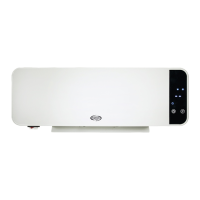

 To Next Page