OPERATION
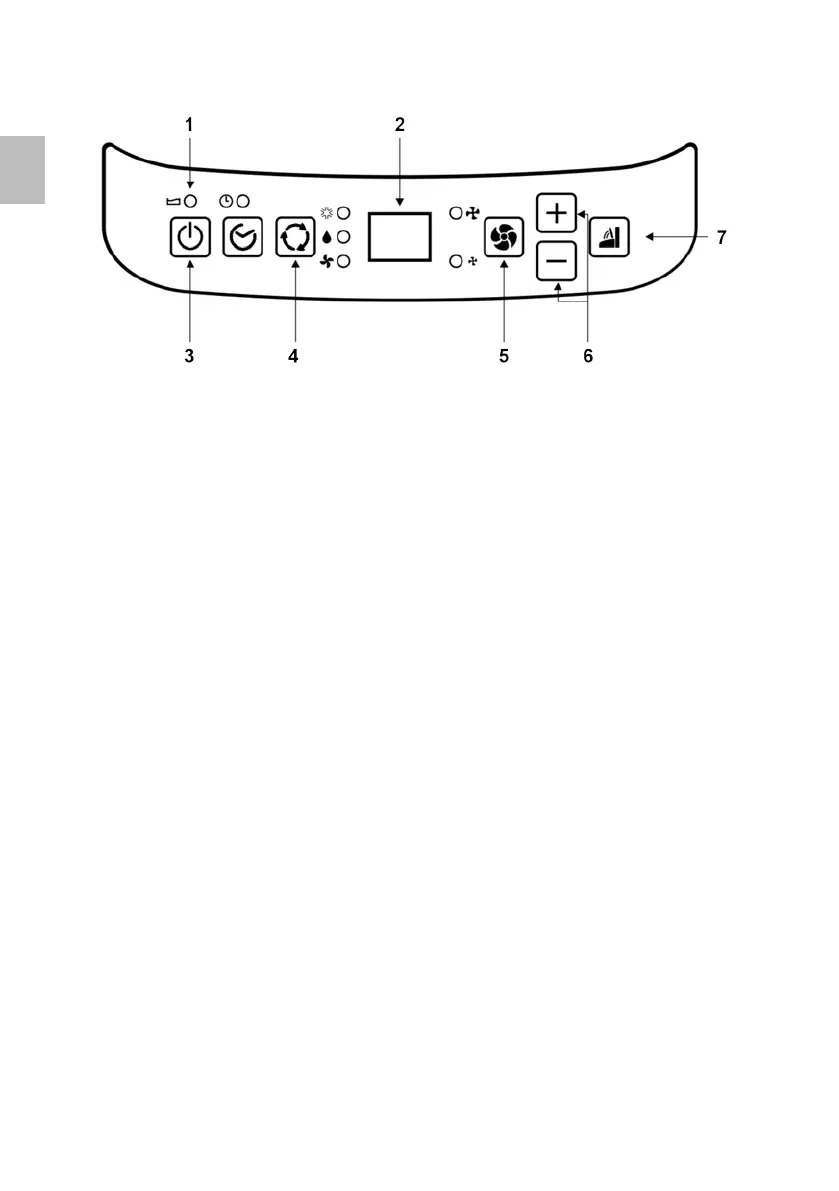
1 Warning Light
2 Display
3 PowerControl
4 Mode Control
5 Fan Speed Control
6 Timer/TempSetControls
7 Swing
Power Control
Thepowercontrolturnstheunitonando.
Mode Control
TheModeControlhas3settings:
Cool - Dehumidify - Fan
ThesettingsareadjustedwithModeControlbutton.Alightwillindicatewhichsettingis
currentlybeingused.
Cooling Mode
During the cooling mode the air is cooled and hot air is exhausted to the outside air through
theexhausttube.Adjustfanspeedairthroughthetemperaturetosuityourdesiredcomfort
level.
Temperaturesettingrangeis16°C~32°C.
NOTE:Theairexchangehosesmustventoutsidetheroomwhenusingcoolmode.
Dehumidify Mode
Airisdehumidiedasitpassesthroughtheunit,withoutbeinginfullcoolingmode.Ifroom
temperatureishigherthan25Celsiusdegree,fanspeedcanbeadjusted;otherwisefan
speedisxedto“low”.
Note:Iftheunitistobeusedasadehumidier,donotconnecttheexhausthoseletthe
warm air return to the room. Continuous drainage is then necessary.
Fan Mode
Air is circulated throughout the room with no cooling.
Note:unitdoesnotneedtobeventedinFanmode
Fan Speed Control
TheFanSpeedControlhas2settings:HighandLow.
30
EN


 To Next Page