GETTING STARTED
1
2
3
4
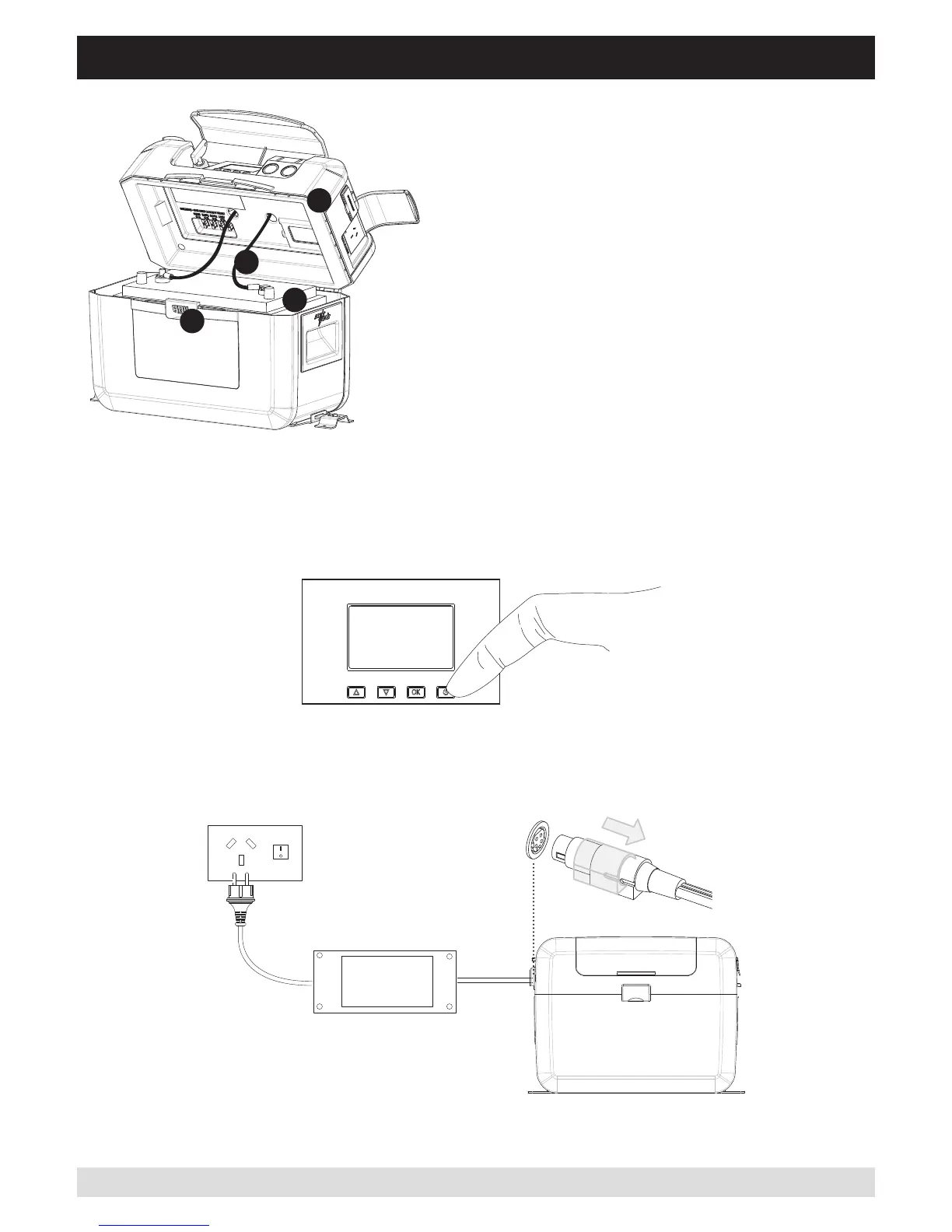
Step 5. Turn ArkPak ON
Step 4. Close the lid and fasten the latch.
PRESS power button once
Step 6. Connect ArkPak to your chosen adaptor (240V AC or 12V DC) then connect adaptor to power
supply, either 240V(AC) or 12V(DC) outlet
240V AC or 12V DC Secure Connection - Simply pull back the plug sleeve, insert, then release. This locks the lead
into the ArkPak for a secure fit in all situations - especially on the move
CONNECTING THE BATTERY
Step 1. Release the front latch
and open the lid.
Step 2. Place a 12 volt lead acid battery (not supplied)
into the base of the ArkPak and secure it with the velcro
belt.
Step 3. Connect the red cable to the positive battery
terminal. Then connect the black cable to the negative
terminal. Make sure the nuts on the battery terminals
are firmly fastened, also make sure any battery carry
ropes are positioned away from the terminals and
battery leads to avoid interference when closing the lid.
3


 To Next Page