EasyManua.ls Logo

Arlec PC222 - User Manual

Arlec PC222
4 pages
Print Icon
To Next Page IconTo Next Page
Loading...
Energy Cost Meter
IMPORTANT! PLEASE READ THESE INSTRUCTIONS CAREFULLY BEFORE
CONNECTING THIS METER TO ELECTRICAL APPLIANCES
Installation and operating instructions PC222
IMPORTANT
Don’t plug in an appliance where the load
exceeds 10 Amps. Always ensure the plug of any
appliance is fully inserted into the meter outlet.
If cleaning of the metre is required, remove from
mains power and wipe meter with a dry cloth.
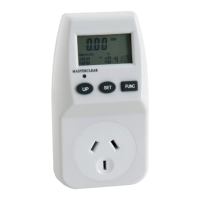
KEYBOARD DEFINITION
1. Master Clear: Clear all data in memory
including current time and all programs.
2. UP: Set current time, price, price programs,
max. overload current combined with buttons
SET; 12-24 hour mode during clock display
state.
3. SET: Set current time, price, price programs,
max. overload combined with buttons UP.
4. FUNC: Set current time, price, price programs,
max. overload combined with buttons UP.
GENERAL FEATURES
1. Display current clock.
2. Display line voltage.
3. Display line current.
4. Display line power.
5. Display peak line power.
6. Display accumulative total electric quantity.
7. Display total on time and total electric charge.
8. Display total on time and total electric charge
of price1.
9. Display total on time and total electric charge
of price2.
10. Display the frequency.
11. Display power factor.
12. Adjustable max, overload current, max,
overload warning.
13. Adjustable price / kWh
11. Combinations of day or blocks of days
available as follows:
MO
TU
WE
TH
FR
SA
SU
MO,TU,WE,TH,FRI
MO,TU,WE,TH,FR,SA
SA, SU
MO,TU,WE,TH,FR,SA,SU
REPLACING BATTERY
Insert the 2pcs battery(LR44/AG13) according to
the correct direction indication, replace battery
cover.
NOTE
1. The cover and the screw must be in place
before use.
2. The battery must be taken out if not use for
an extended period of time.
THE DATA DISPLAY
Press FUNC. Button and the data displays as
follows:
VOLTac AMP WATT MAX WATT KWh
ON TIME PRICE1 PRICE2
1. The meter will display current clock and line
voltage and frequency.
2. Press FUNC. button once and release, the
meter will display current clock and line
current, power factor.
3. Press FUNC. button once again and release,
the meter will display current clock and real
power, power factor.
Question and Answer IconNeed help?

Do you have a question about the Arlec PC222 and is the answer not in the manual?

Summary

Important Information and Operation

Safety and Handling Instructions

Crucial warnings about load limits, plug insertion, cleaning, and battery replacement for safe operation.

Keyboard Definitions and Data Display

Explains button functions and the sequence of data displayed when using the FUNC button.

General Features and Settings Overview

Lists meter display capabilities and introduces price/day settings and battery replacement.

Configuration and Settings

Setting Price and Overload Current

Detailed steps for configuring cost per kWh and maximum overload current limits.

Setting the Current Clock

Step-by-step guide to accurately set the current time, date, and 12/24 hour modes.

Final Steps and Specifications

Post-Setup and Standby Mode

Instructions for connecting the meter after configuration and details on its standby behavior.

Technical Specifications

Comprehensive list of the meter's electrical ratings, accuracy, ranges, and operating conditions.

Warranty and Support

Arlec Guarantee Information

Details the 12-month warranty, its terms, and conditions for making a claim.

Proof of Purchase Requirement

Emphasizes retaining the purchase receipt for warranty and service claims.

Overview

The ARLEC Energy Cost Meter (PC222) is a versatile electrical device designed to monitor and display various electrical parameters and associated costs for connected appliances. It provides users with detailed insights into their energy consumption, enabling better management and awareness of electricity usage.

Function Description

The primary function of the Energy Cost Meter is to measure and display real-time electrical data, including current clock, line voltage, line current, line power, and peak line power. Beyond real-time measurements, it accumulates total electric quantity (kWh) and calculates the total on-time and electric charge based on user-defined electricity prices. The device supports two distinct price settings (Price 1 and Price 2), allowing for different tariffs or time-of-use rates. It also displays the frequency and power factor, offering a comprehensive view of the electrical load characteristics. A key safety feature is the adjustable maximum overload current warning, which alerts the user if the connected appliance exceeds a set current limit.

Usage Features

The meter's interface is designed for straightforward operation, primarily through three buttons: Master Clear, UP, and SET/FUNC.

  • Data Display and Navigation: The FUNC button is central to navigating through the various data displays. A single press cycles through different screens, showing combinations of current clock, line voltage, frequency, line current, power factor, real power, peak line power, accumulative power, total on-time, total electric charge, and individual charges for Price 1 and Price 2. This allows users to quickly access the specific information they need.
  • Setting Current Clock: The device includes a clock function, which is essential for accurate time-based energy calculations. Users can set the current day of the week, hour, and minute using a combination of FUNC, SET, and UP buttons. The clock also supports switching between 12-hour and 24-hour modes.
  • Setting Electricity Prices (COST/kWh): The meter allows for the input of up to two different electricity prices per kilowatt-hour (kWh). This feature is crucial for calculating the actual cost of electricity consumed. The setting process involves entering the digital values for the price, including the radix point, and associating these prices with specific weekdays or blocks of days (e.g., Monday-Friday, weekends, or all days). This flexibility enables the meter to adapt to various tariff structures.
  • Setting Overload Current: To prevent damage from excessive loads, the meter allows users to set a maximum overload current. If the connected appliance draws current exceeding this set limit, an "OVER LOAD WARNING" will flash, and the function button will become inactive. This prompts the user to disconnect the appliance and reset the overload data.
  • Accumulative Data Management: The meter tracks accumulative total electric quantity and total electric charge. These accumulative values can be cleared by pressing and holding the FUNC button for 5 seconds during specific display states, allowing users to start new monitoring periods.
  • Overload Indication: In cases where total electric quantity or total electric charge overflows the display capacity, an "OVER" warning will flash, indicating that the maximum measurable value has been exceeded.
  • Battery Backup: The device operates with 2pcs LR44/AG13 batteries, which maintain the clock and stored data even when the meter is unplugged from the mains power. This ensures that settings and accumulated data are not lost during power outages or when the meter is moved.
  • Standby Mode: To conserve power, the LCD display will automatically turn off after 1 minute of AC power being off and no operation. Pressing any key will reactivate the display.
  • Appliance Connection: The meter is designed to be plugged into a regular power outlet, and then the appliance to be monitored is plugged into the meter's outlet. It is important to ensure that the appliance's plug is fully inserted and that the load does not exceed 10 Amps to prevent damage to the meter or the appliance.

Maintenance Features

The Energy Cost Meter is designed for minimal maintenance, primarily focusing on battery replacement and basic cleaning.

  • Battery Replacement: The device uses two LR44/AG13 batteries. Users are instructed to insert these batteries according to the correct polarity indication and then replace the battery cover. This process is straightforward and can be performed by the user.
  • Battery Life Management: For extended periods of non-use, it is recommended to remove the batteries to prevent leakage and preserve battery life. The battery cover and screw must be in place before use to ensure proper operation and safety.
  • Cleaning: If cleaning is required, the meter should be removed from mains power, and then wiped with a dry cloth. This prevents electrical hazards and ensures the longevity of the device.
  • Data Reset: The "Master Clear" function allows users to clear all data in memory, including current time and all programmed settings. This is useful for resetting the device to its factory default state or for starting a completely fresh monitoring cycle.
  • Max Line Power Clear: The maximum line power display can be cleared by pressing and holding the FUNC button for 5 seconds during its display state, allowing users to monitor peak power over specific intervals.

Arlec PC222 Specifications

General IconGeneral
ModelPC222
CategoryMeasuring Instruments
TypePower Meter
Maximum Current10A
Frequency50Hz
DisplayLCD
Accuracy±1%
Voltage230V AC