EasyManua.ls Logo

Armacost Lighting ProLine 714421 - User Manual

Armacost Lighting ProLine 714421
2 pages
Print Icon
To Next Page IconTo Next Page
Loading...
Introduction
This LED controller is designed to drive constant
voltage RGB+White LED products such as LED
tape light or LED fixtures in a voltage range of
6–24 volts DC. The receiver works with the RF
wireless remote control, which allows the user
to choose between multiple colors, adjust the
LED brightness, and select dynamic effects.
Receiver & wiring
24mm
72mm
87mm
1 23
1. Input – from power supply
The controller input and output voltage range is
6–24 volts DC. Make sure the LED lighting voltage is
within this range and below the rated wattage of the
power supply. Connect input wires from the power
supply to the controller as indicated by the polarity
markings on the controller (+ to + and – to –).
2. Output – to LED lighting
Observe polarity indicated on the controller
when connecting to LED lighting (+ to +,
G to G, R to R, B to B, and W to W).
Make sure the voltage of the LED lighting is the
same as the power supply and the maximum
load doesn’t exceed that of the controller.
CAUTION: Shorting of output cables could cause
permanent damage to controller. Make sure
cables are well insulated from each other.
3. Controller status indicator
This light shows the controller status as follows:
Steady yellow: Remote only mode, Wi-Fi disconnected
Steady green: Remote and Wi-Fi mode
Single green blink: Command received
Long single yellow blink: Brightness or speed limit reached
Red flash: Overload protection
Yellow flash: Overheat protection
Green flash 3 times: Setup command received
4. Wiring diagram
Connect the power supply to the controller input
and the controller output to the LED lighting.
The output voltage of the power supply must
be the same as the voltage of the LED lighting.
Make sure all power cables are conected
securely and insulated before powering on.
LED
Controller
6–24V DC
Output
Power Supply
6–24V DC 6–24V DC
100/230V
AC Power
LED
Lighting
Remote Control
6
8
5
12
11
9
7
10
EFFECTEFFECT
5. On / Off
Press the “|” key to turn on controller or the “0”
key to turn off. The controller will remember
the controller state when powered off, and will
return to that state when powered back on.
6. Mode selection
Press this key to switch between RGB, white, and
RGB+white mode. If the RGB mode is selected,
the white channel will be disabled, and if the white
mode is selected, RGB channel will be disabled.
In RGB+White mode all channels are enabled.
1
2 3
Wireless
Remote
Compact
Size
Wide Voltage
Range
High
Power
Full Safety
Protection
Wi-Fi
Connection
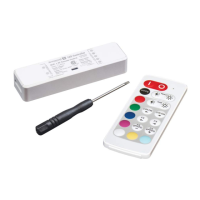
ProLine Wi-Fi RGB+W
Color LED Controller
With RF Remote Control
Model # 714421
Works with the Tuya Smart
App, available at the iOS
and Google Play stores

Other manuals for Armacost Lighting ProLine 714421

Question and Answer IconNeed help?

Do you have a question about the Armacost Lighting ProLine 714421 and is the answer not in the manual?

Summary

Introduction

Receiver and Wiring

Power Supply Input

Connect input wires from the power supply to the controller, observing polarity.

LED Lighting Output

Connect LED lighting to the controller output, observing polarity for each channel.

Controller Status Indicator

Describes the meaning of different indicator light colors and flashes for controller status.

Wiring Diagram

Illustrates connecting the power supply to the controller input and LED lighting to the output.

On;Off Function

Explains how to turn the controller on/off and that it remembers the last state.

Mode Selection

Describes switching between RGB, white, and RGB+white modes.

Remote Control Operation

Select Static RGB Color

Scroll through preset colors using COLOR+ and COLOR- keys.

Shortcut Color Keys

Press to select preset colors directly.

White Brightness Control

Adjust white LED brightness using dedicated keys.

RGB Brightness Control

Adjust RGB LED brightness using dedicated keys.

Dynamic Effect Control

Select dynamic effect modes and adjust speed with MODE and SPEED keys.

Remote Indicator Light

Indicates remote operation and low battery status with blinking patterns.

Wi-Fi Connection Setup

Instructions for connecting the controller to Wi-Fi using the Tuya app.

Remote Pairing and De-pairing

Instructions for pairing a new remote and de-pairing existing remotes.

Factory Default Reset

Procedure to reset Wi-Fi settings and remote control pairing.

Safety Protection

Specifications

Customer Support and Warranty

Overview

The Armacost Lighting ProLine Wi-Fi RGB+W Color LED Controller with RF Remote Control (Model # 714421) is designed to manage constant voltage RGB+White LED products, such as tape lights or fixtures, operating within a 6-24 volts DC range. This controller offers comprehensive control over LED lighting, allowing users to select from multiple colors, adjust brightness, and choose dynamic effects through both an RF wireless remote and a Wi-Fi connection via the Tuya Smart App.

Function Description

The controller acts as an intermediary between a power supply and LED lighting. It receives DC power and outputs controlled power to RGB+W LED fixtures. The RF remote provides immediate control, while the Wi-Fi connectivity enables smart home integration and advanced features through the Tuya app. The device supports full safety protection, wide voltage range, and high power output.

Important Technical Specifications

  • Output Mode: PWM constant voltage
  • Working Voltage: 6-24V DC
  • Rated Output Current: 4x3A (12A max), totaling 12A maximum
  • Static Colors: 30 (remote) / 16 million (app)
  • Brightness Levels: 10 (remote) / 100 (app)
  • Dynamic Effect Modes: 34 (remote only)
  • Dynamic Speed Levels: 10 (remote only)
  • Color Preset Keys (remote): 7
  • Scene / Timing Function: User defined (app only)
  • Music Sensing Color: Yes (app only)
  • PWM Physical Grade: 4000 steps
  • Overload/Heat Protection: Yes
  • Remote Frequency: 433.92MHz
  • Remote Control Range: >49 ft./15m in open areas
  • Wi-Fi Standard: IEEE 802.11a/b/g
  • Controller Dimensions: 3.43 x 0.95 x 0.59 in. (87 x 24 x 15mm)
  • Remote Dimensions: 3.41 x 1.42 x 0.329 in. (86.5 x 36 x 7.5mm)
  • Input Power: 100/230V AC (via power supply)
  • Output Power: 6-24V DC (to LED lighting)

Usage Features

  • Input and Output: Connect the power supply to the controller input, ensuring polarity (+ to + and – to –). Connect LED lighting to the controller output, observing polarity (+ to +, G to G, R to R, B to B, and W to W). Ensure the LED lighting voltage matches the power supply voltage and does not exceed the controller's maximum load.
  • Controller Status Indicator: Provides visual feedback on the controller's operational status:
    • Steady yellow: Remote only mode, Wi-Fi disconnected.
    • Steady green: Remote and Wi-Fi mode.
    • Single green blink: Command received.
    • Long single yellow blink: Brightness or speed limit reached.
    • Red flash: Overload protection.
    • Yellow flash: Overheat protection.
    • Green flash 3 times: Setup command received.
  • Remote Control Operation:
    • On/Off: Press "I" to turn on, "0" to turn off. The controller remembers its last state.
    • Mode Selection: Switch between RGB, white, and RGB+White modes. In RGB mode, the white channel is disabled; in white mode, RGB channels are disabled; in RGB+White mode, all channels are enabled.
    • Static RGB Color: Use "COLOR+" and "COLOR-" keys to scroll through preset colors.
    • Shortcut Color Keys: Select preset colors directly.
    • White Brightness Control: Use the brightness keys to increase or decrease white LED brightness.
    • RGB Brightness Control: Use the brightness keys to increase or decrease RGB LED brightness.
    • Dynamic Effect: Select dynamic effect modes with "MODE+" and "MODE-" and adjust speed with "SPEED+" and "SPEED-".
    • Remote Indicator: Blinks when working properly. Slow flashes indicate low battery (replace with CR2032).
    • Pairing Remote: The remote and receiver are pre-paired. To pair a new remote (up to five remotes per receiver): disconnect power for 5 seconds, reconnect for 10 seconds, then simultaneously press the "MODE-" and "COLOR-" keys for about 3 seconds until the remote indicator flashes quickly.
    • De-pairing Remotes: To de-pair a remote, pair the remote you wish to continue using with the controller; any other paired remotes will be de-paired.
    • Reset to Factory Default: To reset Wi-Fi settings and remote pairing: unplug receiver, plug in after 5 seconds, then simultaneously press the "MODE-" and "SPEED+" keys for about 3 seconds within 10 seconds of power-on. The indicator will flash yellow three times.
  • Wi-Fi Connection: Install the Tuya app to set up the Wi-Fi connection. Ensure the controller is in factory default mode (yellow indicator) before connecting to Wi-Fi.

Maintenance Features

  • Safety Protection: The controller features built-in protection against mis-wiring, output short circuit, overloading, and overheating. It will automatically shut down under extreme conditions and resume operation once safe conditions are restored. To prevent shutdowns, ensure LED lighting is compatible with constant voltage driving, within the controller's rated range, and that cables are securely connected and insulated.
  • Installation: Install the controller with proper ventilation and heat dissipation in mind. Avoid installing in metal enclosures, as this can interfere with the RF wireless remote signal.
  • Warranty: The product comes with a limited 1-year warranty. It is intended for dry location use only. Improper installation, powering, abuse, or use outside its intended purpose will void the warranty. Proof of purchase is required for returns.
  • Customer Support: For assistance, contact support@armacostlighting.com or call 410-354-6000 (Monday-Friday, 9 a.m.–5 p.m., ET).

Armacost Lighting ProLine 714421 Specifications

General IconGeneral
BrandArmacost Lighting
ModelProLine 714421
CategoryLighting Equipment
LanguageEnglish

Related product manuals