Page 6 ?*,)(.82<&80;)@+.'(&*<'A)3;.0'.)80;;)BCDDDCD!!C$EFE5 Item 64355
GH?:IJ KLGIHMMHIKNL OHPIG)MKGI
T*+<(&<7)?;0()O0<.;)I%)(*)R0;;)U,08_.(
RHPLKLSY Some Flat Panel TVs may require
two people to lift and support the TV while it
is being attached to the Wall Bracket.
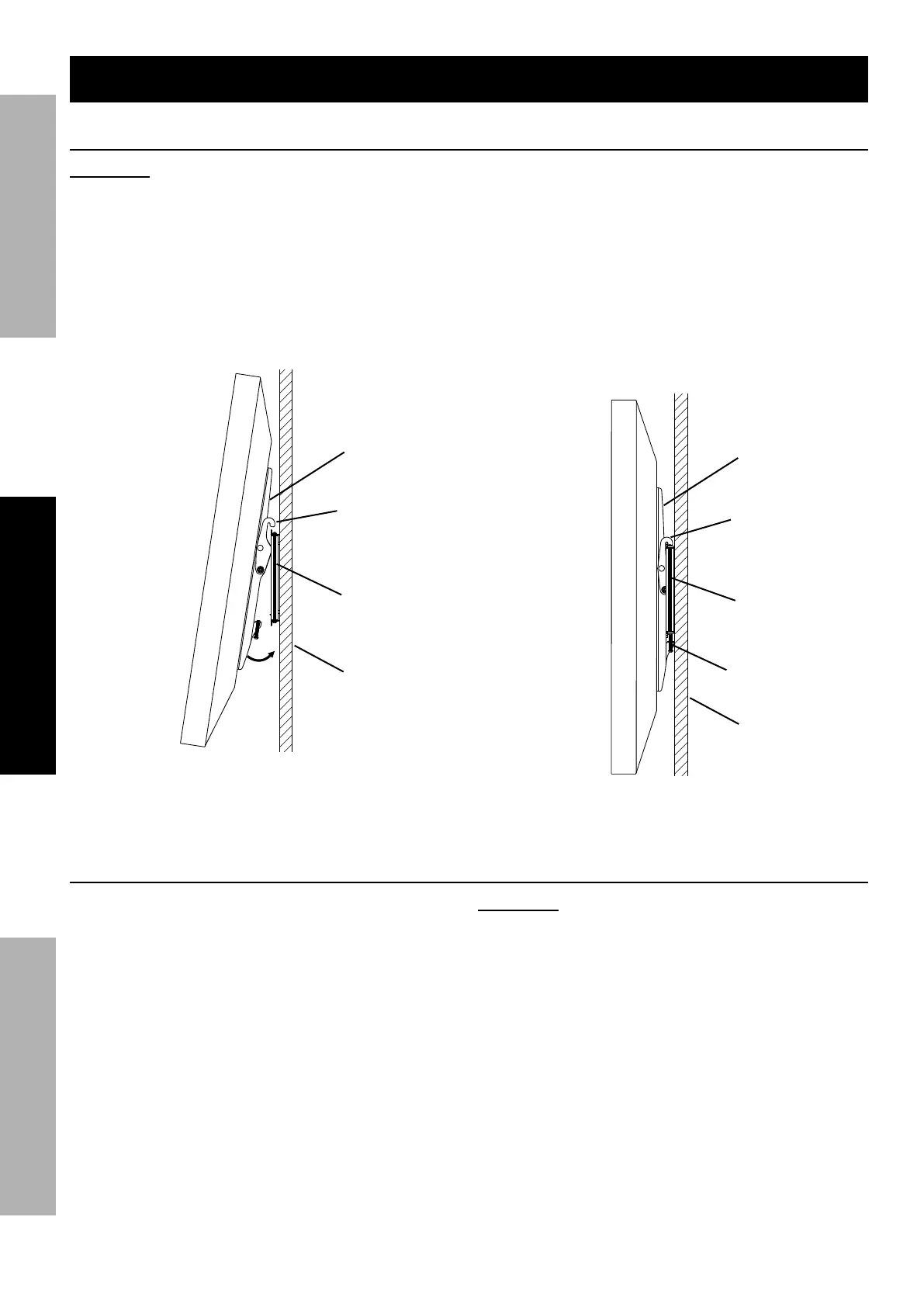
1. Carry TV with attached Support Arms to mounted
Wall Bracket and lower onto top cross bar,
making sure both Hook Brackets on the Support
Arms are hooked onto the top of cross bar
and that TV is centered. Refer to Figure F.
G+33*,()
H,9
Z**_)
U,08_.(
R0;;)
U,08_.(
Wall
?&7+,.)?
2. Carefully rotate the TV toward the wall until
the Support Arms engage the bottom of
the Wall Bracket. Refer to Figure G.
3. Tighten the two Clamping Screws on the bottom
of the Support Arms to secure the TV/Support Arm
assembly to the Wall Bracket. Refer to Figure H.
4. Carefully make sure that the Support Arms are
completely attached to the Wall Bracket, both
at their top and bottom, before releasing TV.
Q;093&<7)
G8,.-
G+33*,()
H,9
Z**_)
U,08_.(
R0;;)
U,08_.(
Wall
?&7+,.)S
H=X+'(&<7)?;0()O0<.;)I%)H<7;.)R2.<)K<'(0;;.=
1. To adjust the angle when the TV is
already mounted to Wall Bracket, use the
following procedure to remove the TV from
the Bracket and adjust the angle:
a. Unplug the TV.
b. Loosen the two Clamping Screws on the
bottom of the Support Arms until the bottom
of the TV/Support Arm assembly can be tilted
forward to disengage the Wall Bracket.
c. Carefully lift the TV/Support Arm
assembly up slightly and off of the Wall
Bracket. Refer to Figures F and G.
RHPLKLSY Some Flat Panel TVs may require
two people to lift and support the TV while it
is being removed from the Wall Bracket.
d. Cover TV screen with a towel or other soft
material and tilt it against the wall or another
solid surface, then follow steps 1 and 2
in Adjusting Flat Panel TV Angle Before
Installation section to adjust angle.
e. Once desired angle is set, remount TV to Wall
Bracket following steps 1 through 4 in Mounting
Flat Panel TV to Wall Bracket section.
K<'(0;;0(&*<)K<'(,+8(&*<')]8*<(&<+.=^


 To Next Page
 Loading...