Page 6 For technical questions, please call 1-888-866-5797. Item 70199
SAFETY INSTALLATION PARTS LIST
Mount TV Plate to TV
WARNING! TO PREVENT SERIOUS INJURY: To reduce risk of electric
shock, unplug TV before threading screws into TV’s back panel.
NOTICE: Consult TV owner’s manual before attaching this Mount. Harbor Freight Tools is not responsible for
damage caused by failure to follow TV mounting instructions, improper installation, or improper/loose hardware.
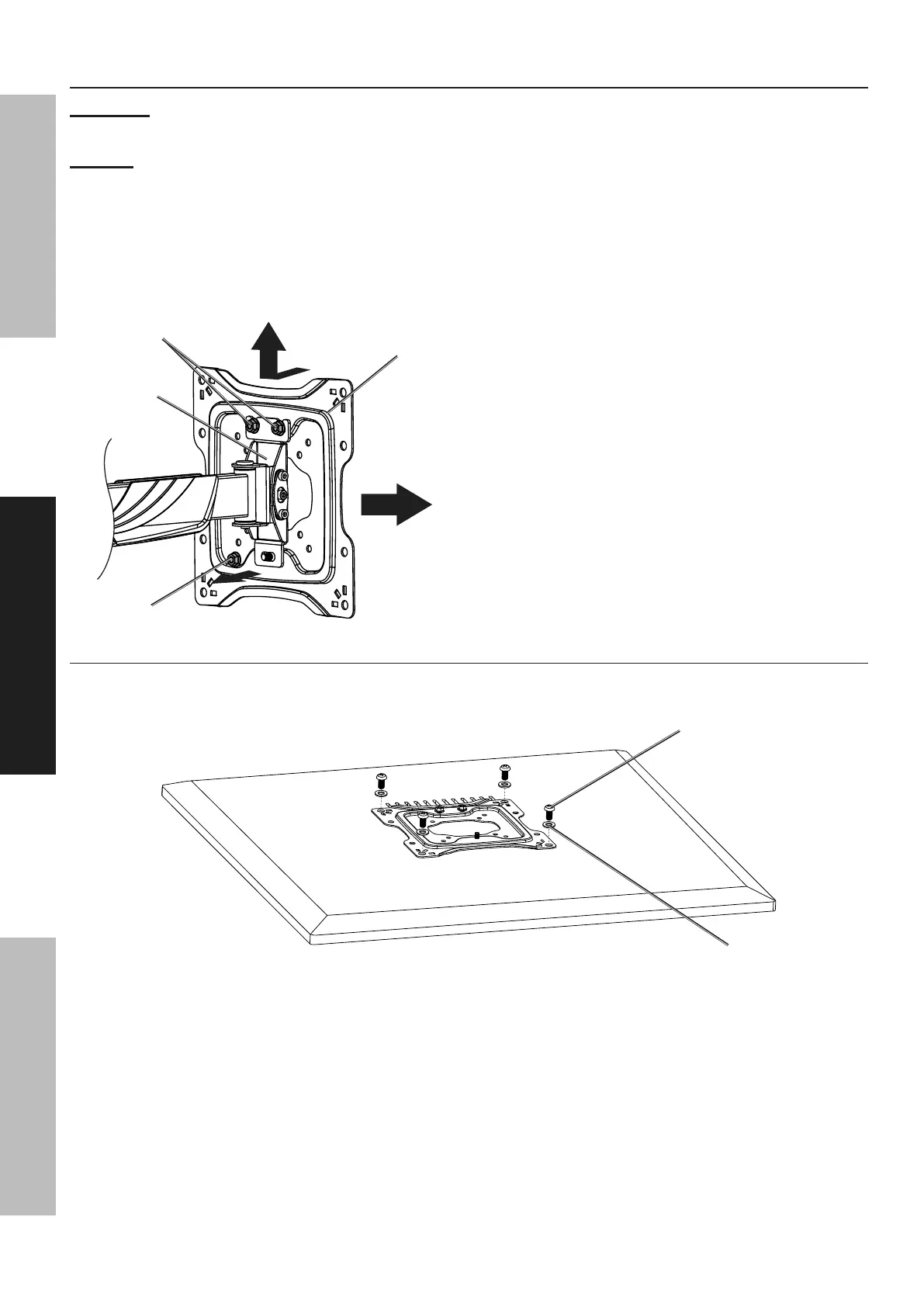
1. Loosen Top Bracket Nuts and
remove Lower Bracket Nut.
2. Pull Mounting Bracket out from the bottom until
threads are clear of the hole, then Lift up and pull
out to remove Mounting Bracket from Wall Mount.
Wall
Mount
Bracket
Mounting
Bracket
Lower Bracket Nut
Top Bracket Nuts
3. Cover TV screen with a towel or other soft material
and tilt it against the wall or another solid surface.
Do not lay TV face down.
4. Consult TV Owner’s Manual to
determine TV’s VESA mounting pattern
and hardware requirements.
5. Mounting Hardware:
a. Use mounting hardware that came with the TV, or
b. If the TV did not come with mounting
hardware, select from included Screws and
Washers (see Parts List on page 10).
WARNING! To prevent serious injury, do not use
hardware that does not match the TV’s hardware,
that is too long or too short, or overtighten
the hardware. Doing so may damage the
TV, create a shock hazard by electrifying the
hardware/mount, and/or cause the TV to fall.
6. Select Mounting Instructions according
to TV’s mounting pattern.
Mounting Instructions for VESA 75x75, 100x100, 200x100, 200x200
Attach Mounting Bracket directly to back of TV using appropriate Screws and Washers. Use included
Spacers between the Mounting Bracket and TV as needed to prevent Screws from bottoming out.
Screw
Washer


 To Next Page
 Loading...