Installation and Maintenance
EHU-600 Series Humidifiers
18
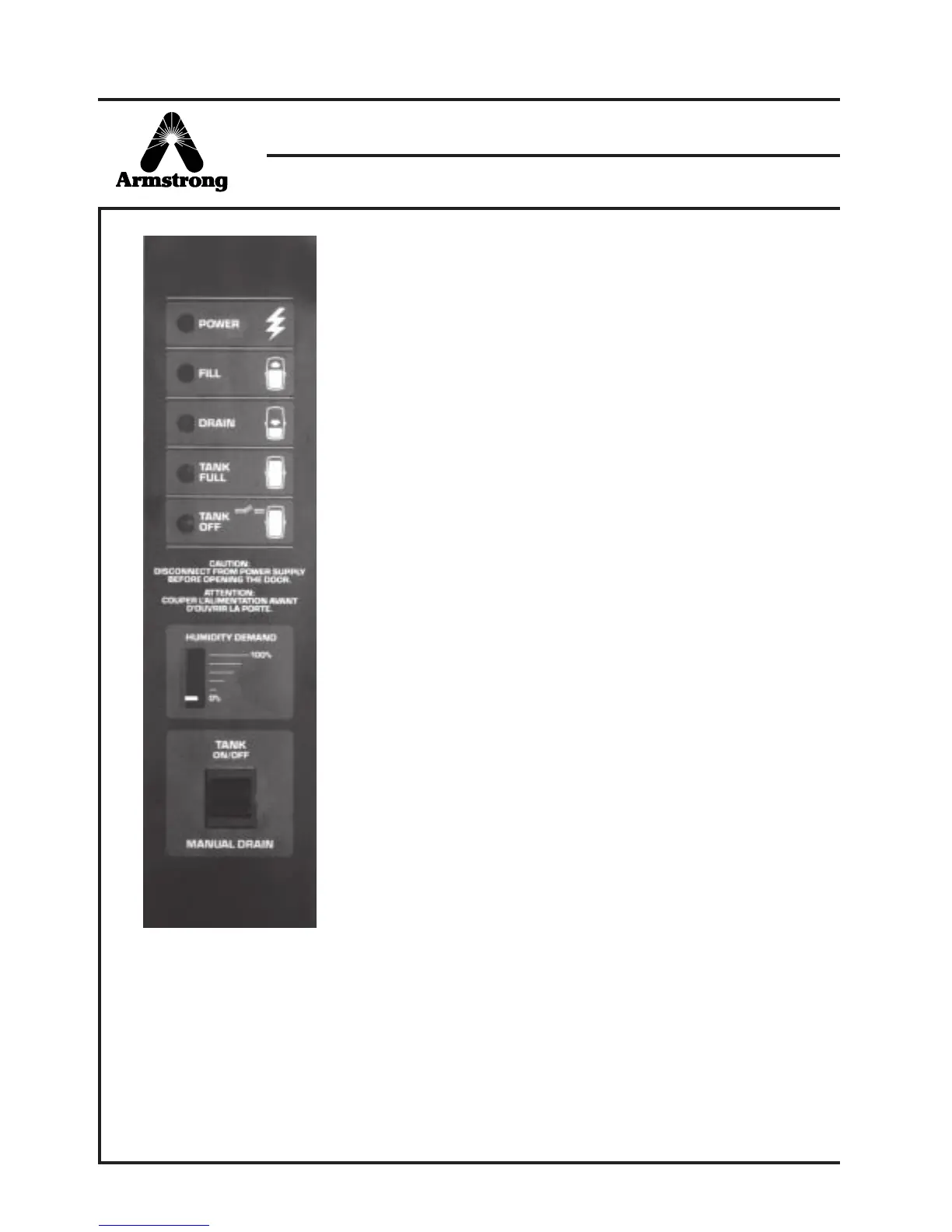
3. Instrument Panel
"Power" Light – Indicates when the electrical supply is energized.
"Fill" Light – Indicates when the fill valve is energized to add water to
the steam generator.
"Drain" Light – Indicates when the drain valve is energized to drain
water from the steam generator. Note: Drain light does not turn on
when manual drain switch is energized.
"Tank Full" Light – Indicates that the water level in the generator has
risen to the high water float switch. The electronic controls automatically
interrupt the fill cycle to prevent overflow. This may be a normal
occurrence with a brand new or recently cleaned steam generator,
especially if the water conductivity is low and amperage requirements
are high. After a few days of operation the water level should drop
below the high water level due to mineral (conductivity) build up in the
tank. To temporarily increase tank water conductivity a small amount
of salt can be added to the tank water. After extended use, repeated
lighting of the Tank Full light indicates that, in spite of periodic draining
of mineral-laden water, the steam generator should be inspected,
and either cleaned or replaced.
Note: When the Tank Full light is on, the unit may not be able to
generate a sufficient supply of steam to satisfy the demand.
"Tank Off" Light – Indicates when power to the generator has been
interrupted. This may be due to low demand, high duct humidity
interlock, fan interlock, high current, or failed drain system.
"Demand Meter" – Indicates the demand for humidity in relation to the
RH set on the humidistat. The demand meter for the EHU-600 is a
series of 5 LED's which indicate demands of 10%-30%, 30%-50%,
50%-70%, 70%-90%, and 90%-100%.
"Tank On/Off" – Pushing and releasing the top part of the black switch
starts the humidifier or resets the internal overcurrent protection. Pushing
and holding the TANK ON/OFF switch for 15 seconds starts the
diagnostics system. See the section on Maintenance.
"Manual Drain" – Pushing and holding the bottom part of the black
switch activates the manual drain. Note: Drain light will not illuminate
during the manual drain.
Figure 18-1: Instrument Panel



 To Next Page