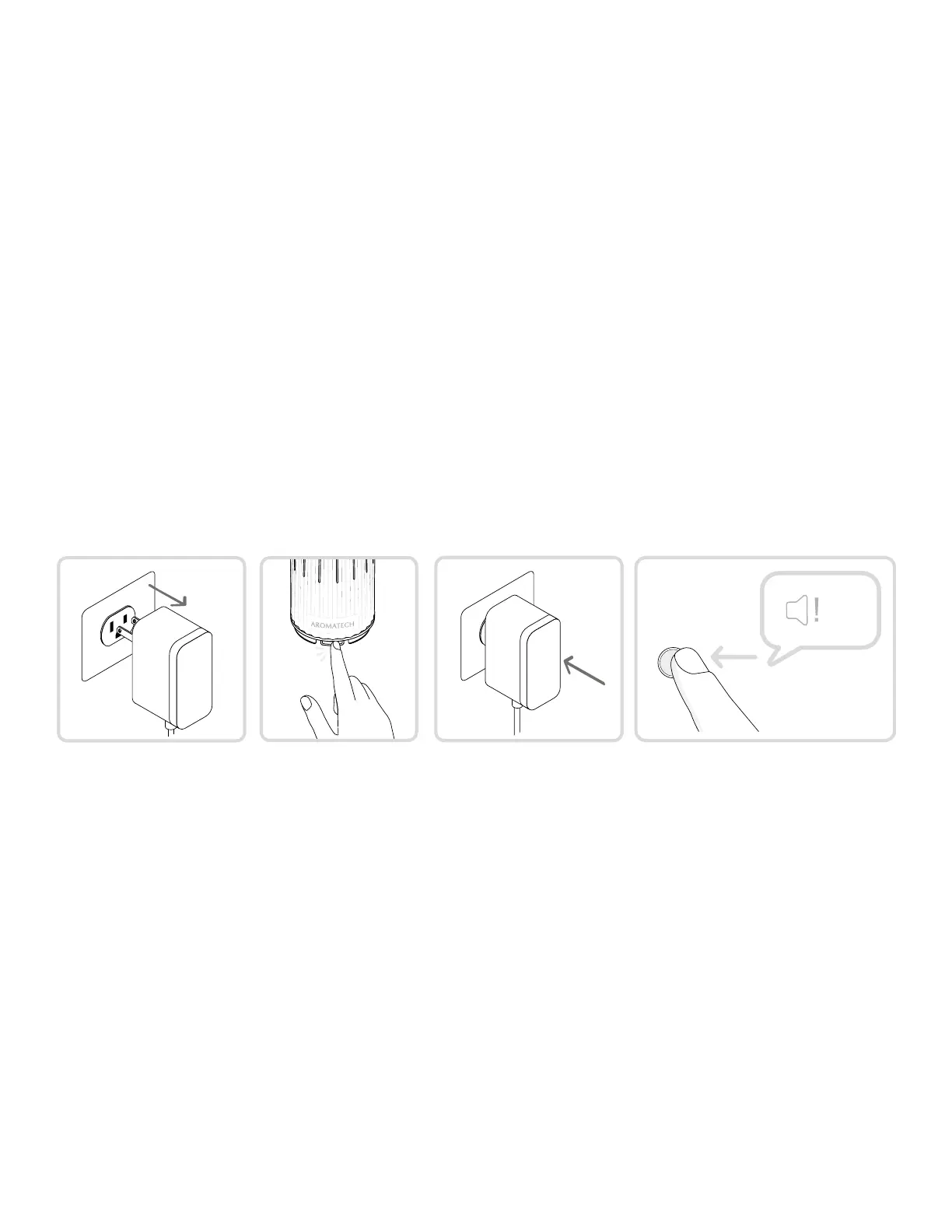
How do I reset my diffuser?
25
My diffuser is not diffusing.
• If you are using the app, make sure the “Diffuser Control” is set to “On.”
• If you ever connected to the app, make sure you have at least one schedule that is active
and set to diffuse within the current time (day of the week, and start and end time). A
schedule is active when it is not grayed out.
• If your diffuser is still not diffusing, try factory resetting it.
I can’t connect to my diffuser.
1. Ensure Bluetooth is enabled for both your phone and the app; check your phone settings.
2. Ensure no one else is controlling your diffuser.
3. Ensure you are near your diffuser.
4. Try resetting your diffuser by holding down the power button till you hear one long beep,
then turning it back on by holding down the power button till you hear another long beep.
5. Try fully shutting down the app and reopening it.
6. Try factory resetting your diffuser (instructions below).
To reset your diffuser:
1. Unplug the diffuser (if plued in).
2. Hold down the power button while connecting the plug.
3. Release the power button after you hear 5 short beeps.
x 5



 To Next Page