X T R E M E F O R T H E A R C - 1 0
5.2
Loading the Software
The software is self-installing. Drag the ‘Install Xtreme.exe’ file from the CDROM to the PC desktop. Then simply double click on the
‘Install Xtreme.exe’ file and it will install itself. Short cuts will be placed on the desktop, Start menu, and Programs menu.
Note: the software is extracted by default to the ‘C:\Arrakis’ directory
Connecting the PC to the Console
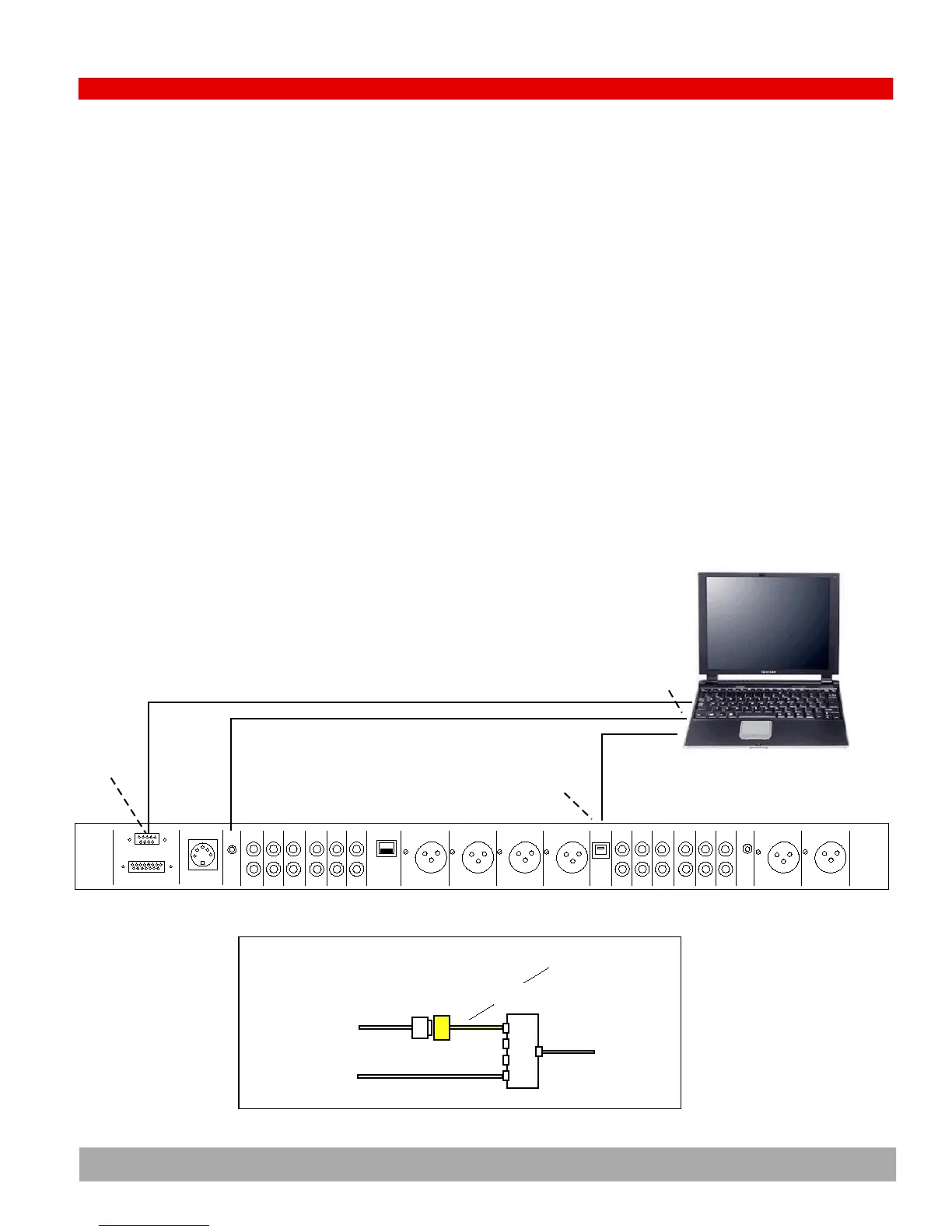
To fully interface the console and the PC, three cables must be connected between the two pieces of equipment.
(1) USB cable: transfers play and record audio between the PC and the console
(2) RS232 cable: transfers logic commands such as play and stop between the PC and the console
(3) Audio cable: 1/8" stereo phone jack from the ‘Cue In’ on the console to the ‘Line out (or speaker out)’ on the PC
Some PCs do not have an RS232 com port. This will require the user to purchase an ‘RS232 to USB’ adapter and a ‘USB hub’. The
adapter and the hub will combine the RS232 cable and USB cable into one and then connect to the PC with only a single USB cable.
RS232
CONTROL
PORT
9 PIN
SERIAL
CABLE
LAPTOP OR DEKTOP PC
Logic
RS232
DC Power
Cue
Ch 9
In
Phone
Logic
Pgm Left Pgm Rght Phone Ch 10 Phone
Out Out Out In
PC
USB
Mic 1
In
Mic2
InIn In In In In In
Ch 8 Ch 7 Ch 6 Ch 5 Ch 4 Ch 3
48V
pwr
Ch 9
Out
Pgm
Out
Aud
AMM
PMM
Out
Mon
In
Mon
In
USB
PORT
USB
cable
CUE
IN
PC LINE OUT
AUDIO CABLE WITH
1/8" PHONE JACKS
USB
HUB
ARC CH 9 USB PORT
ARC RS232 PORT
PC USB PORT
RS232 to USB adapter
IF YOUR PC DOES NOT HAVE AN RS232 PORT
such as: IOGEAR GUC232A


 To Next Page