I N S T A L L A T I O N I N S T R U C TI O N S
Record Output
STEP 7- CONSOLE RECORD OUTPUT
The console AUDITION output (AUD) is usually the bus that is used for recording. By using the Audition bus for recording, a recording can be occurring at the
same time as the Program bus is used On Air. If you want to record the On Air signal on the Program bus, simply assign all of the channels in PGM also to
AUD.
The Audition output connectors are located on the console back panel. It is an unbalanced (-10dBu) audio output.
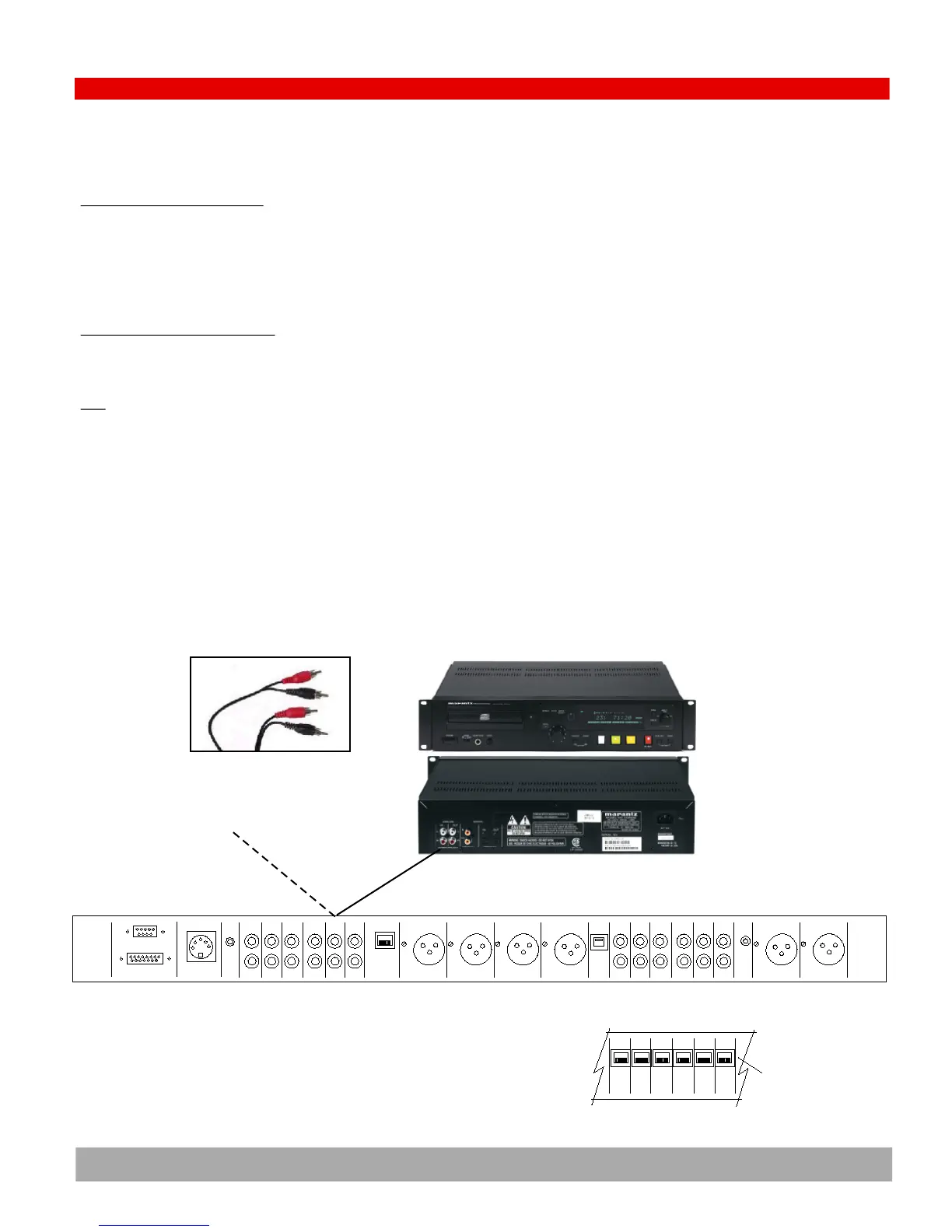
CONNECTING TO AN AUDIO RECORDER
Most audio recorders will directly connect to consumer type unbalanced sources such as the Audition (Record) output of the console. Connect to the record-
er with the analog cable supplied with the recorder.
TEST
Once connected, send audio from the console output to the recorder and view the input signal on the recorder. Refer to the recorder manual for more infor-
mation.
STEP 7- ANALOG AUDITION (RECORD) OUTPUT
Logic
RS232
DC Power
Cue
Ch 9
In
Phone
Logic
Pgm Left Pgm Rght Phone Ch 10 Phone
Out Out Out In
PC
USB
Mic 1
In
Mic2
InIn In In In In In
Ch 8 Ch 7 Ch 6 Ch 5 Ch 4 Ch 3
48V
pwr
Ch 9
Out
Pgm
Out
Aud
AMM
PMM
Out
Mon
In
Mon
In
Back panel Diagram for ARC-10U (unbalanced base model) & ARC-10UP (unbalanced with PC model)
Ch 8 Ch 7 Ch 6 Ch 5 Ch 4 Ch 3
In In In In In In
ARC-10BP (balanced with PC model)
RJ45 balanced
audio connectors
EXAMPLE: MARANTZ CD RECORDER
4.8
RCA AUDIO CABLE
The Black con-
nector is right
and the Red con-
nector is left


 To Next Page