X T R E M E F O R T H E A R C - 1 0
5.7
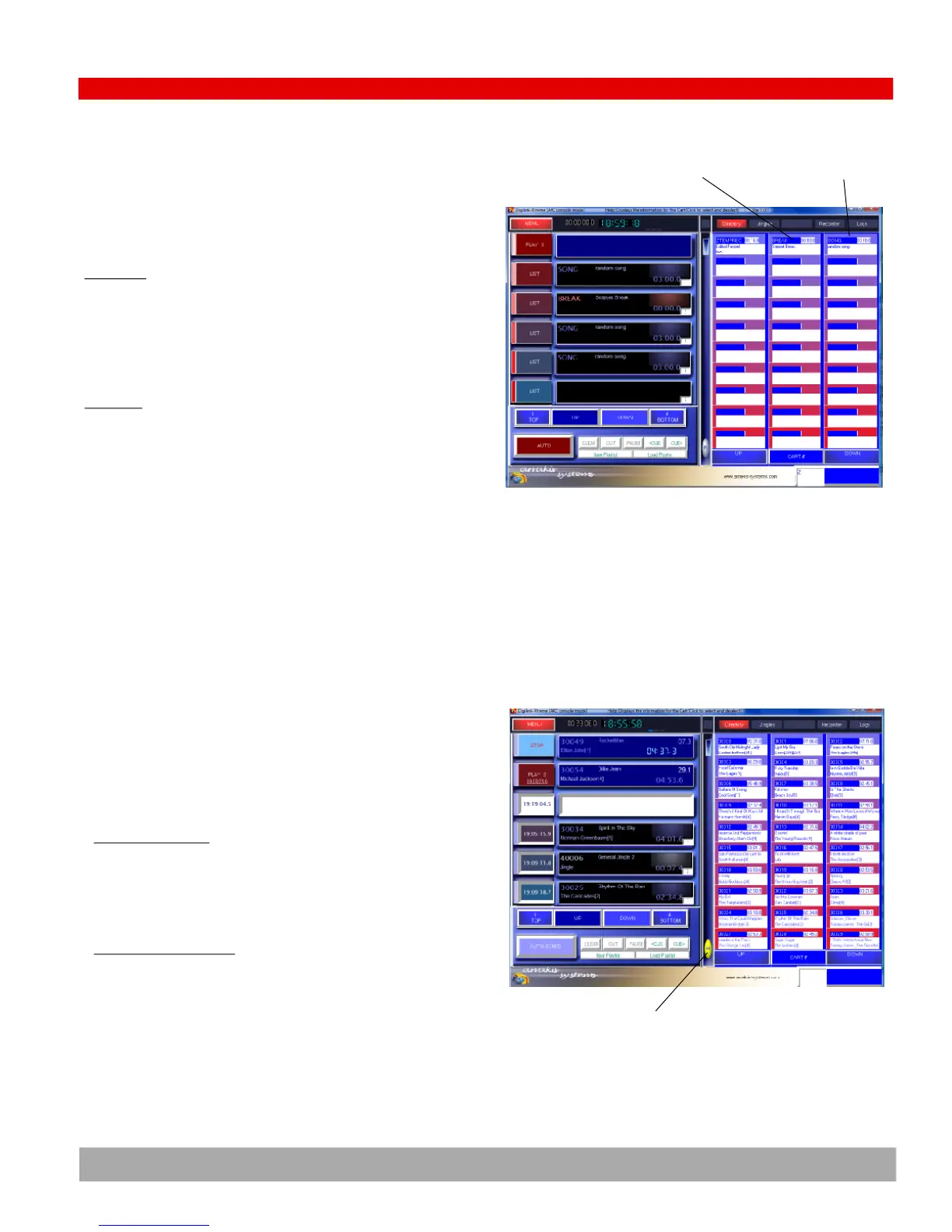
Song & Break events
There are two special non-audio events displayed in the directory.
These are (1) BREAK, and (2) SONG. They can be added to and manipu-
lated in the play list just as any audio file can be.
BREAK event
Place this event into the play list wherever you would like the play list
to Stop play. The break event can be used to break up commercial
stopsets, insert a time when the live announcer may enter the news,
etc. Once the live event is completed, the operator must then click on
the AUTO button again to start the play of the play list.
SONG event
In Xtreme, audio files are assigned a single letter as a ‘TYPE’. Exam-
ples are ‘M’ for music, ‘S’ for commercials, ‘J’ for jingles. The SONG
event uses the type ‘M’ music audio files to automatically select a
song for play in the play list. All type ‘M’ audio files are treated as a
single large category. Songs are randomly selected out of the cate-
gory but will not be played twice within a minimum back to back set-
ting (usually 100 songs). The specific song is selected when the SONG
event is loaded into the top two lines in the play list for play.
The SONG event is particularly useful when you are saving a play list
as a template for repeated play on air.
BREAK event
Random List Play
Random List Play is a powerful feature for filling on air time between
live programs. It will play three songs in a row followed by a jingle
and then three songs again until the mode is turned off.
Activating Random Play
If the ‘Random List Play’ check box is check in the Setup screen, then
the ‘R’ button will appear in the bottom center of the on air screen.
Click on the button to activate random play (turns yellow). Click on it
again to stop random play.
How Random Play Schedules
If the ‘R’ button is on (yellow), then Xtreme will automatically fill the
play list if the number of files in the list is less than four. It will auto-
matically and repeatedly schedule three type ‘M’ SONG events fol-
lowed by a type ‘J’ jingle event. If there are no type ‘M’ or ‘J’ events,
then the mode will play randomly from the entire audio library.
SONG event
Random List Play
button (yellow
when active)


 To Next Page