Fixture Menu
44
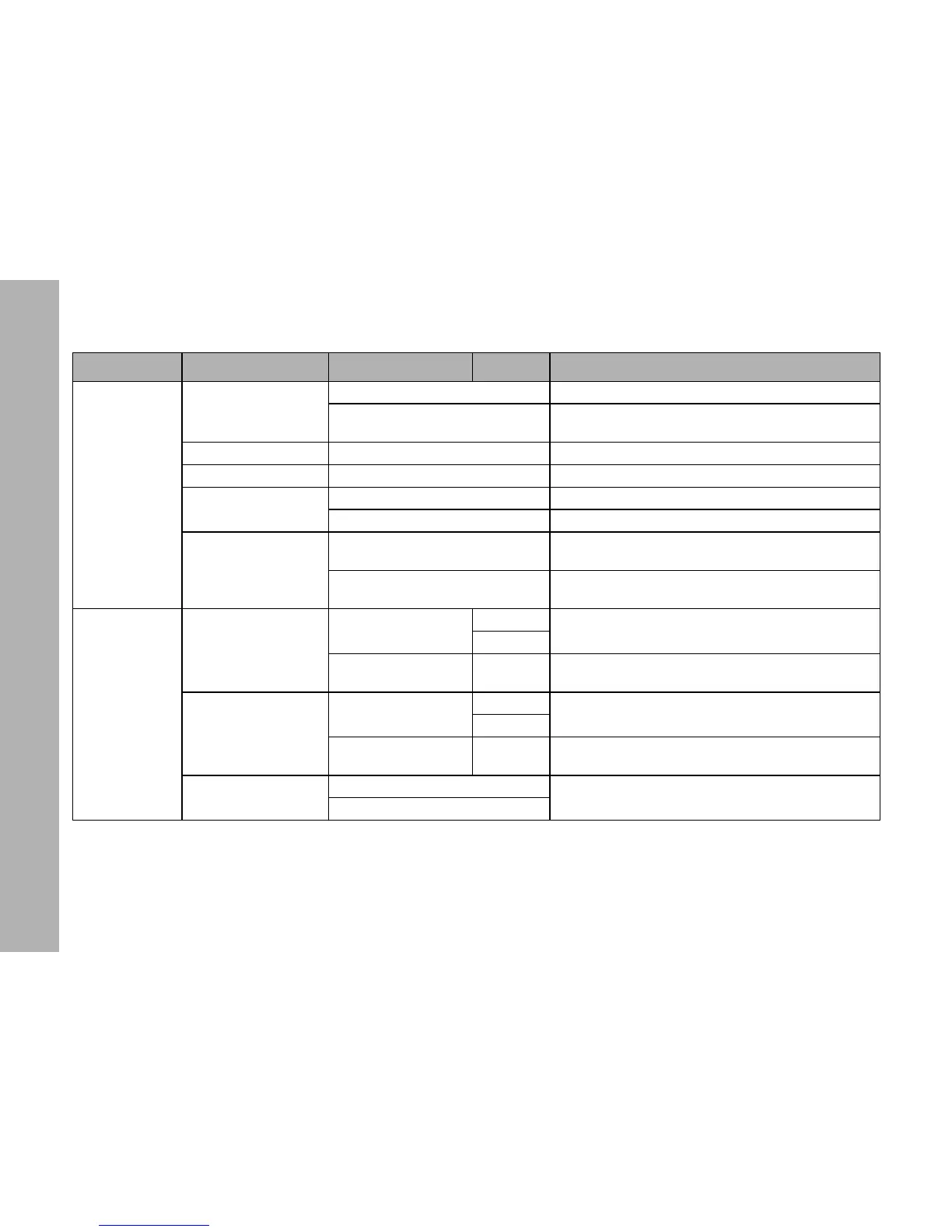
Display Setup
Display Illumination
Always On Display illumination always on
Off After 10 Sec.
Display illumination douses 10 sec. after last menu
action
Display Brightness 0 - 10 Brightness of the display illumination
Display Contrast 01 - 03 - 10 Contrast of the display content
Display Rotation
Normal No rotation of the display content
Upside-Down Display content 180° rotated
Display Error Mode
Normal
Show error codes, switch status LED and display
illumination to red.
Hidden
Show error codes. Status LEDs and display illumina-
tion off.
USB Functions
Light Presets
Save Light Presets
No
Store preset list to an USB memory stick (see page 36)
Yes
Load Light Presets [List]
Load preset list from an USB memory stick. Select pre-
set list with Intensity / Selector (see page 36)
Fixture Settings
Save Fix. Settings
No
Store fixture settings to an USB memory stick (see
page 36)
Yes
Load Fix. Settings [List]
Load fixture settings from an USB memory stick. Select
fixture settings with Intensity / Selector (see page 36)
Save Error Log
No
Store error and service log to an USB memory stick
(see page 37)
Yes
Level 1 Level 2 Level 3 Level 4 Explanation (default setting = bold)


 To Next Page