PLEASE READ THIS BEFORE USING YOUR NEW
ARRIS BDA “PASSIVE RETURN” AMPLIFIER KIT
This amplifier is intended for use on cable TV systems or over-the-air (Antenna) systems, NOT
satellite. Connecting this product to a satellite system can damage the amplifier and will void
the warranty. If you have a satellite system, please arrange a product return prior to
installation.
Antenna users: IF YOU HAVE A PREAMP or AMPLIFIED ANTENNA you should NOT use this
amplifier. There are lots of good tips and OTA information at the website WWW.OTADTV.COM.
Connections:
RF Input (top right) = The connection coming
FROM the cable company or from the antenna.
OUTPUTS (bottom) = Amplifier outputs, going
toward your TVs and devices in the home.
Power 12VDC (top left) = connection to the
power supply. Use a standard RG59 or RG6
coaxial cable, less than 100’ long.
NOTE: It is normal for the product to get warm or
even hot during normal operation. It is best to
mount in a well-ventilated area.
Please note:
If your amplifier is not working as expected, be sure that you have connected the amplifier properly as
shown above. Amplifier failures are very rare. However the amplifier only performs well if the input signal
is in good shape. If the input signal is weak, you may not get the results you expected.
Here are some things to look for if the product is not working as expected:
1. Is the green power LED on the amplifier lit?
2. Do the amplifier and power supply get warm after about ½ hour of use?
3. Does the picture improve, get worse, or stay the same?
4. Have you tried different cables to connect the amplifier? (bad cables/connectors are common problems).
5. Is the amplifier connected at a point as close as possible to where the cabling enters the house?
6. Have you connected it before other splitters and long cable runs degrade the signal?
ADDITIONAL NOTES ON USING AN ANTENNA:
This amplifier is compatible with HD signals, but you need to be careful when amplifying an HD antenna signal. This
product is designed to boost a signal for distribution purposes, but may provide mixed results if the incoming signal is
not strong enough. The amplifier cannot take a weak antenna signal and make it perfect. The amplifier will boost the
antenna signal, but it will also boost anything else that hits the antenna. This means that other unwanted signals
received by the antenna which normally won’t cause any issue could cause problems after boosting. It is possible
that installing the amplifier could actually prevent reception of HD signals. Please see the next page.
IMPORTANT NOTE: If your poor TV picture is caused by other issues (weak input signal, cabling
problems, etc.) the amplifier may not have the desired effect on your picture. In some
instances an amplifier may not be able to improve your picture.


 To Next Page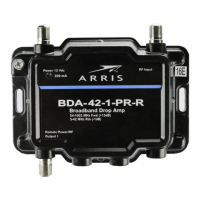


 General