6300 Series ComboSource User’s Manual · Page 31
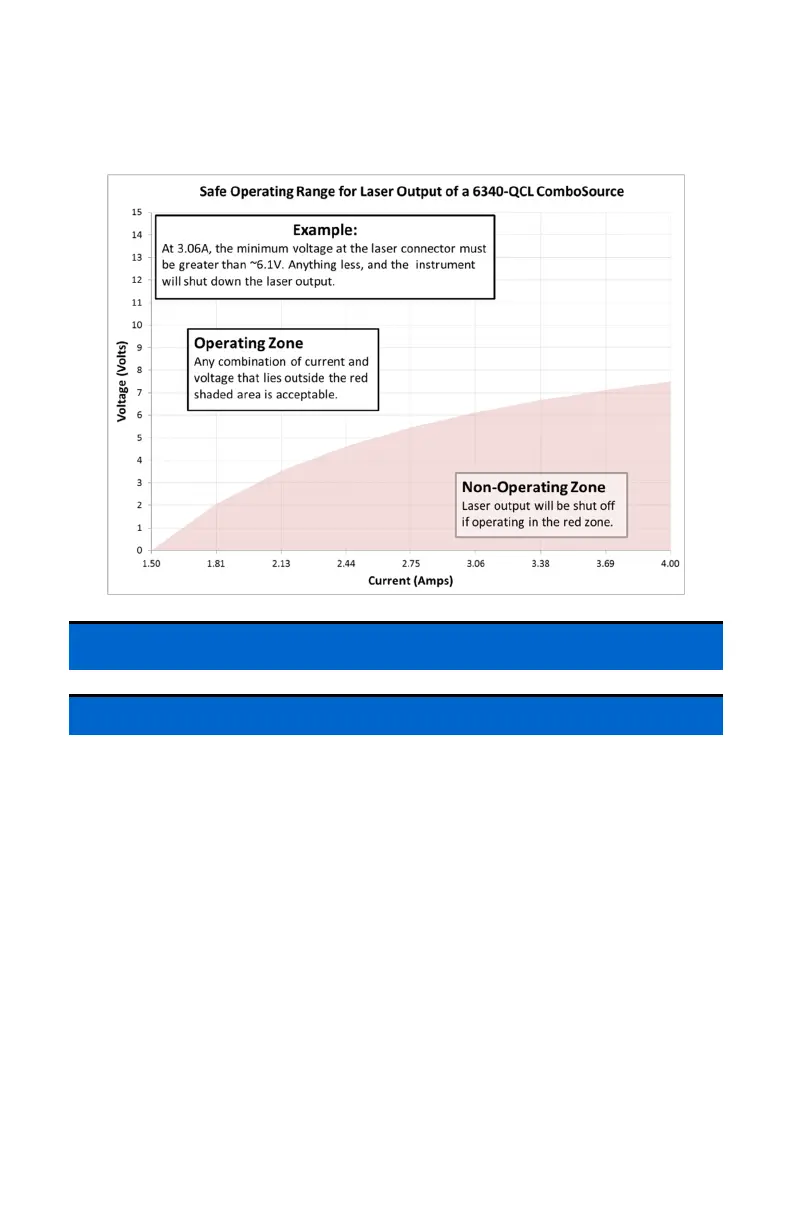
The 6340-QCL ComboSource also has the following minimum voltage
requirements for the laser output:
Using the Laser Driver
Laser Control Modes
The ComboSource offers the following control modes: Io (ACC), Io HiBW
(ACC), Im (AMC), Po (APC), and Vf (AVC).
Changing the control mode is done through the menu by changing the Mode
parameter in the Laser menu to one of these values.
Io and Io HiBW modes (referred to collectively as ACC, or automatic current
control modes) are used to drive a specific current through the laser diode.
When in this mode, the set point will be in milliamps, and the ComboSource will
drive the desired current through the laser diode as long as the voltage at the
chosen set point does not exceed the voltage limit. In Io mode, you will be
limited to less than a 10 Hz bandwidth. To modulate above that rate, use the Io
HiBW, which is a high bandwidth current mode supporting modulation.
Im mode (also referred to as AMC, or automatic monitor photodiode control
mode) is used to control the laser diode using the monitor diode feedback. You
select the target monitor diode current, and the ComboSource will drive exactly



 To Next Page