REMOTE SWITCH 2
= DECR PROGS 9
EXAMPLE 5
Adding Performance MIDI to an existing preset.
In this example we are going to add PM to preset 32, "GO TO YOUR ROOM". The
effect parameter we will control is: LVL:MASTER, the master level of the preset.
The intended controller will be MC 4, Foot Controller. Now when the MIDI
controller is used, the Master Level will change from 0% to 100%.
-Recall preset 32.
-Press the EDIT button.
-Use the Encoder to scroll up to preset 120.
-Press the Store button.
*You've just copied 32 to location 120.
-Press the ADD EFFECT button and turn the Encoder until you see [ADD:MIDI
CONTRL?].
-Press the ENTER button.
*You have just added a MIDI controller to the preset.
-Press the Param button four times.
-Press the Value button.
-Use the Encoder to select [LVL:MASTER= 93%]
-Press the Value button again, DON'T CHANGE THIS VALUE.
-Press the Value button again. DON'T CHANGE THIS VALUE
-Press the Value button one more time!!!!
-DON"T CHANGE THIS SETTING EITHER.
-Press the STORE button.
You now have edited a Factory Preset for PM control. You may edit any existing
preset to be controlled by PM. Remember to UNLOCK the preset to STORE your
changes and then re-lock the presets.
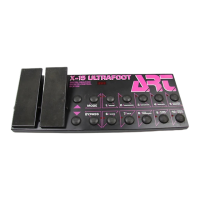
The MIDI controller assigned in this preset is MC 4, a foot controller. If you
are using your SGX 2000 with an ART X-15 ULTRAFOOT, the left pedal will control
the master level of the preset.


 To Next Page