How to use a flashlight?
- Just press the No.15 button on the side to turn on or turn off the flashlight.
How to use the SOS function?
- Status: Set the function on or off here:
- SOS numbers: This is very important, you can set no more than 5 telephone
numbers here. When you press the SOS button, the phone will dial the numbers
one by one automatically.
- SOS SMS: You can edit SMS
- SOS SMS ON/OFF: You can turn on or off SOS message
How to make a call?
1. Input a telephone number and press the left green button
2. Find a contact in the phonebook and press the left green button
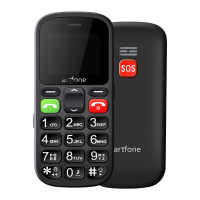
3. SOS special dial: press the SOS button and the phone will dial pre-set SOS
number automatically
4. Speed dial: long press numbers 1-9 or */# (you can set it in settings/speed
dial)
Volume adjustment
Press the side button + or - to adjust the volume.
How to change ringtone/message tone/volume?
Go to Settings → Profiles → General → Customize
Restore to factory settings:
Settings → Phone settings → Restore factory settings → Password is 1234



 To Next Page