Need help?
Do you have a question about the Artfone C1 and is the answer not in the manual?
Identifies essential parts like the receiver, LCD, soft keys, navigation buttons, and call/end keys.
Details the numeric keypad, specific button functions, audio jack, and USB socket.
Explains icons representing GSM signal, unread messages, profiles, headphones, alarms, Bluetooth, and battery status.
Instructions for turning the ARTFONE C1 on and off using the red button.
Guide on how to activate and deactivate the phone's built-in flashlight.
Details on setting up and using the SOS feature, including numbers and SMS.
Steps for initiating calls by dialing, using contacts, SOS dial, or speed dial.
Instructions on how to configure speed dial numbers for quick dialing.
How to increase or decrease the device volume using the side buttons.
Procedure for changing ringtone, message tone, and overall volume settings.
Information on security settings and default passwords for phone security and factory reset.
Information regarding supported SIM card types and recommendations.
Details on the phone's network support, including GSM bands and 3G capability.
Confirmation that Artfone phones are unlocked for worldwide GSM network usage.
Information about whether earphones are included in the phone packaging.
Instructions on how to access the camera and take photos.
This document describes the Artfone C1, a mobile phone designed for simplicity and ease of use, particularly for individuals who may prefer a more straightforward device. The phone features a classic candy bar design with a physical keypad and a clear display. Its primary functions revolve around basic communication, with an emphasis on accessibility and safety features.
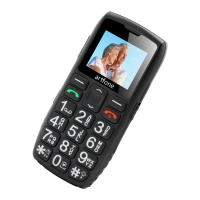
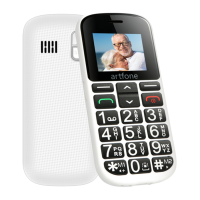
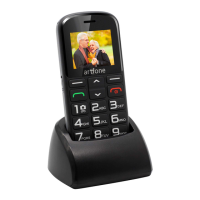
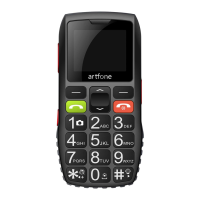
The Artfone C1 has a compact form factor, making it easy to hold and operate. On the front, it features a receiver (1) at the top for audio during calls, and an LCD screen (2) below it for displaying information. The main interface is dominated by a large numeric keypad (8) with clearly labeled buttons. Above the keypad are the left soft key (3) and the right soft key (4), which have context-dependent functions. A green button (6) is dedicated to answering or making calls, while a red button (7) is used to end calls or power the device on/off. Navigation is facilitated by an up/down button (5).
On the sides of the phone, there are several important features. A side button (15) is present for turning the flashlight on or off, and another side button (16) is used for adjusting the volume. The phone also includes a 3.5mm audio jack (10) for headphones and a Micro USB socket (11) for charging and data transfer. A flashlight LED (12) is located on the device, providing a convenient light source. For security, there are lock (13) and unlock (14) keypad functions.
Powering On/Off: To power on the Artfone C1, the user needs to press and hold the red button (7) for 2.5 seconds. To power off, ensure the keypad is unlocked, then press and hold the red button (7) for 2.5 seconds again.
Making Calls: There are several ways to make a call. The most direct method is to input a telephone number using the numeric keypad (8) and then press the left green button (6). Alternatively, users can navigate to their phonebook, select a contact, and then press the left green button (6). The phone also supports speed dial, allowing users to quickly dial pre-set numbers.
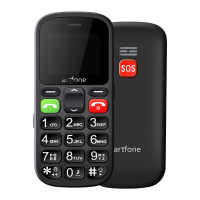
SOS Function: A key safety feature of the Artfone C1 is its SOS function. This is activated by pressing a dedicated SOS button, which is prominently displayed on the phone. Before using this feature, users must configure SOS settings, including setting up to five emergency telephone numbers. When the SOS button is pressed, the phone will automatically dial these numbers one by one until a connection is made. The SOS function also includes an option to send an SOS SMS message, which can be customized by the user. This feature can be turned on or off as needed.
Flashlight: The built-in flashlight is a practical utility. It can be easily activated or deactivated by pressing the side button (15).
Volume Adjustment: The volume of the phone can be adjusted using the side button (16), which has "+" and "-" functions.
Ringtone/Message Tone/Volume: Users can customize their ringtones, message tones, and overall volume settings. This is done by navigating through the phone's menu: Settings → Profiles → General → Customize.
Speed Dial: The Artfone C1 offers a speed dial feature for quick and easy calling. Users can set up speed dial numbers through the settings menu. This function can also be turned off if not desired.
Passwords: For security, the phone has password-protected settings. The default password for "Phone security" and "Restore factory settings" is 1234.
Icon Description: The phone's display uses various icons to convey information at a glance. These include:
SIM Card: The Artfone C1 supports nano and micro SIM cards, but it is recommended to use a standard SIM card for optimal performance. The phone has slots for two SIM cards (SIM1 and SIM2).
Network Compatibility: This device is a 2G GSM phone. It supports quad bands (850/900/1800/1900), making it compatible with 2G GSM networks worldwide. It does not operate on 3G networks.
Unlocked Status: All Artfone phones, including the C1, are unlocked, meaning they can be used with various network providers.
Earphones: While the phone packaging does not include earphones, it features a standard 3.5mm port, making it compatible with most earphones available on the market.
Camera: The phone includes a camera function, accessible through the Multimedia menu. Users can take photos by pressing the number 1 button once the camera application is open.
The Artfone C1 is designed to be a reliable and user-friendly communication tool, prioritizing essential functions and safety features in a straightforward package.
 General
| SIM | Dual SIM |
|---|---|
| Connectivity | 2G |
| Memory | 32MB |
| Expandable Storage | Up to 32GB |
| Special Features | Flashlight |
| Camera | VGA |

 To Next Page