R99
2
2. CONTENTS OF THE BOX
• Internet Radio Tuner
• Power adaptor
• Wire antenna
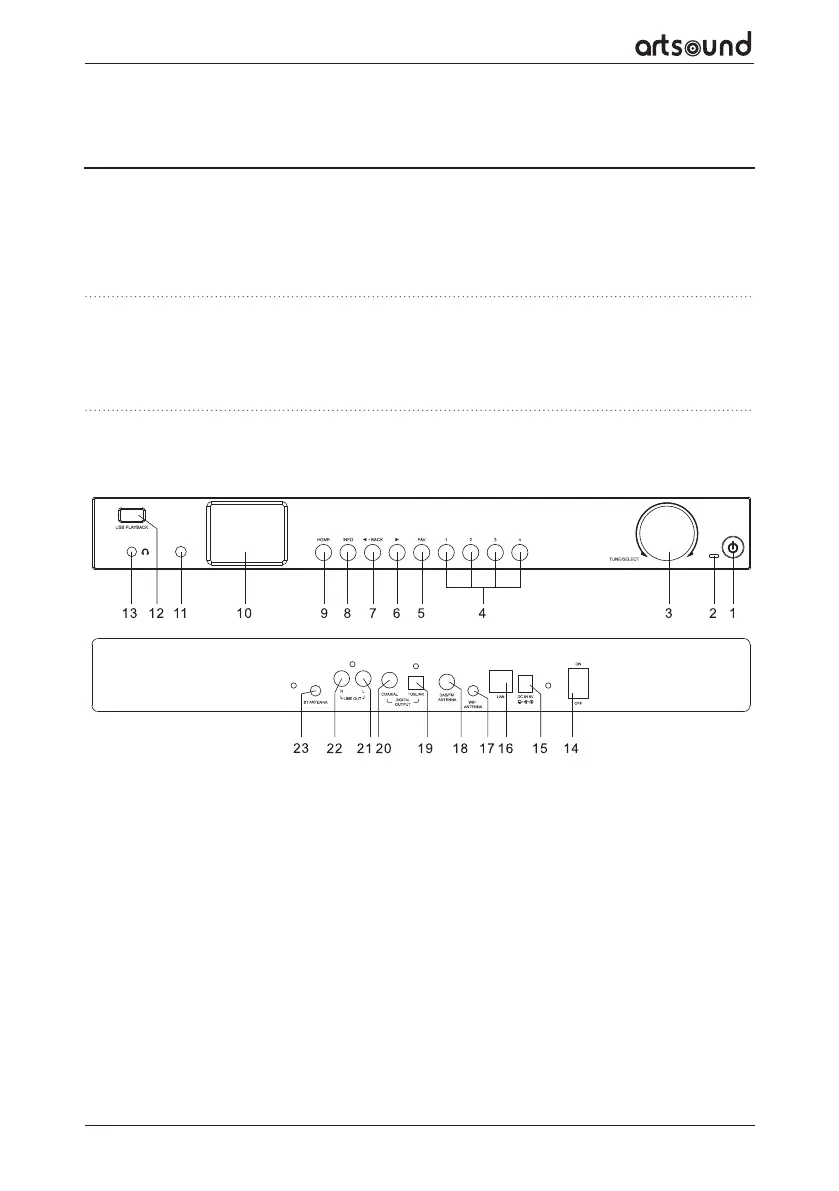
3. LOCATION OF CONTROLS
1. WARNINGS AND SAFETY
• To prevent fire or electric shocks, the device must not be exposed to rain or humidity.
• For your own safety: to prevent electric shocks do not remove the housing.
• Do not try to repair any malfunctioning parts of the device yourself. Ask a professional expert to do this for you.
• When plugged into the mains, the device remains electrically charged even when switched o.
Thank you for buying our ArtSound R99 radio. We hope you’ll enjoy it for years to come. Please read these
instructions carefully and keep this manual for later reference.
The R99 is a high-quality internet, DAB+ and FM radio with Bluetooth and stereo audio output and input.
1. Power
Press to enter/exit from Standby mode
2. Power LED
Lit when DC-in has valid power
3. Tune/Select
Rotate to navigate menu
Rotate to adjust volume of headphone
Press to select an item
4. Dedicated Preset button No.1-4
Press and hold to preset 4 dedicated stations.
Press briefly to recall to play. These are inde-
pendent presets and will not appear on the "My
Favorite" list.
5. FAV
Press and hold to preset the favorite stations up to
150. Press it briefly to recall the list.
6. ⊲ (FORWARD)
Press to cycle through the display option in radio
playing mode / Enter edit menu in Favourite list /
cursor right
7. ⊳ BACK
Press to exit to previous menu / delete entry of
character's input/ cursor left
8. INFO
Toggle to cycle through the station's info, the big
clock display or return to now playing screen
9. HOME
Press to display Home screen to view dierent
radio modes / setting options
10. 2.4”TFT color display
11. IR sensor
Receives Infra red signal from remote control
• External antenna x 2 pcs
• RCA cable
• Remote control (without batteries)
• User manual



 To Next Page